What Is Autotune in Music? Pitch Correction and Settings Explained

MuseGen Team
8/28/2026
You have a take that feels right. The phrasing is yours, the emotion lands — and then one held note sags a quarter-tone flat and the whole line stops working. Autotune exists for exactly that moment. Confusingly, it also exists for the opposite reason: to make a voice sound deliberately, unmistakably machine-processed. Same plug-in, one control apart.
In short
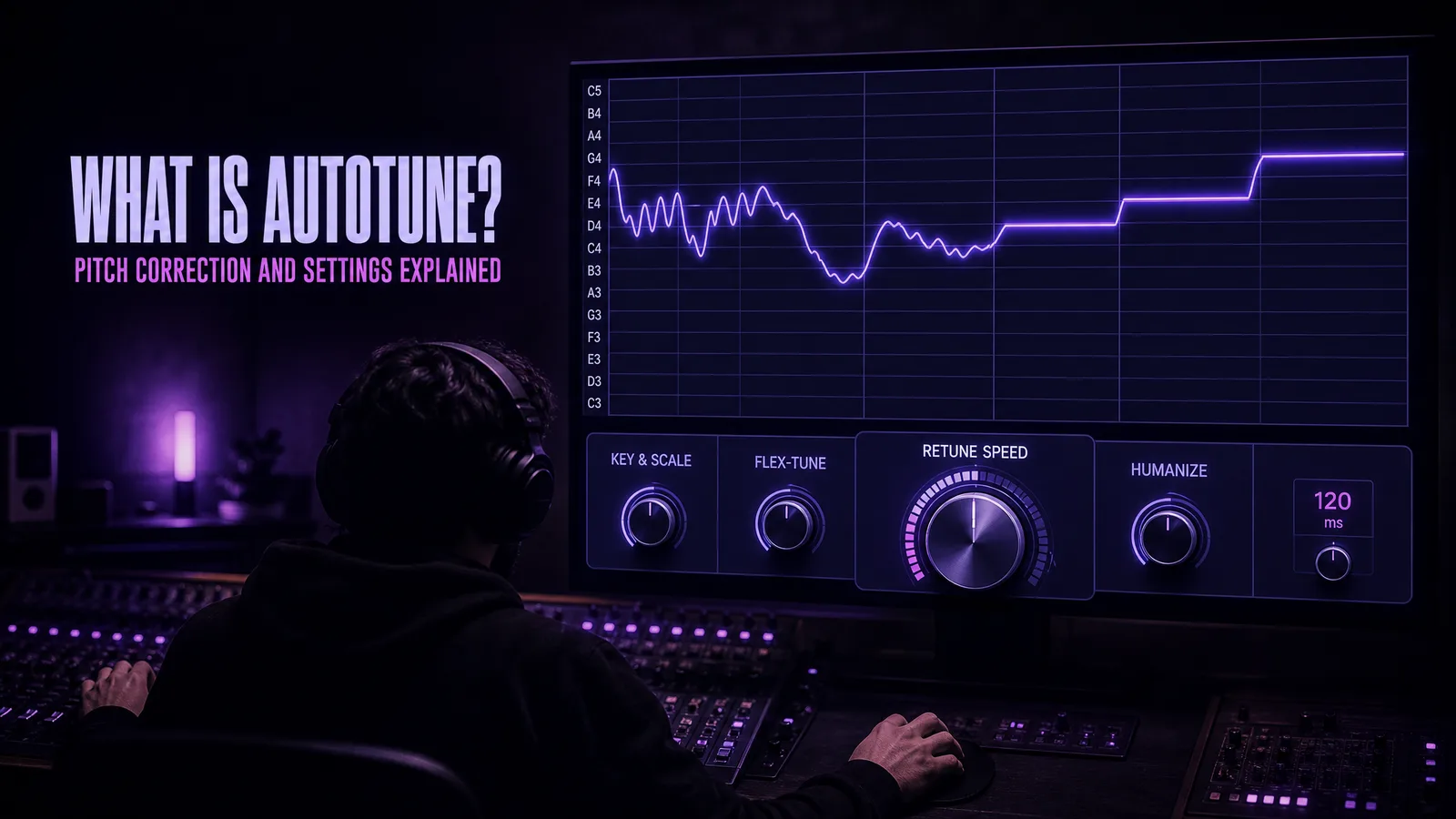
Autotune is pitch correction software. It detects the pitch a singer actually produced, compares it against a scale you choose, and moves the note to the nearest pitch that scale allows. One control — retune speed — decides whether that correction is inaudible or turns into the stepped, synthetic vocal sound heard across pop and hip-hop.
Auto-Tune with a hyphen is a product made by Antares and released in 1997. Autotune as one lowercase word is now the generic name for the whole category, which also covers Melodyne, Waves Tune, Flex Pitch in Logic and VariAudio in Cubase.
It belongs early in the signal path, on a clean dry vocal, before EQ, compression and reverb — and it fixes pitch only. Timing, tone and delivery are still yours to get right.
Quick facts
- What it is: Software that detects sung pitch and shifts each note onto the notes of a key and scale you set.
- Brand vs category: Auto-Tune is Antares' product name; "autotune" has become the generic term for pitch correction.
- Invented by: Andy Hildebrand, a research engineer who previously used the same maths to interpret seismic data for oil exploration.
- Released: 1997.
- The control that matters: Retune speed, in milliseconds — how fast a note is dragged onto its target.
- Where it goes: Early — on a dry, uncompressed vocal, before EQ, compression and effects.
- Two working modes: Automatic correction as the track plays, or note-by-note graphical editing.
What autotune actually is
Autotune is a piece of software that listens to a monophonic performance — one voice, one note at a time — works out what pitch is being sung at every instant, and shifts that pitch onto a note you have declared acceptable. That is the whole idea. Everything else is a control over how gently, how quickly, and how selectively that shift happens.
The word carries a naming problem that trips up almost every article on the subject. Auto-Tune, capitalised and hyphenated, is a specific commercial product made by Antares Audio Technologies. Autotune, lowercase and unhyphenated, is what the category is now called in ordinary speech, in the same way people say they will hoover a carpet regardless of who made the vacuum cleaner. When a producer says a vocal is "autotuned", they almost never mean that one particular plug-in was used.
The category is crowded, and the alternatives are not clones:
| Tool | Made by | What it is known for |
|---|---|---|
| Auto-Tune | Antares | The original. Real-time correction as the track plays, plus a graphical mode for note-by-note editing. The source of the hard effect. |
| Melodyne | Celemony | Note-by-note editing with unusually natural results, and the ability to separate individual notes inside a chord. |
| Waves Tune | Waves | Both a real-time version and a full graphical editor, commonly bundled in mixing suites. |
| Flex Pitch | Apple, in Logic Pro | Pitch editing built directly into the DAW, no separate plug-in needed. |
| VariAudio | Steinberg, in Cubase | The same idea as Flex Pitch, native to Cubase. |
If you own a modern DAW, you already have a pitch correction tool. Whether you also want Antares' version usually comes down to one thing: nothing else produces the hard, instantly recognisable effect quite the way Auto-Tune does, because that effect is a byproduct of how Antares' particular algorithm behaves when you push it to its limit.
The short version: autotune is not a sound. It is a process with a range, and the range runs from "you would never know" to "that is obviously the point". The person at the controls decides which end you land on.
How autotune works
Three things happen, in order, continuously, while audio flows through the plug-in.
- Detect the pitch. The software has to work out what note is being sung right now. A voice is not a clean sine wave — it is a fundamental frequency plus a stack of harmonics and a lot of noise — so finding the fundamental is genuinely hard. The classic approach is autocorrelation: compare the waveform against delayed copies of itself and look for the delay at which it lines up best. That delay is the repeating period, and the period gives you the pitch.
- Decide where the note should be. You have told the plug-in a key and a scale, which is really a list of frequencies that count as in tune. The software takes the pitch it detected and finds the nearest allowed one. If you sang 438 Hz and the nearest permitted note is A at 440 Hz, the target is 440.
- Move the audio there. The signal is pitch-shifted onto the target, ideally without changing anything else about it — the singer should not suddenly sound like a different person, and the timing should not move. How fast that shift happens is under your control, and that is where all the character comes from.
Step one is the part with the interesting history. Andy Hildebrand had spent years using correlation maths to interpret seismic reflections in oil exploration, where the same question — how long until this signal repeats? — answers what lies underground. Applying it to a voice was, in engineering terms, the same problem in a different costume. The breakthrough was making it fast enough to run live: as he later described it, a simplification changed a million multiply-adds into just four. That is the difference between an academic curiosity and something that runs on a track while you listen.
Background on the algorithm and its origins: Auto-Tune on Wikipedia.
The pitch detection step is not unique to vocal tuning. Any tool that has to answer "what note is this?" faces the same problem, which is why the same family of techniques sits underneath audio-to-MIDI conversion: detect the notes in a recording, then write them out as data instead of shifting them. Same question, different answer format.
That is the shape of it from the outside. The inside is a longer story: how autocorrelation actually finds the period and why that sets a floor on latency, which two documented families of algorithm do the shifting, why formants have to be held in place separately, and why zero retune speed produces a staircase as a matter of arithmetic rather than distortion. All of that is covered in How Does Autotune Work? From Detection to Pitch Shift, Step by Step.
Retune speed, the control that decides everything
If you learn one control, learn this one. Retune speed is how long, in milliseconds, the plug-in takes to drag a detected note onto its target pitch. Every other parameter modifies the correction. This one decides whether there is an audible correction at all.
The reason it matters so much is that singing is not a series of static pitches. A real vocal is constantly moving: scooping up into the first note of a phrase, drifting slightly under a long note and pulling back, adding vibrato on a sustain, sliding between words. All of that movement is expression, and all of it is, technically speaking, out of tune.
A slow retune speed simply never catches up with that movement. By the time the correction has begun pulling towards the target, the singer has already moved on, so scoops and vibrato survive intact and only the genuinely sustained errors get fixed. A fast retune speed catches everything. Set it to zero and the note is on target the instant it is detected, so the glide between two words becomes a step, and the vibrato becomes a stack of tiny stairs.
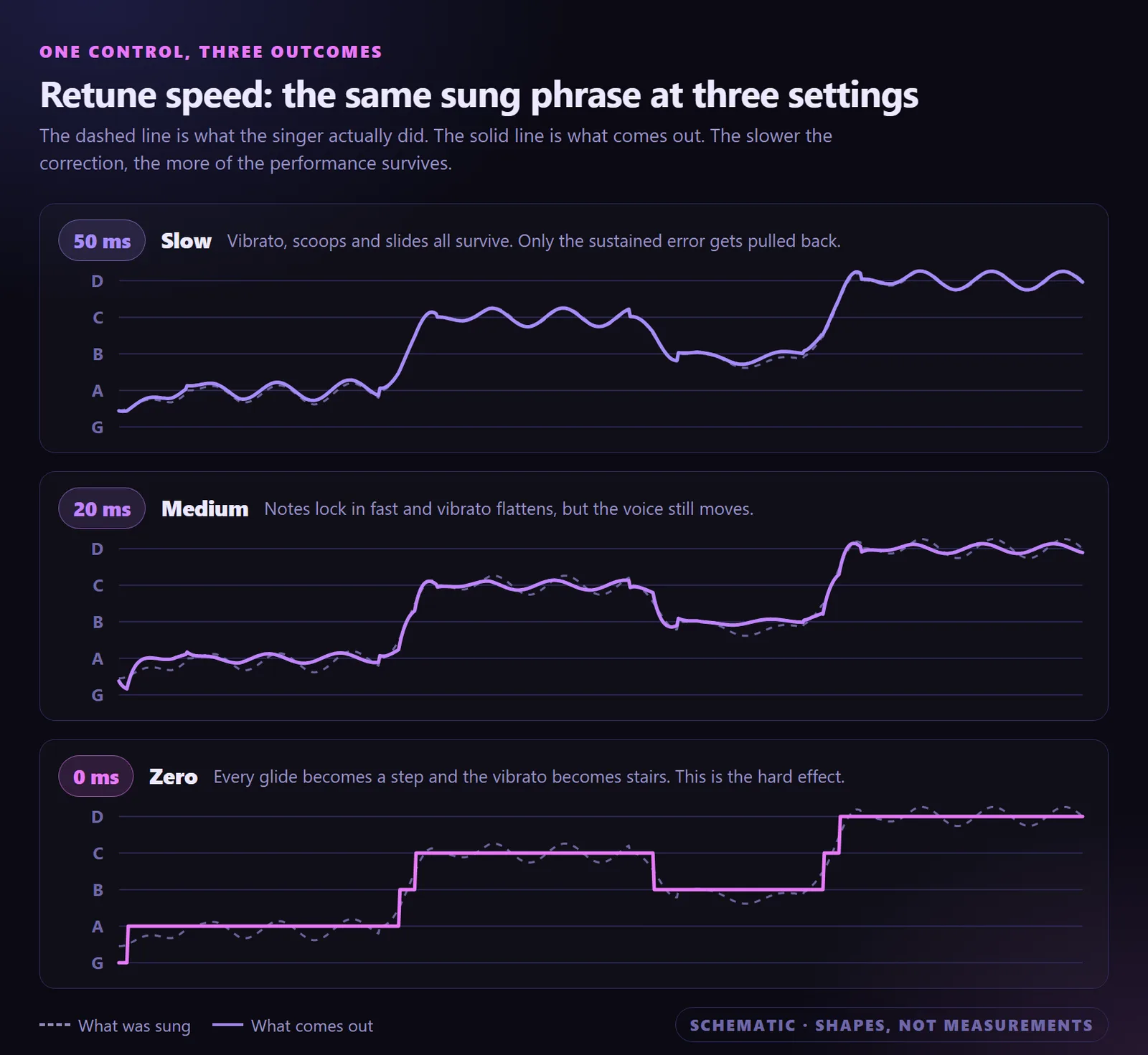
The same sung phrase at three retune speeds. Slow correction leaves the movement; zero removes it entirely.
Rough territories, in the order you are most likely to want them:
| Retune speed | What survives | What it sounds like |
|---|---|---|
| 0–10 ms | Nothing. Every pitch move becomes a step. | The hard effect. Obvious, and meant to be. |
| 15–25 ms | Fast movement is caught; some shape remains. | The tight, melodic sound used across modern rap and sung-rap. |
| 25–50 ms | Vibrato and scoops mostly survive. | Transparent correction. The default starting territory. |
| 50–80 ms | Almost all expression survives. | Gentle safety net — only the sustained errors get fixed. |
| 80 ms and up | Effectively everything. | Minimal audible effect. Useful when you barely want to intervene. |
The most useful piece of advice on this control is a troubleshooting rule rather than a setting: if a corrected vocal sounds unnaturally stiff, the retune speed is almost always too fast. Start at 50 ms or higher and only tighten it if the performance genuinely still drifts.
Retune speed ranges and behaviour as described in Antares' own guide: Pitch Correction: The Complete Guide to Tuning Vocals.
A note that arrives late is often heard as out of tune. Before you reach for retune speed, check whether the problem is actually timing — pitch correction cannot fix it, and tightening the speed to compensate just makes the vocal stiff.
The controls that matter
Modern pitch correction plug-ins have a lot of parameters. Six of them do most of the work, and they are listed here in the order you would normally set them.
| Control | What it does | Where to start | Set wrong, it sounds like |
|---|---|---|---|
| Input type | Tells the pitch detector what it is listening to, so it searches the right frequency range. | Match the actual source — soprano, alto or tenor, bass, instrument. | Octave jumps and notes flickering wildly on low or breathy passages. |
| Key and scale | Defines which notes count as in tune, giving the correction something to aim at. | The key of the song. Chromatic if the melody moves outside it. | Passing notes yanked onto the wrong degree; a blue note flattened into the scale. |
| Retune speed | How fast a detected note is moved onto its target. | Around 25–50 ms for transparent work. | Too fast: stiff, stepped, synthetic. Too slow: the drift you were fixing is still there. |
| Flex-Tune | Leaves a note alone while it is still clearly heading somewhere, and only corrects once it settles. | Engaged for natural correction; off for the hard effect. | Off when you wanted transparency: scoops and slides get flattened out. |
| Humanize | Applies slower correction to sustained notes than to short ones. | Roughly 20–40 on a sung lead; 0 for the effect. | At zero on long notes: held notes freeze and lose their vibrato. |
| Formant correction | Preserves the resonances that give a voice its character when a note is shifted. | On for anything more than a small shift. | Chipmunk on upward shifts, hollow and oversized on downward ones. |
One thing that is not a control but behaves like one: where the plug-in sits in the chain. Pitch correction should run early in the signal path, on a clean, dry, uncompressed signal — before EQ, compression, reverb and effects. The reason is the pitch detector. Compression changes the relative level of the harmonics, reverb adds a decaying copy of every note on top of the next one, and both make the fundamental harder to find. Feed the detector the cleanest possible signal and it makes fewer mistakes, which means you spend less time fixing its mistakes by hand.
That placement also explains why tuning happens before the mix rather than during it. Everything else you do to a vocal — the EQ, compression, reverb and effects that make up the rest of the vocal chain — comes after this step, not before.
Control definitions and signal chain placement per Antares' setup documentation: Getting Started with Auto-Tune.
Transparent tuning vs the hard effect
These are not two different tools. They are two ends of the same set of dials, and the distance between them is smaller than most people expect — a few tens of milliseconds and two switches.
Transparent tuning is correction you are not supposed to notice. Slow retune speed so the movement of the voice survives, Flex-Tune engaged so notes are only corrected once they settle, Humanize raised so long notes are treated more gently than short ones. Done well, the listener hears a singer who happens to be reliably in tune. Done badly, they hear something subtly lifeless without being able to say why.
The hard effect is correction as an instrument. Retune speed at or near zero, Flex-Tune off, Humanize at zero, and a tight scale rather than chromatic so there are fewer legal notes and therefore bigger jumps between them. The result is a voice that moves in steps rather than curves. It is not an accident or a failure — it is a deliberate sound with thirty years of records behind it, and it works best on melodies that move a lot and on singers who scoop into their notes, because those are exactly the moments the correction turns into audible stairs.
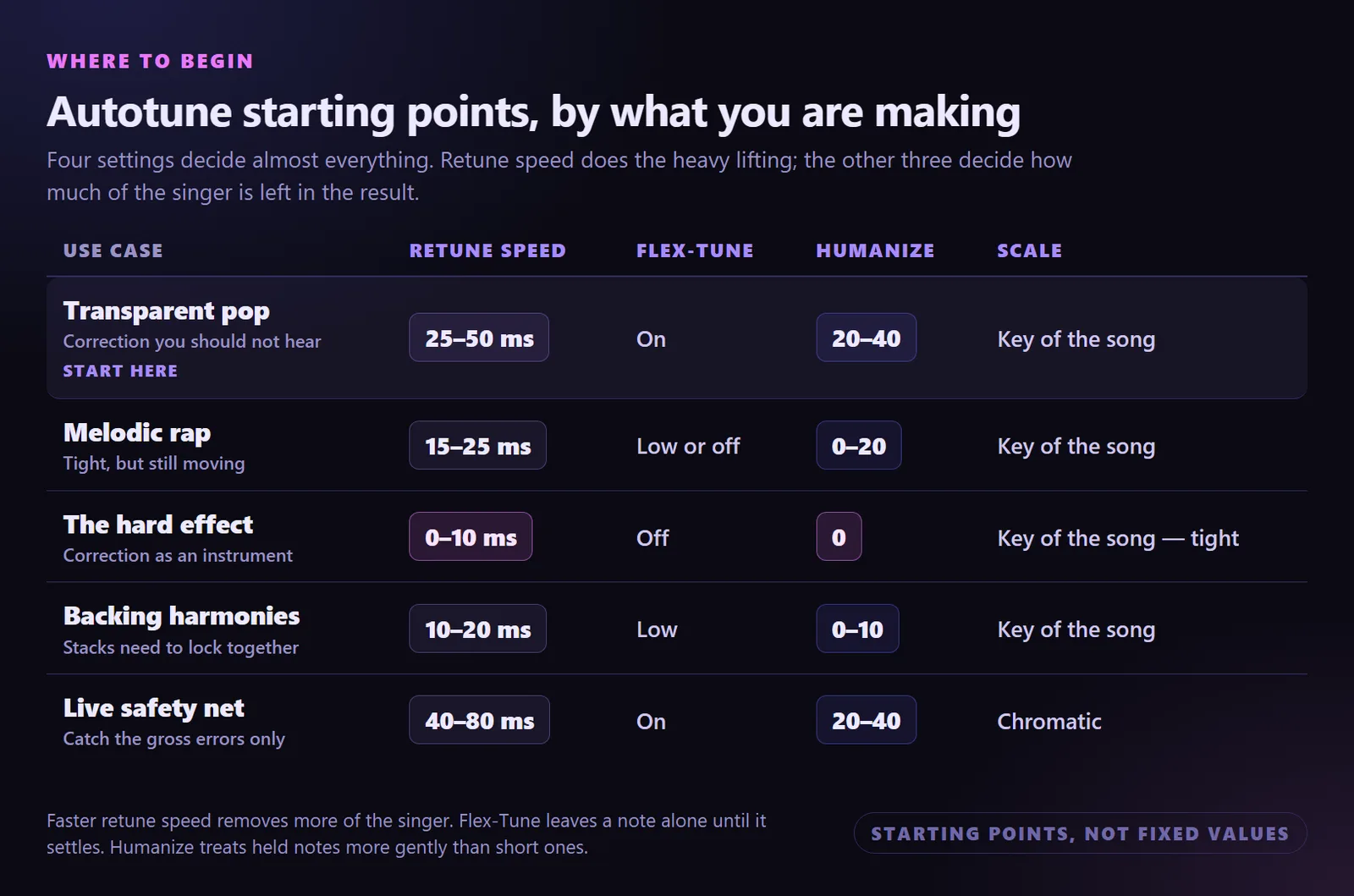
Starting points by use case. These are places to begin dialling in by ear, not fixed values.
Two practical notes on the effect. First, it is far more convincing when the performance already sits close to the target, because a singer who is wildly off will produce corrections large enough to smear the audio. Second, the tighter the scale, the stronger the effect — a major scale gives seven legal notes and therefore large jumps, while chromatic gives twelve and much smaller ones.
Everything in between is legitimate territory. A retune speed around 15–25 ms sits deliberately in the middle: tight enough to be part of the sound, loose enough that the voice still moves. That middle ground is where a great deal of contemporary melodic rap lives, and it is neither of the two extremes people usually argue about.
Where the robot voice came from
Andy Hildebrand was a research engineer working in stochastic estimation theory and digital signal processing. His job was sending sound into the ground and interpreting what came back, so that oil companies could see what lay beneath. He built the first version of Auto-Tune on a Mac in early 1996, and Antares released it in 1997. The patent language is unusually direct about the intent: when voices or instruments are out of tune, the emotional qualities of the performance are lost. It was designed as a repair tool.
The repurposing happened almost immediately. Cher's 1998 single Believe is generally credited as the first commercial recording to use Auto-Tune as a stylistic effect rather than a corrective one, with the retune speed pushed to its fastest setting so the vocal jumped between notes instead of gliding. The producers spent a while claiming they had used a vocoder, which held up about as long as you would expect once other engineers went looking for the setting.
Seven years later T-Pain built an entire artistic identity on it, using the hard setting as a permanent voice across Rappa Ternt Sanga in 2005 and everything after. That is the point at which autotune stopped being a studio secret and became a genre marker — something a listener could name and either love or complain about.
The full arc took a while to be acknowledged. In 2023 Hildebrand received a Special Merit Award from the Recording Academy for the invention, which is a reasonable summary of where the argument landed: a tool built to fix mistakes ended up defining the sound of an era.
On the Recording Academy honour: Dr. Andy Hildebrand honored with a Recording Academy Special Merit Award.
How to tune a vocal, step by step
The order matters more than the settings do. Most bad-sounding tuning is not a wrong parameter — it is correction applied to audio that was not ready for it.
- Start from the best take you have. Comp the strongest performance first, remove clicks and obvious noise, and work from an uncompressed lossless file. Pitch detection is only as good as the audio you feed it, and heavy lossy compression blurs exactly the high-frequency detail the detector uses. If your source is an MP3, convert it to WAV before you start.
- Fix timing before pitch. Line the words up with the grid first. A note that arrives late reads to the ear as wrong, and it is remarkably easy to spend twenty minutes chasing a pitch problem that was really a timing problem. Knowing the song's tempo makes this quick — detect the BPM if you are working with audio you did not record yourself.
- Set input type, key and scale — then check them. Tell the plug-in what it is listening to and which notes are legal, then play the whole song through once watching the correction meter. What you are looking for is a note being pulled somewhere it should not go: a passing tone, a blue note, a modulation the scale setting does not know about.
- Dial retune speed for this performance. Presets are guesses about a singer they have never heard. Start slow — around 50 ms — and tighten only if the vocal genuinely still drifts. Tighten in small steps and keep asking whether the last change fixed a problem or just removed some life.
- Fix the rest by hand, then judge it in the mix. Automatic correction handles the bulk; a handful of notes will need note-by-note graphical editing, where you drag individual notes rather than setting a rule. Then take the vocal out of solo. Tuning that sounds slightly over-corrected on its own often sits perfectly in a busy arrangement, and tuning that sounds fine soloed can wobble once it is against a piano.
Worked example — one flat held note
Symptom  : chorus note sags flat over 2 beats, rest of the take is fine
Wrong fix: retune speed 0 ms on the whole vocal
Right fix: retune speed 50 ms globally + a graphical edit on that one note only
Global settings are for tendencies. Individual problems get individual fixes — otherwise you process an entire performance to solve two beats of it.
Common autotune mistakes (and what to do instead)
| Common mistake | What to do instead |
|---|---|
| Reaching for a faster retune speed whenever something sounds off. | Diagnose first. Stiffness comes from speed being too fast, not too slow — and a surprising share of "pitchy" complaints are timing problems in disguise. |
| Leaving the key and scale on whatever the plug-in opened with. | Set them deliberately, and use chromatic when the melody genuinely moves outside the key. A wrong scale does not sound processed — it sounds wrong, which is harder to spot and worse. |
| Tuning after compression and reverb, because that is where the plug-in slot was free. | Put pitch correction first, on the dry uncompressed signal. Everything downstream of it makes the pitch detector's job harder and its errors your problem. |
| Stacking a second tuning plug-in because the first one did not fix everything. | Two corrections fight each other and double the artefacts. If one pass is not enough, the fix is graphical editing on the specific notes, or a better take. |
| Expecting correction to rescue a performance that was never going to work. | Re-sing it. Pitch correction sounds best when it has the least to do, and it changes nothing about timing, tone, breath or delivery — which is most of what makes a vocal land. |
How to check your work
- Bypass it and listen twice. A quick A/B answers the only question that matters: did the correction fix something, or did it just remove movement? If you cannot hear what it fixed, it is doing too much.
- Listen to the sustained notes specifically. Held notes are where over-correction shows first — vibrato flattening into a straight line, or freezing into a stack of small steps.
- Check it against the full mix, not soloed. A vocal is judged in context. Solo tells you what the plug-in did; the mix tells you whether it was the right amount.
Where MuseGen fits
MuseGen does not do pitch correction, and it is not a mixing tool. If you have recorded a vocal that needs tuning, the tools for that job are the ones named earlier in this article — Auto-Tune, Melodyne, or whatever your DAW already includes.
What MuseGen does is upstream of all of it. It is an all-in-one system: it writes lyrics, produces complete songs from them, and generates music videos. If you are still deciding whether a melody or a topline is worth recording, that is the stage MuseGen is built for — hearing the idea as a finished song in any genre or style before you book a session or set up a mic.
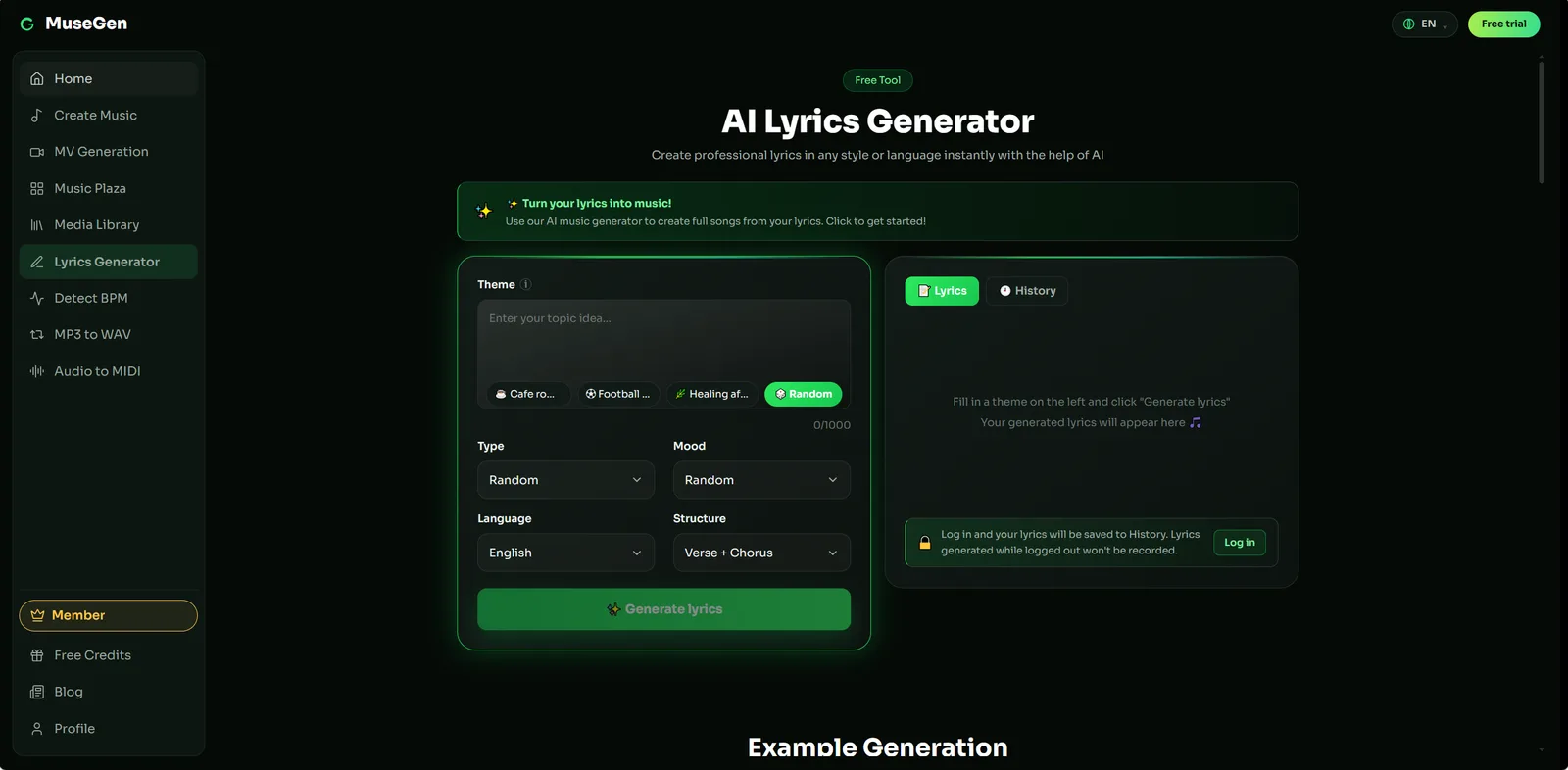
Step 1 — draft the lyric with a real song structure.
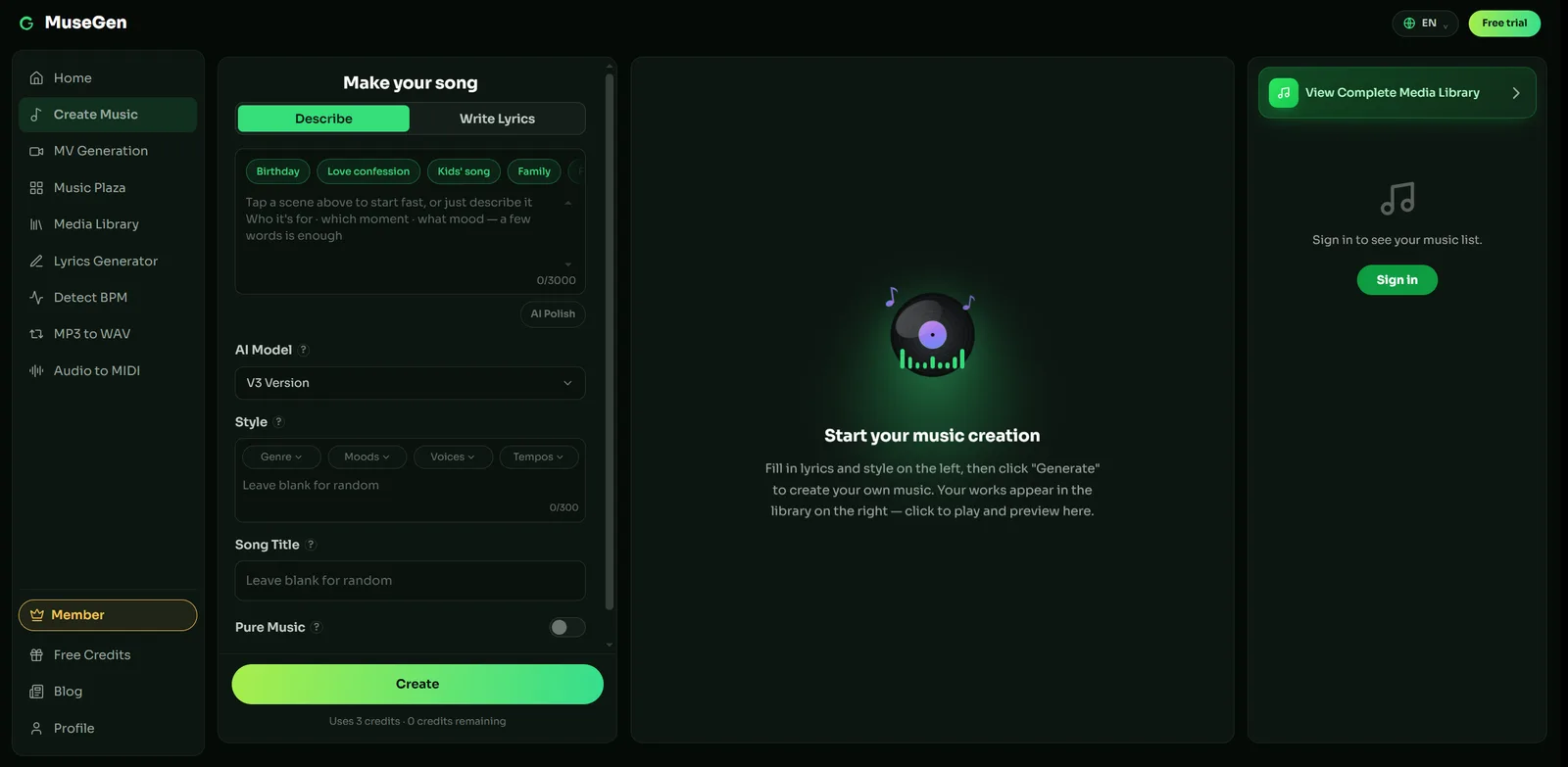
Step 2 — hear the topline in a finished arrangement.
Two limitations worth stating plainly, since they are exactly what this article's subject depends on. First, pitch correction needs an isolated vocal track, and generated songs currently export as a stereo mix — there is no separate vocal to process. Stem and multitrack export is coming soon. Second, exports come as royalty-free WAV or MP3, but check MuseGen's current terms before commercial use rather than assuming.
The practical division of labour: write the lyric, turn it into a song to find out whether the idea holds up, and if you want something to publish alongside it, generate a music video. Then, when you go and record it properly, everything in this guide applies to the vocal you sang.
Hear the song before you record the vocal — draft the lyric, generate the track, and find out whether the melody is worth tuning in the first place. → Make a song with MuseGen
FAQ
What is autotune?
Autotune is pitch correction software. It measures the pitch a singer actually produced, compares it against a set of notes you have declared acceptable, and moves each note to the nearest one of those notes. Used gently it makes a good performance sit reliably in tune; used at its most extreme setting it produces the stepped, synthetic vocal sound heard across pop and hip-hop.
How does autotune work?
It works in three stages. First it detects the fundamental frequency of the incoming voice, traditionally by comparing the waveform against delayed copies of itself to find the repeating period. Second it compares that frequency to the key and scale you set and works out the nearest allowed note. Third it shifts the audio to that target pitch at a speed you control, ideally without changing the vocal timbre.
What is retune speed in autotune?
Retune speed is how long, in milliseconds, the plug-in takes to move a detected note onto its target pitch. A slow setting lets vibrato, scoops and slides survive because the correction never catches up with them. A fast setting removes all of that movement and snaps notes into place, which is what produces the robotic effect. It is the single most consequential control in any pitch correction plug-in.
Is Auto-Tune the same thing as autotune?
Not quite. Auto-Tune with a hyphen is a specific product made by Antares, released in 1997. Autotune as one lowercase word has become the generic name for the whole category of pitch correction tools, which also includes Celemony Melodyne, Waves Tune, Flex Pitch in Logic Pro and VariAudio in Cubase. When someone says a record is autotuned they usually mean pitch corrected, not that a particular brand was used.
What autotune settings sound natural?
Slow correction with the natural movement of the voice left intact. Antares suggests a retune speed in the region of twenty-five to fifty milliseconds for transparent correction, with Flex-Tune engaged so notes are only corrected once they settle, and Humanize around twenty to forty so held notes are treated more gently than short ones. If in doubt, start slower than you think you need and only tighten when the vocal genuinely still drifts.
How do you get the robotic autotune effect?
Set the retune speed to zero or near zero, turn Flex-Tune off, set Humanize to zero, and choose a tight scale such as the key of the song rather than chromatic. With those settings every note jumps instantly to the nearest scale degree, so the glides between words become audible steps. The effect is stronger on melodies that move a lot and on singers who scoop into notes.
Does autotune fix a bad singer?
It fixes pitch, and pitch is only one part of singing. Timing, tone, breath control, diction and emotional delivery are untouched by pitch correction, and a performance that is weak in those areas sounds no better in tune than it did out of tune. Pitch correction also works best when it has little to do, because large corrections introduce artefacts. It is a finishing tool, not a substitute for a usable take.
Sources
- Auto-Tune — Wikipedia. Invention, algorithm, and the Cher and T-Pain recordings.
- Pitch Correction: The Complete Guide to Tuning Vocals — Antares. Retune speed ranges, Flex-Tune, Humanize, formants, and signal chain placement.
- Getting Started with Auto-Tune — Antares. Setup order and mode selection.
- Dr. Andy Hildebrand Honored With a Recording Academy Special Merit Award — Grammy.com.
- How Auto-Tune Works — Tom Scott, YouTube.