How Does Autotune Work? Pitch Detection and Shifting Explained

MuseGen Team
8/28/2026
Two engineers can load the same plug-in on the same vocal and get results that sound nothing alike — one invisible, one unmistakably synthetic. The usual explanation is "it's the settings", which is true and completely unilluminating. The useful answer is what the software actually does to the waveform between arriving and leaving, because once you know that, the settings stop being magic numbers.
In short
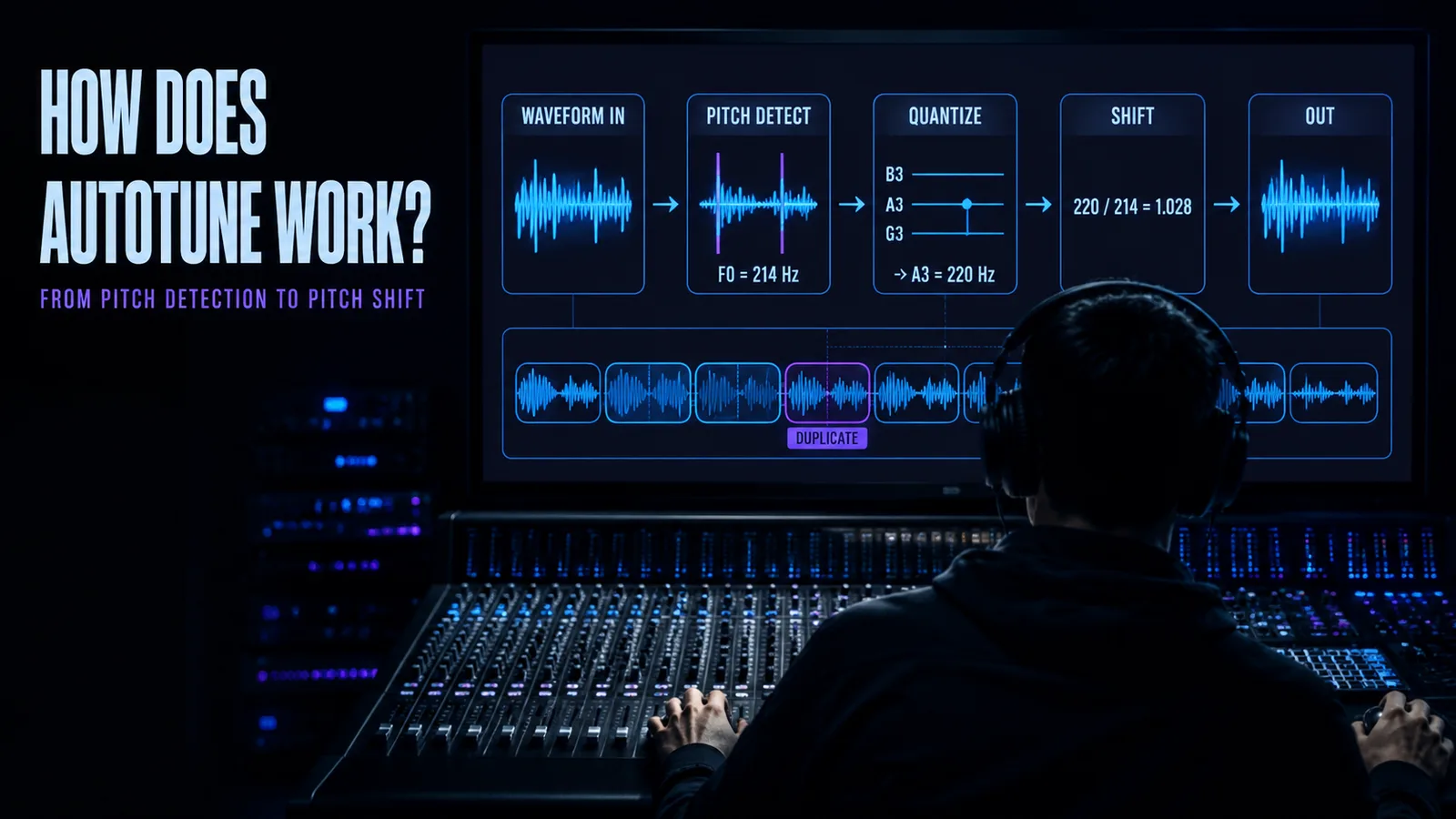
Autotune runs three stages, continuously, on short overlapping slices of audio: it estimates what pitch is being sung, decides which pitch it should be, and rebuilds the audio at that new pitch without changing the timing. Every control in the plug-in modifies one of those three stages.
Stage one is the hard one. Pitch is not stored in the signal — it has to be inferred from a stretch of it, which is why pitch correction has latency that no amount of processing power removes.
Stage three is where the artefacts live. Moving a note up or down without also moving the resonances that make a voice sound like that voice is the difference between correction and a chipmunk.
Quick facts
- The three stages: Detect the pitch → quantise it to an allowed note → resynthesise the audio at that pitch.
- How pitch is detected: Most commonly by autocorrelation — compare the waveform against delayed copies of itself and find the delay at which it best matches.
- Why latency is unavoidable: Autocorrelation needs at least two pitch periods. A 40 Hz fundamental means at least 50 ms of audio before a first estimate can exist.
- Two ways to shift pitch: Time domain, by repositioning small waveform segments; or frequency domain, by editing a spectrum and transforming back.
- Why formants need separate handling: Vowel identity comes from vocal tract resonances, not from the note. Move them with the note and the singer sounds like a different size of person.
- Why it needs a solo vocal: Detection assumes one quasi-periodic signal. Two notes at once have no single repeating period.
The signal path, end to end
Before the detail, the map. Audio arrives, five things happen to it, audio leaves. Everything else in this article is an expansion of one of these boxes.
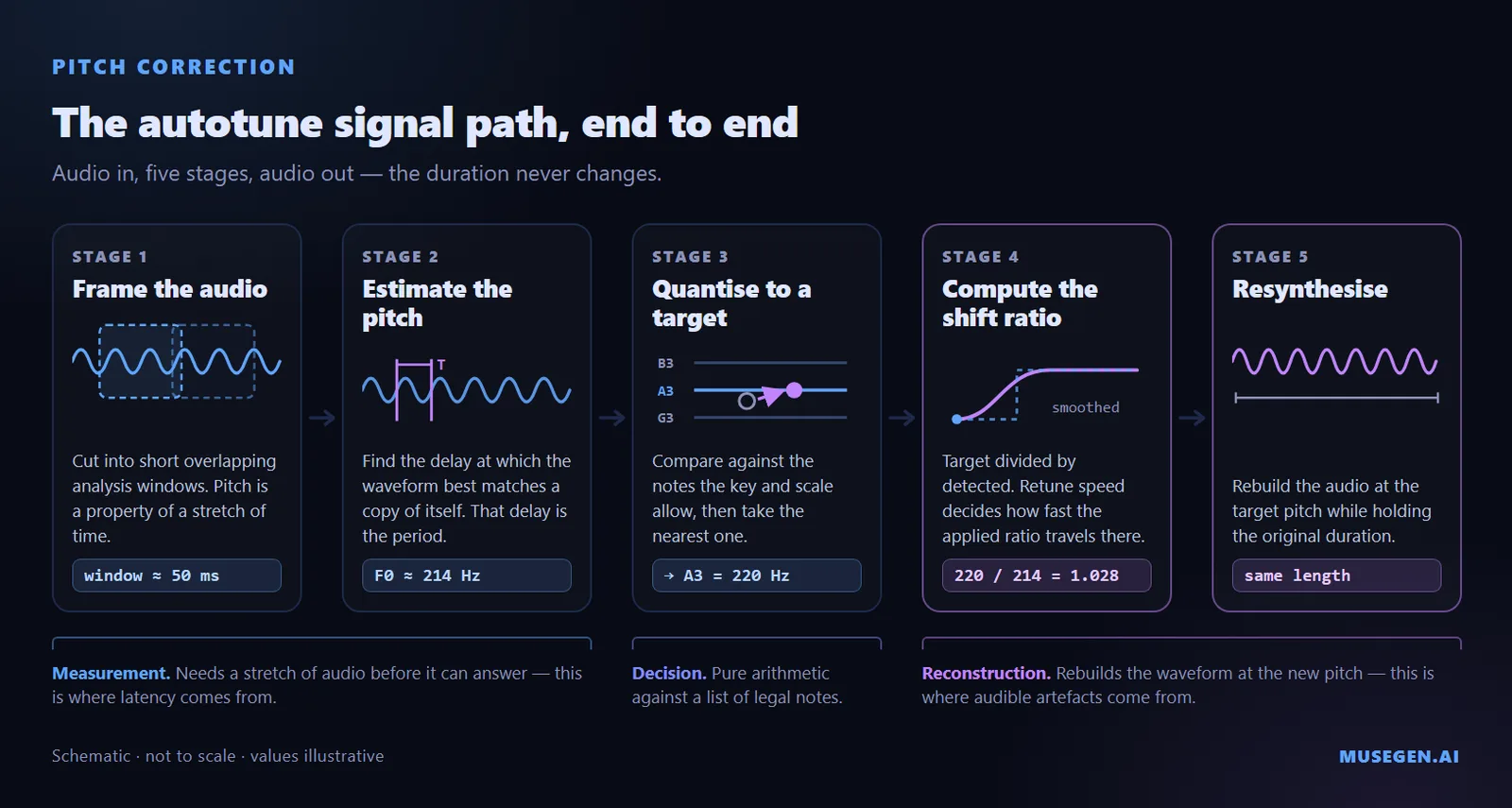
The five stages. The latency you hear accumulates in the first two.
- Frame the audio. The signal is cut into short overlapping windows. This is not an optimisation — it is forced. Pitch is a property of a stretch of time, so there is no such thing as "the pitch of this sample".
- Estimate the fundamental. Inside each window, work out the frequency at which the waveform repeats. This is the step that fails in interesting ways.
- Quantise to a target. Compare the estimate against the list of frequencies your key and scale allow, and take the nearest.
- Compute the shift ratio. Target divided by detected gives the factor the audio has to be scaled by. Retune speed decides how quickly the applied ratio is allowed to travel from 1.0 towards that number.
- Resynthesise. Rebuild the audio at the new pitch while keeping its original duration. Two engineering families do this, and they fail differently.
The useful mental model: stages one and two are a measurement problem, stage three is a reconstruction problem. Most complaints about "autotune artefacts" are actually complaints about one or the other, and they sound completely different once you know which is which.
Stage 1 — finding the note that was actually sung
A voice is not a tone. It is a fundamental frequency, a stack of harmonics at multiples of it, and a substantial amount of noise from breath and consonants — and the fundamental is often not even the loudest thing in the signal. So the detector has to answer a question the audio does not directly contain: how often does this pattern repeat?
The dominant approach is autocorrelation — slide the signal against a delayed copy of itself and find the delay at which the two line up best. That delay is the period; one divided by the period is the frequency. The refinements used in modern tools, YIN and MPM among them, are built on this idea. Frequency-domain alternatives exist too, working from a spectrum rather than a waveform.
Algorithm families, octave errors and the window-length tradeoff as described in the standard overview: pitch detection algorithms.
The two failures worth recognising
Octave errors. Sometimes the detector locks onto a harmonic instead of the fundamental, usually because that harmonic is louder. The classic demonstration is a guitar tuner that reads correctly for a moment and then jumps as the note decays, because the balance between fundamental and overtones changes over the life of a note. On a vocal it shows up as a syllable that suddenly reads an octave high and gets corrected to a target an octave from anything the singer intended.
The window length tradeoff. Autocorrelation needs at least two pitch periods to work at all. A deep male voice with a fundamental near 40 Hz has periods of 25 ms, so the detector needs at least 50 ms of audio before it can produce a first answer. Lengthening the window buys accuracy on low notes and costs responsiveness everywhere — and over a window that long, a high, fast-moving voice may not hold one steady pitch at all, so the estimate gets smeared across whatever the singer did during it.
This is why the input type control exists. Telling the plug-in it is listening to a bass rather than a soprano is not cosmetic — it sets the search range and the window length, which is to say it configures the tradeoff above on your behalf.
The same problem turns up anywhere software has to name a note, which is why audio-to-MIDI conversion shares its foundations with pitch correction. The difference is only what happens after the estimate: write it out as data, or use it to move the audio.
Stage 2 — deciding where the note should go
This is the simplest stage and it takes one paragraph. A key and scale is, to the software, a list of frequencies that count as legal. The detected frequency is compared against that list and the nearest entry becomes the target. The gap between them is the pitch error, which determines both how far and in which direction the audio has to move.
Errors are measured in cents, hundredths of a semitone; equal temperament divides the octave into twelve steps of 100 cents each. That unit makes the quantiser's behaviour predictable: correction is always towards the nearest legal note, so a note more than 50 cents away from where the singer aimed gets pulled to the wrong one, confidently and silently.
It also explains a behaviour that surprises people. A tighter scale produces a stronger effect, not a gentler one. A major scale offers seven legal notes per octave, so the gaps between them are large and the jumps the quantiser makes are large. Chromatic offers twelve, so every jump is smaller and the correction is less audible. If you want the effect, narrow the scale; if you want transparency, widen it.
Which control does what, and where to start with each of them, is covered in our companion guide: what autotune is and how to set it up. This article stays underneath the controls.
Stage 3 — actually moving the pitch
Here is the part most explainers skip with a phrase like "and then it shifts the pitch". It is by far the hardest of the three, because the requirement is contradictory: change how fast the waveform repeats, without changing how long it lasts, and without making it sound like anything happened. Speeding up a recording raises its pitch, but it also shortens it — the two are locked together by playback rate. Separating them is the entire problem, and two families of technique solve it in opposite ways.
Time domain: overlap and add
The best-documented time-domain approach is PSOLA, short for Pitch Synchronous Overlap and Add. It works by dividing the waveform into small overlapping segments, aligned with the pitch periods it already found in stage one. To raise the pitch, those segments are moved closer together; to lower it, further apart. Because repositioning them also changes the total length, segments are then duplicated or discarded to restore the original duration, and the whole thing is reassembled by overlapping and adding the pieces back together.
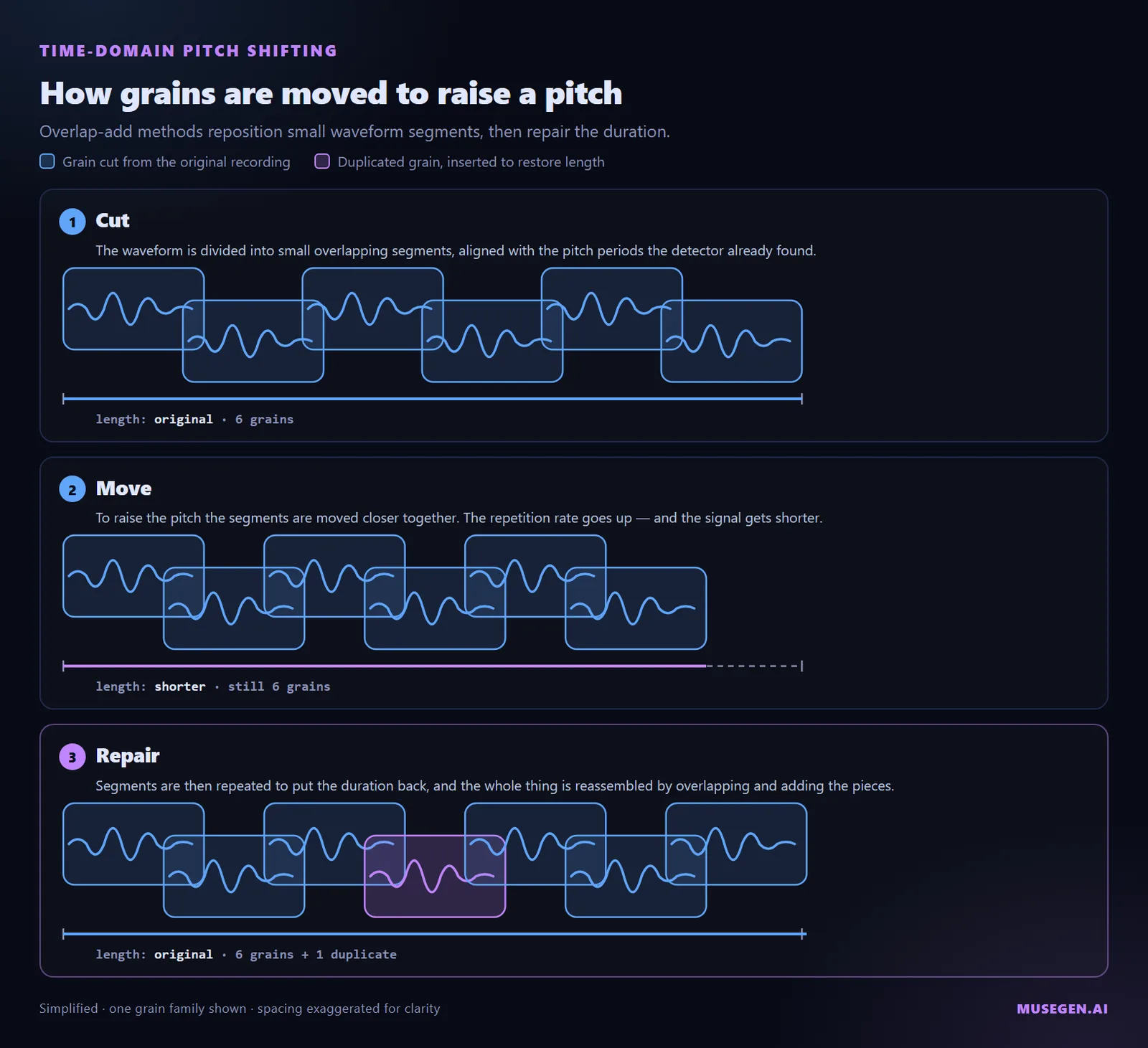
Repositioning grains raises the pitch and shortens the signal; duplicated grains put the duration back.
Two properties follow directly. Small shifts are close to transparent, because most of the original waveform survives untouched; large ones are not, because you are increasingly listening to duplicated material rather than to what was sung.
Frequency domain: analyse, edit, rebuild
The alternative is the phase vocoder, which converts the audio into a time-frequency representation using a short-time Fourier transform, modifies it there, and transforms back. In principle this is cleaner, because in the frequency domain pitch and time are separate axes and you can move one without the other.
In practice the difficulty is phase. A single sustained tone does not sit neatly in one place — windowing spreads it across neighbouring frequency bins and overlapping frames spread it across time, so any edit has to keep the relationships intact in both directions at once. Getting the frame-to-frame relationship right but not the bin-to-bin one produces output that is rhythmically correct but noticeably lacking clarity, a limitation that stood until Laroche and Dolson published a way to preserve phase consistency across bins in 1999.
| Property | Time domain (PSOLA family) | Frequency domain (phase vocoder) |
|---|---|---|
| Works by | Repositioning, duplicating and overlapping waveform grains. | Transforming to a spectrum, editing it, transforming back. |
| Strong at | Small shifts on a clean monophonic voice — close to transparent. | Larger shifts and independent control of pitch and time. |
| Struggles with | Large shifts, where duplicated material starts to dominate. | Phase coherence, especially across note onsets and transients. |
| Needs from stage 1 | An accurate period, since the grains are cut in sync with it. | Less dependent on it — the transform does not need the period. |
One honest caveat, because the internet is confidently wrong about this. Antares has never published which approach Auto-Tune uses, and its own public explainer of the technology describes an FFT-based method in the body and autocorrelation in its FAQ. What is documented is the category: these are the two well-described engineering routes to the problem, and any given product may use either, both, or something proprietary built on top of them.
Why a shifted voice sounds like a chipmunk
A voice is produced in two parts, and they are independent. The vocal folds generate a harmonically rich buzz whose rate is the pitch. That buzz then passes through the throat and mouth, which act as a resonant tube and emphasise certain frequency regions. Those emphasised regions are formants, and they are a property of the shape of the vocal tract, not of the note being sung.
Formants carry vowel identity. The first two are usually enough to tell a listener which vowel they are hearing — the first tracks how open the mouth is, the second how far forward the tongue sits. Sing "ee" and then "ah" on the same note: the pitch does not change at all, the formants do.
On the source-filter distinction and how the first two formants determine vowel identity: formants.
Now the problem is obvious. A naive pitch shift scales the entire spectrum, formants included. Shift a voice up four semitones and the resonances move up four semitones too — and since resonance frequency is a function of tube length, the listener's ear reads that as a shorter vocal tract, which is to say a smaller person. That is the chipmunk effect, and it is not a bug in anyone's code. It is what happens when you move something that should have stayed put.
Formant correction is the fix: estimate the spectral envelope before the shift and reimpose it afterwards, so the fundamental and its harmonics move while the resonances stay anchored. This is also why it matters far more on large shifts than small ones. Correcting a note that was 30 cents flat moves the formants by 30 cents, which nobody can hear; moving a note by five semitones is a different situation entirely.
Why zero retune speed produces a staircase
The stepped robotic sound gets described as an artefact, a glitch, or a distortion. It is none of those. It is the un-smoothed output of a quantiser, and it is exactly what the maths says should happen.
Recall stage two: the target pitch is always the nearest legal note. As a singer glides from one word to the next, the detected pitch moves smoothly, but the target does not — it stays on one note, then jumps to the next the instant the detected pitch crosses the halfway line. The target has always been a staircase. That is not a setting; it is what quantisation means.
Retune speed is the smoothing placed in front of that staircase. Treat it as a time constant: the correction moves towards the target at a rate governed by that constant rather than arriving instantly. Set it to 50 ms and the output is a heavily smoothed version of the target, which in practice tracks the singing — by the time the correction has begun moving, the voice is somewhere else, so vibrato and scoops survive. Reduce it and the smoothing weakens. At zero, there is no smoothing at all, and the output is the staircase.
The robot voice is not added to the signal. It is what remains when you remove the smoothing. Which is why it cannot be dialled in halfway with any other control — nothing else in the plug-in sits between the quantiser and the output.
It also explains why the effect lands harder on some singers than others: someone who scoops into notes spends more time gliding, so more of the performance gets turned into steps rather than sitting on one. The settings that produce each end of the range follow from this directly.
Real-time correction vs graphical editing
Every pitch correction tool offers two modes, and the difference between them is not convenience. It is how much of the future the algorithm is allowed to see.
Real-time mode works forward, one frame at a time, bound by the constraint from stage one: it cannot report a pitch until it has enough audio to measure one. That is where plug-in latency comes from, and it is worse on low voices, which have longer periods and need longer windows. It also has no way to reconsider — if the detector produces an octave error on one syllable, the correction based on it is already downstream before anything could have caught it.
Graphical mode analyses the whole file first, which removes both limitations at once: latency is irrelevant because nothing is happening live, and the analysis can use context in both directions, so a frame that looks like it jumped an octave can be checked against its neighbours. This is why note-by-note editing consistently beats global settings on difficult material — not because you are being more careful, but because the algorithm has strictly more information.
Any tool that measures something spread over time faces the same choice, which is why a tempo detector also needs a stretch of audio rather than an instant of it.
What the algorithm cannot do
Three limits fall directly out of the mechanism, and none of them are fixable by better settings.
It needs one voice. Stage one assumes a quasi-periodic signal. Two notes sounding together do not have one shared period, so headphone bleed, a doubled vocal left in the same file, or a sustained pad under the take can destabilise correction that worked fine on a clean track. Pulling individual notes out of polyphonic audio is a genuinely harder problem, and the tools that manage it use different technology.
Big corrections cost audio quality. Stage three degrades with the size of the shift, in both families: a note slightly flat is a small ratio and a nearly transparent reconstruction, while a note a whole tone off is a large one and you hear the reconstruction working. The folk wisdom that pitch correction sounds best when it has least to do is not aesthetic preference — it is a property of the algorithm.
It only touches pitch. Timing, tone, breath control, diction and phrasing pass through untouched, because nothing in the three stages measures any of them. Detection is also degraded by anything that blurs the harmonic structure it depends on, which is why lossy files are poor source material — if what you have is an MP3, convert it to WAV before you start, and accept that the detail already discarded is not coming back.
How to hear each stage for yourself
The fastest way to internalise any of this is to break one stage at a time on purpose and listen to what changes. Each of these isolates a different box in the diagram.
- Break the detector. Set the input type to soprano on a low male vocal and play a breathy passage. Notes that flicker or leap an octave are stage one failing — and notice that the correction downstream is behaving perfectly, it is just being fed nonsense.
- Unpin the formants. Turn formant correction off and force a shift of several semitones. The voice thins and shrinks. Turn it back on at the same shift and the size of the singer returns while the note stays where you put it.
- Expose the quantiser. Find a phrase where the singer slides between two words, set retune speed to zero, and listen to the slide specifically. That step is the staircase with the smoothing removed.
- Starve the detector. Move the plug-in after a reverb and listen to the ends of phrases. Correction wobbles in the tails, because the decaying copy of one note is still sounding underneath the next one — the monophonic assumption, broken by your own signal chain.
Diagnostic shortcut — which stage is it?
Wrong note entirely       → stage 2 (scale/key), or an octave error in stage 1
Right note, wrong voice    → stage 3 (formants)
Right note, stiff/stepped  → smoothing removed, not a defect
Unstable only in tails     → stage 1, starved by upstream effects
Almost every "the autotune sounds bad" complaint resolves to one of these four rows, and each one has a different fix.
Where MuseGen fits
MuseGen does not do pitch correction, and it is not a mixing or DSP tool. If you have a recorded vocal that needs tuning, use a dedicated pitch correction plug-in, including the one your DAW already ships with.
MuseGen sits earlier than any of it — an all-in-one system that writes lyrics, produces complete songs from them, and generates music videos, which is the stage before there is a recording to process at all. If you are working out whether a topline is worth booking studio time for, hearing it as a finished song in any genre or style answers that faster than imagining it.
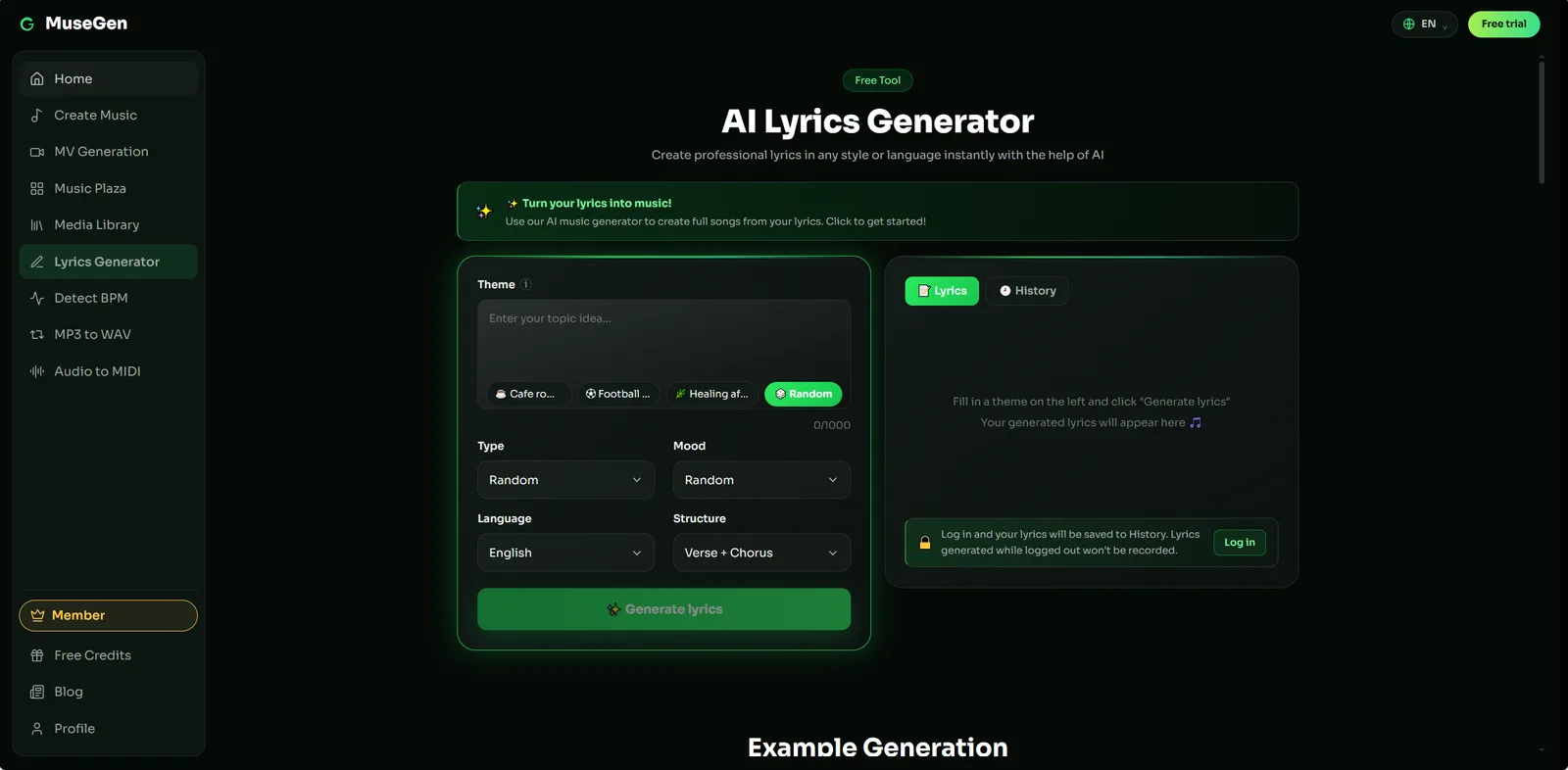
Step 1 — draft the lyric with a real song structure.
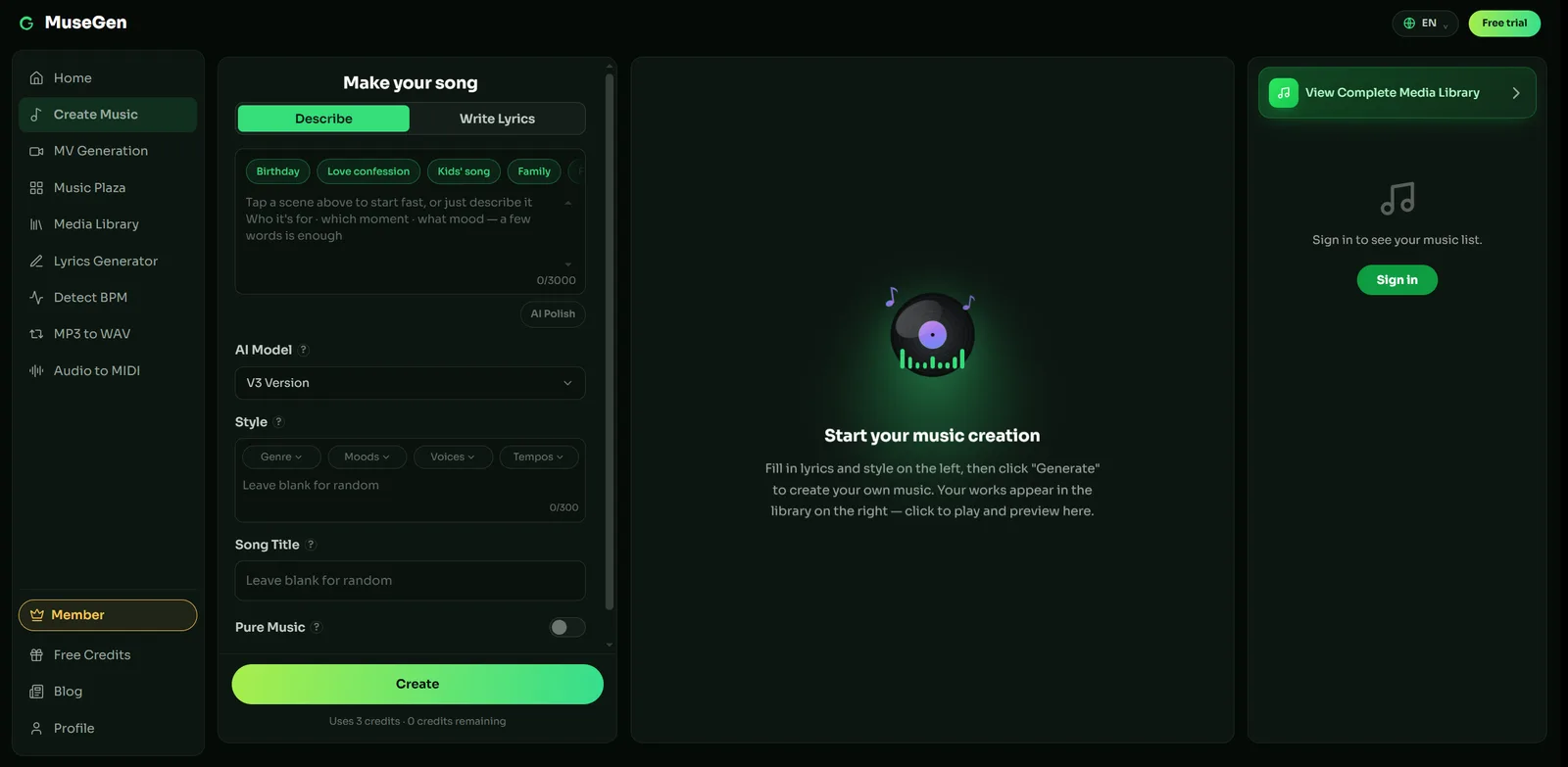
Step 2 — hear the topline in a finished arrangement.
Two limitations worth naming, since they follow from this article's own subject. Everything above assumes an isolated vocal track, because detection needs one voice; generated songs currently export as a stereo mix, so there is no separate vocal to feed a pitch corrector. Stem and multitrack export is coming soon. And exports come as royalty-free WAV or MP3, but check MuseGen's current terms before commercial use rather than assuming.
The practical division of labour: write the lyric, turn it into a song to find out whether the idea holds up, and generate a music video to publish alongside it. Then record it properly — and everything in this guide applies to the signal you captured.
Hear the song before you record the vocal — draft the lyric, generate the track, and find out whether the melody is worth tracking in the first place. → Make a song with MuseGen
FAQ
How does autotune work?
It runs three stages continuously. It cuts the audio into short overlapping windows and estimates the fundamental frequency in each one, usually by finding the delay at which the waveform best matches a copy of itself. It takes the nearest note your key and scale allow as the target. Then it rebuilds the audio at that pitch without changing its duration, travelling there at the rate retune speed sets.
Does autotune use FFT or autocorrelation?
Both families are used in real products. Autocorrelation and its descendants such as YIN work in the time domain, comparing a signal against delayed copies of itself; FFT-based methods look for harmonic structure in a spectrum. Antares has never published the internals of Auto-Tune, and its own explainer describes FFT in one place and autocorrelation in another, so the specific product is not documented.
Why does autotune have latency?
Pitch is not a property of a single sample, so the detector needs a stretch of audio before it can answer. Autocorrelation methods need at least two pitch periods, which means a voice with a fundamental around 40 Hz requires at least 50 milliseconds of signal before a first estimate exists. That floor is set by physics, not by the software.
Why does a pitch-shifted voice sound like a chipmunk?
Because the resonances of the vocal tract moved with the note. Pitch comes from the vocal folds, while formants are resonances created by the shape of the throat and mouth, and the first two largely determine which vowel a listener hears. A naive shift scales the whole spectrum and drags those resonances up as well, which sounds like a much shorter vocal tract. Formant correction holds them in place.
Why does zero retune speed produce a staircase?
Because retune speed is the smoothing in front of the quantiser. The target is already a staircase, since only certain notes are legal and the detected pitch always snaps to the nearest one. Retune speed controls how gradually the output moves towards it, so a non-zero setting lets glides and vibrato survive. At zero there is no smoothing left, and the output is the staircase itself.
Can autotune work on a full mix or on a chord?
Standard pitch correction cannot, because detection assumes one quasi-periodic signal with a single repeating period. Two notes sounding together do not share one, so the estimate becomes meaningless. Headphone bleed, a doubled vocal or a sustained pad can be enough to destabilise it. Separating notes inside polyphonic audio is a harder, separate problem solved with different technology.
Is autotune the same as a vocoder?
No, and they work in opposite directions. A vocoder takes the spectral envelope of a voice and imposes it on a separate synthesiser tone, so the pitch you hear belongs to the synth. Autotune keeps the recorded voice and moves its pitch. The confusion is historical: the producers of Cher's Believe initially claimed a vocoder had been used.
Sources
- Pitch detection algorithm — Wikipedia. Autocorrelation and YIN, octave errors, and the two-period minimum behind detection latency.
- PSOLA — Wikipedia. Segmenting, repositioning and overlap-adding waveform grains to change pitch independently of duration.
- Phase vocoder — Wikipedia. Short-time Fourier analysis and resynthesis, and the phase coherence problem.
- Formant — Wikipedia. Source-filter production and the role of the first two formants in vowel identity.
- The Science Behind Auto-Tune — Antares. The manufacturer's own account of detection and correction.
- Auto-Tune — Wikipedia. Origins of the algorithm and the Cher recording.
- Making a Pitch Shifter — JentGent, YouTube.