BPM Detector: Find the Tempo of Any Song
Instantly detect a song's BPM with the help of AI
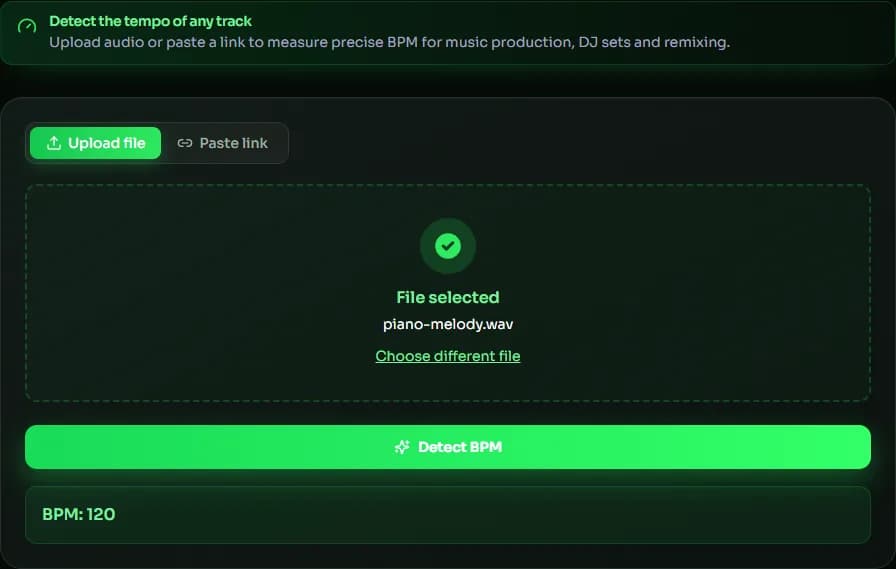
Detect the tempo of any track
How to Use a Music BPM Detector
Use our AI technology to detect and analyze the tempo of your music.
Select your local music file
Upload an audio file that requires BPM detection for analysis.
Click to detect BPM
Click to detect BPM, then wait for our AI to analyze the audio file's BPM.
Detection complete
Once the detection is complete, the BPM of the audio file will be returned.
Why choose our BPM detector?
Our AI BPM detector helps you find the tempo of any track quickly and accurately.
Accurate BPM detection
AI analyzes your audio to detect the exact beats per minute.
Any audio format
Works with MP3, WAV, OGG, FLAC and many more.
Instant results
Get your song's tempo in just a few seconds.
Made for DJs & producers
Match tempos to build seamless mixes and playlists.
No installation needed
Runs right in your browser on any device.
Free to use
Detect BPM as many times as you like, completely free.
Explore music creation tools
Explore various AI-powered music creation tools, including lyric generation, instrument generation, and more.
AI Music Generator
Create original music using our advanced artificial intelligence technology. Generate complete songs, instrumentals, and melodies in any genre within minutes.
AI Lyrics Generator
Turn a theme, mood, or music style into complete song lyrics with AI. Create structured verses and choruses in seconds.
BPM Detector Guide: How Tempo Detection Works and How to Use the Result
BPM (beats per minute) is the tempo of a song: how many beats fit into one minute. A BPM detector listens for the regular pulse of kicks, snares and other accents and turns it into a number you can use for DJ mixing, remixing, video editing or setting your DAW's project tempo. This guide explains how BPM detection works and how to read the result.
How the BPM detector finds the tempo
The detector looks for peaks in the audio — moments where the level jumps, such as drum hits — and measures the time between them. The interval that repeats most often becomes the beat, and the BPM is 60 divided by that interval in seconds. Songs with a clear, steady beat give the most reliable BPM; rubato piano or ambient tracks without percussion are harder to measure.
Half-time and double-time results
A BPM detector can sometimes report half or double the tempo you feel — for example 70 instead of 140 — because both numbers fit the same pulse. If the BPM looks off, tap along and compare: if you clap twice per detected beat, double it; if only every other clap lands on a beat, halve it. Genres like drum & bass and trap are often felt at half-time.
Using the BPM in your workflow
DJs match the BPM of two tracks so their beats line up during a mix. Producers set the DAW tempo to the detected BPM before adding loops or starting a remix. Video editors cut on the beat by dividing 60 by the BPM to get the length of one beat: at 120 BPM a beat lasts 0.5 seconds and a 4/4 bar lasts 2 seconds.
Detecting the BPM from a link
Besides uploading a file, you can paste a direct link to an MP3 or WAV file — for example from cloud storage — and the BPM detector downloads and analyzes it for you. Links to streaming pages such as YouTube or Spotify won't work, because they don't point to the audio file itself.
| Genre | Typical BPM |
|---|---|
| Hip-hop | 80–100 |
| Pop | 100–130 |
| House | 120–130 |
| Techno | 125–140 |
| Trap (often felt at half-time) | 130–170 |
| Drum & bass | 160–180 |
BPM Detector FAQ
Sources & further reading
The concepts, formats and algorithms behind this tool, with their original references.
- Tempo – Wikipedia — what tempo and beats per minute (BPM) mean
- Beat (music) – Wikipedia — how beats are defined and grouped in music
- Web Audio API – MDN Web Docs — the browser audio API used to decode and analyze your file locally
Last updated:
 MuseGen
Create original music in any genre using advanced MuseGen technology.