FLAC to WAV Converter
Convert FLAC to WAV in your browser without losing quality. No uploads — your audio stays on your device.
Lossless FLAC to lossless WAV
How to Convert FLAC to WAV
Unpack a FLAC file to WAV in three quick steps.
Add your FLAC file
Drag in a FLAC file — a CD rip, a Bandcamp download or a studio bounce — or click to browse.
Convert to WAV
Click convert. The FLAC is decoded in your browser and written as WAV at its original bit depth (16 or 24-bit).
Preview & download
Check the result in the player and download the WAV file.
Why convert FLAC to WAV with MuseGen?
Keep lossless quality while gaining WAV's near-universal compatibility.
No quality loss
FLAC is lossless compression, so unpacking it to WAV keeps the full audio quality.
Bit depth preserved
16-bit FLAC becomes 16-bit WAV, and 24-bit FLAC becomes 24-bit WAV.
Original sample rate
44.1, 48, 96 kHz and other rates are kept as they are, with no resampling.
Hardware friendly
Many older CDJs, samplers and DAWs read WAV but not FLAC.
Private & local
Files are processed on your device and never uploaded.
Free, no install
Works in any modern browser without software or an account.
Explore music creation tools
Try more free tools for music analysis and songwriting.
FLAC to WAV: Lossless In, Lossless Out
FLAC and WAV can hold exactly the same audio; FLAC just packs it more efficiently, the way a ZIP file packs a document. Converting FLAC to WAV unpacks the samples so that software and hardware without FLAC support can play and edit them. Because both formats are lossless, a correct FLAC to WAV conversion is bit-for-bit identical to the original recording.
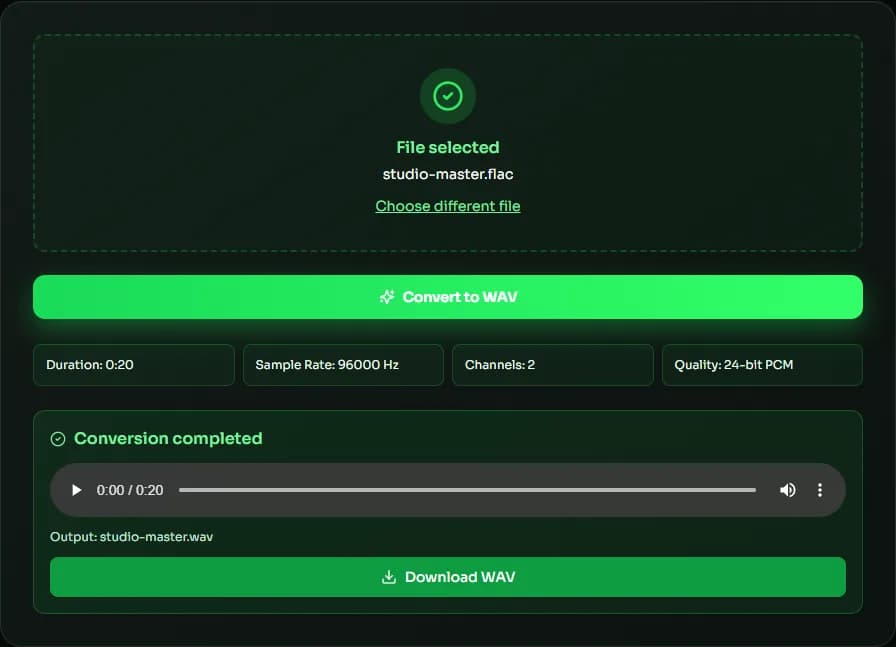
Bit depth and sample rate are preserved
The converter reads the FLAC stream's own sample rate and bit depth before decoding, then writes a WAV with the same values: 16-bit FLAC becomes 16-bit WAV, 24-bit FLAC becomes 24-bit WAV, and 44.1, 48, 88.2 or 96 kHz files keep their rate. In our tests, the PCM data in each converted WAV matched a reference FLAC decoder sample for sample.
Why the WAV is bigger than the FLAC
FLAC typically compresses music to about 50–70% of its WAV size, depending on how dense the recording is — quiet acoustic music compresses better than loud, distorted rock. Expect the WAV to be roughly 1.5 to 2 times larger than the FLAC you started with.
When to convert FLAC to WAV
Convert FLAC to WAV when a DJ player, sampler, video editor, older DAW or upload form doesn't accept FLAC. Keep your FLAC files as the archive copy: they save space and carry tags, and you can always convert FLAC to WAV again whenever you need it.
What happens to tags and cover art
FLAC files usually carry tags such as artist, album and track number, plus embedded cover art. WAV has only limited, inconsistently supported metadata, so the converter writes the audio alone. If you need tags in your DJ software or library, keep the FLAC alongside the WAV, or add the details again in the app that reads the WAV.
| Bit depth | Sample rate | Size per minute |
|---|---|---|
| 16-bit | 44.1 kHz | ≈ 10.6 MB |
| 24-bit | 48 kHz | ≈ 17.3 MB |
| 24-bit | 96 kHz | ≈ 34.6 MB |
| 24-bit | 192 kHz | ≈ 69.1 MB |
FLAC to WAV FAQ
Sources & further reading
The concepts, formats and algorithms behind this tool, with their original references.
- FLAC – Xiph.Org — the FLAC lossless codec and its reference tools
- RFC 9639: Free Lossless Audio Codec (FLAC) – IETF — the official FLAC format specification
- WAVE Audio File Format – Library of Congress — the WAV (WAVE) file format
- BaseAudioContext.decodeAudioData() – MDN Web Docs — how browsers decode audio on your device without uploading it
Last updated:
