WAV to MP3 Converter
Compress WAV to MP3 at 128, 192 or 320 kbps directly in your browser. No uploads — your audio stays private.
Shrink WAV files for sharing
How to Convert WAV to MP3
Compress a WAV file to MP3 in three quick steps.
Add your WAV file
Drag in a WAV bounce, recording or sample, or click to browse.
Choose bitrate & convert
Pick 128, 192 or 320 kbps, then click convert to encode the MP3 locally.
Preview & download
Listen to the MP3 and download it, ready for sharing.
Why convert WAV to MP3 with MuseGen?
Smaller files for sharing, demos and email, encoded right on your device.
Much smaller files
A 192 kbps MP3 is roughly one-seventh the size of a 16-bit/44.1 kHz stereo WAV.
Choose your bitrate
128 kbps for quick previews, 192 kbps for everyday listening, 320 kbps for the best MP3 quality.
LAME-based encoding
Uses a JavaScript port of the well-known LAME MP3 encoder.
Private & local
Your mixes and recordings are never uploaded to a server.
Plays everywhere
MP3 works on phones, cars, browsers, social platforms and messaging apps.
Free to use
No account or watermark, and no software to install.
Explore music creation tools
Try more free tools for music analysis and songwriting.
Choosing an MP3 Bitrate When You Convert WAV to MP3
WAV keeps every sample of a recording; MP3 keeps what matters most to the ear and drops the rest, so files get much smaller. The bitrate you choose when you convert WAV to MP3 decides that trade-off. This guide explains the three bitrates the converter offers and what happens to the sample rate and channels.
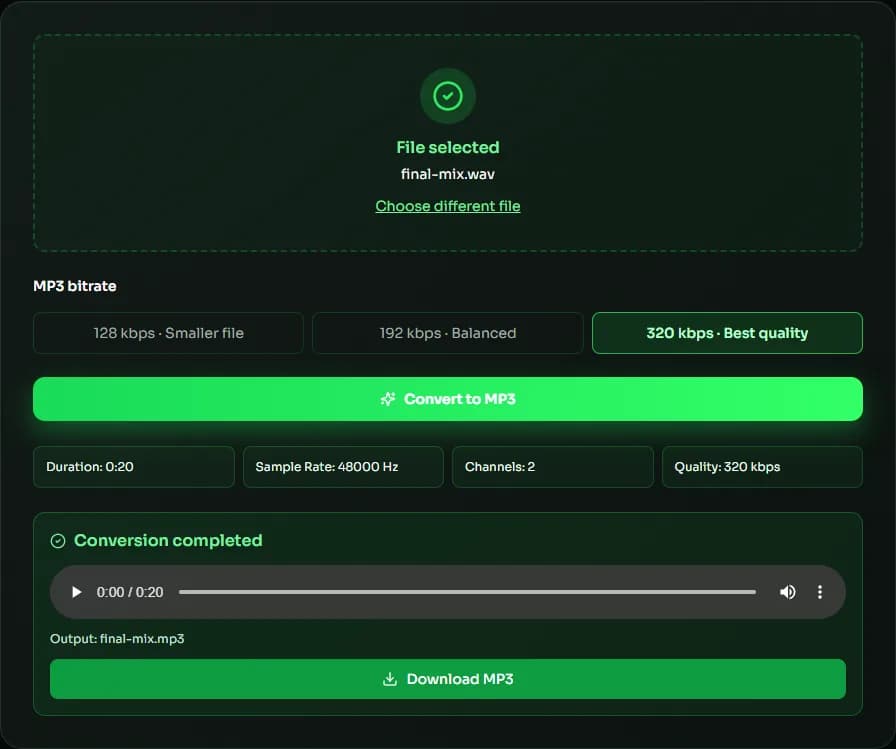
128, 192 or 320 kbps?
At 320 kbps — the highest MP3 bitrate — most listeners can't tell the MP3 from the WAV, so use it for finished music. 192 kbps is a good default for everyday listening and sharing. 128 kbps is fine for speech, podcasts and rough demos where small files matter most. Whichever you choose, keep the original WAV as your master: converting WAV to MP3 is a one-way, lossy step. If you are not sure, start at 192 kbps and listen on the speakers or headphones your audience will use.
How the encoder works
The converter uses a JavaScript port of LAME, the open-source MP3 encoder behind many desktop tools. It encodes at a constant bitrate (CBR), which every player and upload form accepts, and works in small chunks so the page stays responsive while it encodes.
Sample rate and channels
MP3 supports sample rates up to 48 kHz. A 44.1 or 48 kHz WAV keeps its rate; 88.2 and 176.4 kHz files are converted to 44.1 kHz, and 96 and 192 kHz files to 48 kHz. Mono and stereo files stay as they are, and for a multichannel WAV the first two channels are used.
When to convert WAV to MP3
Convert WAV to MP3 to send a mix for feedback, upload a demo to a site with a size limit, put songs on a phone or in a car, or attach audio to an email. For releases on streaming services, check their requirements first — many prefer that you upload WAV and let them encode.
| Format | Bitrate | File size | Compared with WAV |
|---|---|---|---|
| WAV, 16-bit, 44.1 kHz | 1,411 kbps | ≈ 42 MB | 100% |
| MP3 | 320 kbps | ≈ 9.6 MB | ≈ 23% |
| MP3 | 192 kbps | ≈ 5.8 MB | ≈ 14% |
| MP3 | 128 kbps | ≈ 3.8 MB | ≈ 9% |
WAV to MP3 FAQ
Sources & further reading
The concepts, formats and algorithms behind this tool, with their original references.
- WAVE Audio File Format – Library of Congress — the WAV (WAVE) file format
- mp3 – Fraunhofer IIS — the origins of MP3 audio coding
- LAME MP3 Encoder — the LAME MP3 encoder that this tool's MP3 encoding is based on
- Web audio codec guide – MDN Web Docs — lossy vs. lossless audio codecs
Last updated:
