Pitch Changer
Change the pitch or key of any song without changing its speed, or change the tempo without changing the pitch. Runs in your browser — no uploads.
Shift pitch, keep the groove
Drag your audio file here
Or click to select a file
Supported formats: MP3, WAV, M4A, FLAC, OGG
Max duration: 6 minutes
How to Change the Pitch of a Song
Transpose or slow down any track in three quick steps.
Add your audio
Drag in an MP3, WAV, M4A, FLAC or OGG file, or click to choose one from your device.
Adjust pitch & tempo
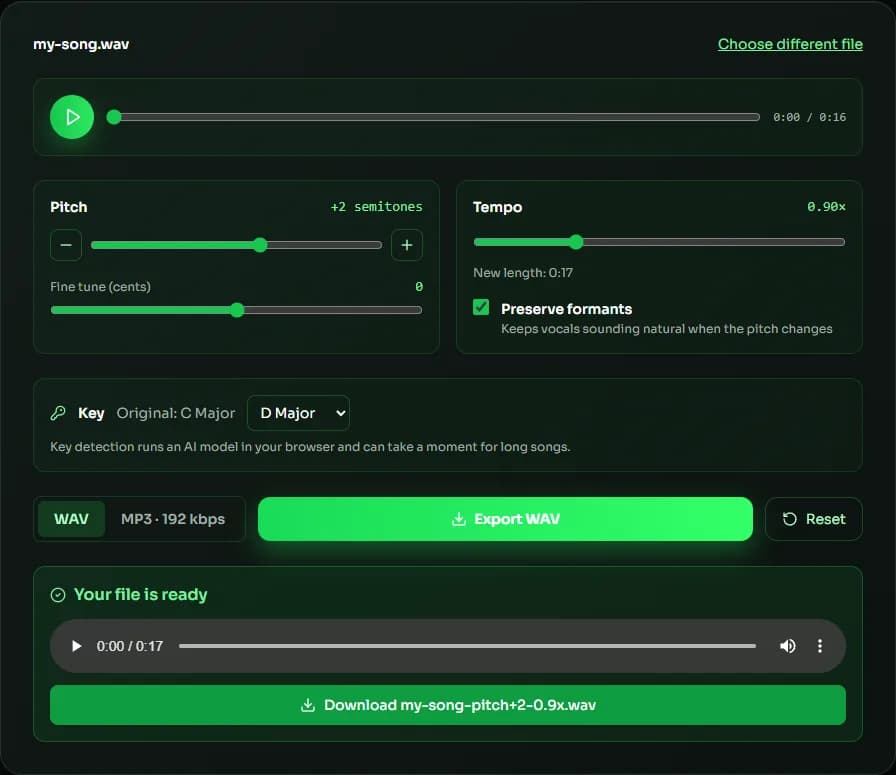
Move the semitone and cents sliders, change the tempo, or detect the key and pick a target key. Press play to hear changes instantly.
Export
Choose WAV or MP3 and export. The new file is rendered in your browser and ready to download.
Why use MuseGen's Pitch Changer?
Studio-grade pitch and time processing, free and private in your browser.
Pitch without speed change
Shift up to 12 semitones up or down, with cents for fine tuning, while the tempo stays the same.
Private by design
Your audio is processed on your device and never uploaded to a server.
No install needed
Works in modern desktop and mobile browsers without plugins or sign-up.
Real-time preview
Hear every change instantly while the song plays, before you export.
Change key in one click
Detect the original key and choose a target key; the tool works out the shortest shift for you.
Natural-sounding vocals
Formant preservation reduces the chipmunk or muddy effect when shifting vocals.
Explore more music tools
Analyze songs before you transpose or practice them.
Pitch Changer Guide: Change the Key of a Song Without Changing Its Speed
A pitch changer (also called a pitch shifter or key changer) moves every note in a recording up or down while the tempo stays the same. Singers use a pitch changer to put a song in a comfortable range, musicians use it to play along with tracks recorded in an unusual tuning, and producers use it to audition new keys before they record vocals. MuseGen's free online pitch changer does all of this in your browser: you hear each change live, then export a WAV or MP3 file.
How many semitones should you shift?
Each semitone is one step on a piano keyboard, and 12 semitones make an octave. Shifting up 2 semitones turns a song in C into D; shifting down 3 turns C into A. For vocals, most singers stay within about ±4 semitones before a voice starts to sound unnatural, so try small moves first. The cents slider in the pitch changer moves the pitch in 1/100-semitone steps, which helps you match a recording that is slightly out of tune with your instrument — a track tuned to A = 432 Hz, for example, sits about 32 cents below standard 440 Hz tuning.
Transpose to a target key in one click
If you don't know the original key, click Detect key. The pitch changer analyzes the notes in your browser, shows the original key and lets you pick the key you want. It then applies the shortest shift — never more than 6 semitones up or down — so the result keeps as much of the original sound as possible. Major songs stay major and minor songs stay minor.
Change the tempo without changing the pitch
The tempo slider slows a song down to 0.5× or speeds it up to 2× while the key stays exactly where it was. This is the classic practice workflow: slow a solo to 0.75×, learn it, then bring it back to full speed. You can combine both controls — for example −1 semitone at 0.9× tempo — and the pitch changer shows the new length before you export.
When to turn on formant preservation
Shifting a voice also moves its formants, the resonances that make a voice sound like a particular person. Without correction, a voice shifted up sounds thin and chipmunk-like, and a voice shifted down sounds muffled. Turn on Preserve formants when the track has vocals; leave it off for drums, bass and other instruments, where it isn't needed.
| Goal | Pitch | Tempo | Formants |
|---|---|---|---|
| Sing a song a little lower | −2 to −3 semitones | 1.00× | On |
| Play in standard tuning along with a song tuned half a step down | +1 semitone | 1.00× | Off |
| Practice a fast solo | 0 | 0.70×–0.80× | Off |
| Bring a track tuned to A = 432 Hz back to 440 Hz | +32 cents | 1.00× | Off |
| Nightcore-style edit | +3 to +4 semitones | 1.20×–1.30× | Off |
Pitch Changer FAQ
Sources & further reading
The concepts, formats and algorithms behind this tool, with their original references.
- Semitone – Wikipedia — what a semitone is and how 12 make an octave
- Cent (music) – Wikipedia — cents, the 1/100-semitone unit used for fine tuning
- Audio time stretching and pitch scaling – Wikipedia — how pitch shifting and time stretching work
- Formant – Wikipedia — formants and why they shape the character of a voice
- Signalsmith Stretch – Signalsmith Audio — the open-source pitch and time engine this tool uses
Last updated:
