M4A to WAV Converter
Convert M4A audio to uncompressed WAV right in your browser. No uploads — your files never leave your device.
Turn M4A into edit-ready WAV
How to Convert M4A to WAV
Turn an M4A file into WAV in three quick steps.
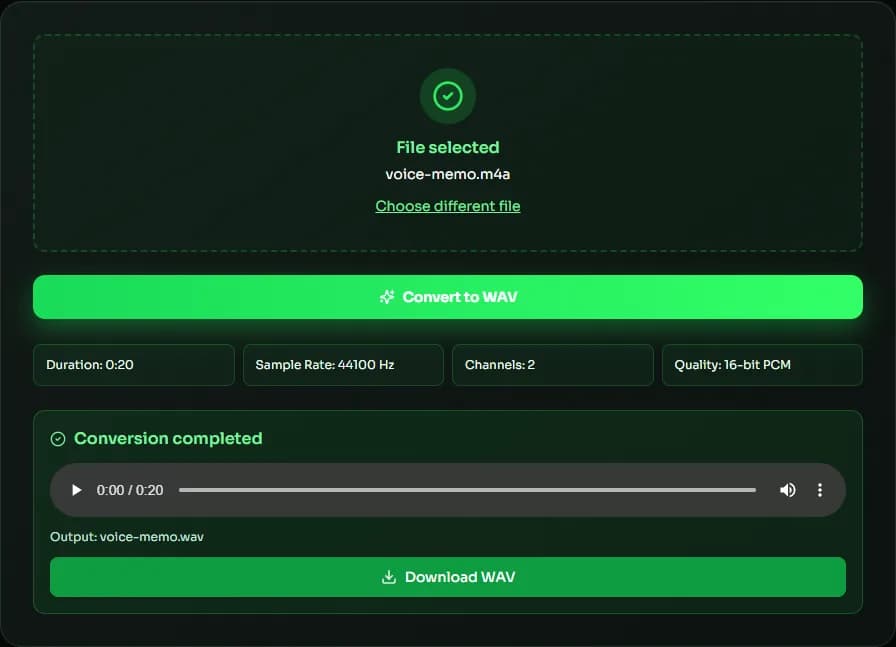
Add your M4A file
Drag in an M4A file — for example an iPhone voice memo or a GarageBand export — or click to browse.
Convert to WAV
Click convert. Your browser decodes the AAC audio and writes a 16-bit PCM WAV file locally.
Preview & download
Listen to the result, then save the WAV file to your device.
Why convert M4A to WAV with MuseGen?
Get a universally compatible WAV from M4A audio, without installing software.
Works in any editor
WAV opens in virtually every DAW, sampler and video editor, including tools that don't accept M4A.
Private by design
Conversion happens on your device, so voice memos and unreleased mixes never touch a server.
Original sample rate kept
The WAV keeps the sample rate of your M4A, so there is no extra resampling step.
No install, no sign-up
Open the page and convert. There is nothing to download or register.
Clean editing source
Uncompressed PCM avoids repeated AAC decoding while you cut, fade and mix.
Free to use
Convert as many M4A files as you need at no cost.
Explore music creation tools
Try more free tools for music analysis and songwriting.
M4A to WAV: AAC, Apple Lossless and What You Get After Converting
M4A is a file container from the MP4 family. Most M4A files hold AAC audio — the format used by iPhone voice memos, GarageBand exports and many downloads — while some hold Apple Lossless (ALAC). Converting M4A to WAV unpacks either one into plain PCM, the most widely supported audio format there is.
AAC M4A vs Apple Lossless M4A
The .m4a extension doesn't tell you which codec is inside. AAC is lossy and small, roughly 1–2 MB per minute; ALAC is lossless and usually 4–6 MB per minute. Converting AAC M4A to WAV works in every modern browser. ALAC decoding depends on the browser — Safari supports it, while some other browsers don't — so if an ALAC file fails, open this M4A to WAV converter in Safari.
Why convert M4A to WAV
Many Windows apps, older DAWs, hardware samplers, broadcast systems and video editors handle WAV more reliably than M4A. Converting M4A to WAV is also a common first step before editing a voice memo or an interview: WAV opens instantly, scrubs smoothly and can be cut without any extra decoding.
Does converting change the sound?
No. The converter decodes the AAC or ALAC audio and writes the samples into a 16-bit PCM WAV at the original sample rate. Nothing is added or enhanced, and for AAC sources the WAV sounds identical to the M4A. Converting does drop metadata such as the title and artwork, which WAV files rarely use anyway.
Converting iPhone voice memos
Voice Memos on iPhone saves recordings as M4A. To convert one, tap the recording, choose Share and then Save to Files, or AirDrop it to a Mac. On a computer, open this page, drag the M4A file in and download the WAV. The recording keeps its original sample rate, so it lines up with other audio in your editing project.
| Codec | Type | Typical size per minute | Browser support |
|---|---|---|---|
| AAC-LC | Lossy | 1–2 MB | All modern browsers |
| HE-AAC | Lossy, low bitrate | 0.3–0.5 MB | Most modern browsers |
| ALAC (Apple Lossless) | Lossless | 4–6 MB | Safari; varies elsewhere |
M4A to WAV FAQ
Sources & further reading
The concepts, formats and algorithms behind this tool, with their original references.
- Advanced Audio Coding – Wikipedia — how AAC audio inside M4A files is encoded
- Media container formats – MDN Web Docs — the MP4/M4A container and other media file types
- WAVE Audio File Format – Library of Congress — the WAV (WAVE) file format
- BaseAudioContext.decodeAudioData() – MDN Web Docs — how browsers decode audio on your device without uploading it
Last updated:
