Music Visualizer
Turn any song into a colorful, audio-reactive music video. Start from 18 templates for YouTube, TikTok and podcasts, then customize styles, palettes, animated backgrounds and beat effects. Export MP4 free, in your browser.
Want a full music video?
Or drag an audio file anywhere onto the workspace
Supported formats: MP3, WAV, M4A, FLAC, OGG · Max duration: 6 minutes
How to Make a Music Visualizer Video
Go from an audio file to a shareable video in three steps.
Add your song
Drag in an MP3, WAV, M4A, FLAC or OGG file, or click to choose one from your device.
Design your visualizer
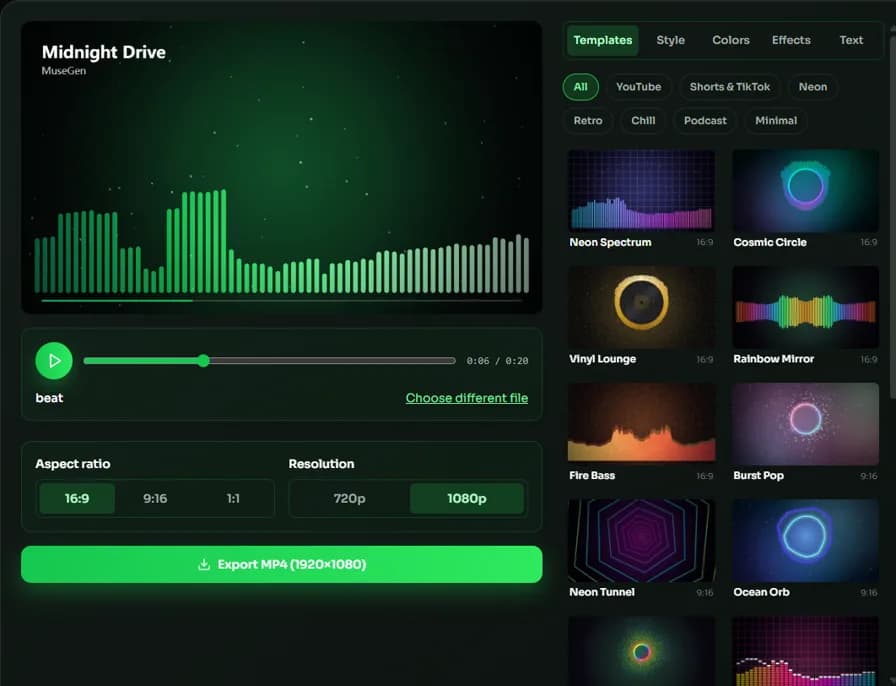
Pick one of 18 templates, or fine-tune the style, colors, background and effects. Add your title and artist and choose 16:9, 9:16 or 1:1. Press play to preview.
Export MP4
Choose 720p or 1080p and export. The video is rendered in your browser and ready to download and upload anywhere.
Why use MuseGen's Music Visualizer?
A fast, private way to give every track a video.
18 templates, endless combinations
Pick a ready-made look for YouTube, Shorts or podcasts, then mix 14 styles, 14 multi-color palettes, 5 animated backgrounds and 8 effects — every frame follows your song's spectrum.
Private by design
Your audio and images are processed on your device and never uploaded to a server.
Made for every platform
Export 16:9 for YouTube, 9:16 for TikTok, Shorts and Reels, or 1:1 for Instagram posts.
Your cover art, your title
Use album art as the background or in the center of round styles like Vinyl, and show the song title and artist on screen.
Faster than real time
In modern browsers the video is encoded faster than the song plays, so you don't wait the full length of the track.
Free, no watermark
No sign-up, no watermark and no install. Export as many videos as you like.
Explore more music tools
Go further with your track and its video.
Music Visualizer Guide: Turn a Song into an Audio Visualizer Video
A music visualizer (also called an audio visualizer or audio spectrum video) turns a song into moving graphics that follow its rhythm and frequencies. Musicians use visualizer videos to publish tracks on YouTube without filming anything, producers post 9:16 clips to TikTok and Reels to promote a release, and podcasters add a waveform so audio isn't just a still image. MuseGen's free online music visualizer does this in your browser: you preview the animation as the song plays, then export an MP4 ready to upload.
How the visualizer reacts to your song
When you add a file, the tool decodes the audio and runs a fast Fourier transform (FFT) on it 30 times per second, splitting each moment into 64 frequency bands from deep bass to bright treble. Bass sits on the left of the Bars style and in the middle of the Mirror style. Each band rises quickly with a hit and falls back smoothly, so the motion follows the beat without flickering. The low-frequency energy also drives a soft glow behind the visual and makes the Circle style pulse with the kick drum.
Choosing a style
Start with a template: 18 ready-made looks grouped by use — YouTube, Shorts & TikTok, Neon, Retro, Chill, Podcast and Minimal — each combining a style, a color palette, an animated background and effects. Then fine-tune anything. The 14 styles fall into three groups: spectrum styles (Bars, Mirror, LED, Peaks, Line) suit almost any genre; round styles (Circle, Vinyl, Rings, Burst, Orb) put your cover art in the center, the look most people know from YouTube music channels; immersive styles (Tunnel, Sunburst, Ridgeline) fill the frame for electronic music and lo-fi beats, while Wave draws the real waveform for podcasts and voice. Pick from 14 multi-color palettes such as Synthwave, Cyberpunk, Aurora, Fire and Rainbow, five animated backgrounds (Gradient, Aurora, Synthwave sunset, Starfield, Neon grid) or your own image, and add effects like Beat pulse, Color flow, Floating particles and Film grain.
Pick the right size before you export
Choose the aspect ratio for where the video will be posted, because each platform crops differently. Export 1080p for YouTube and anywhere the video may be watched full screen; 720p exports faster and makes a smaller file, which is fine for social feeds and quick previews. Every export is 30 fps MP4 with H.264 video and AAC audio where your browser supports it, the format YouTube recommends for uploads.
Tips for a cleaner result
Use a square cover image of at least 1000×1000 pixels so it stays sharp inside the circle and as the background. Busy or very bright images are darkened automatically, but simple artwork keeps the bars easier to see. Keep titles short — long ones are shortened with an ellipsis. If you need a full music video with scenes instead of an animated spectrum, MuseGen's AI MV Generator can create one from the same song.
| Platform | Aspect ratio | Resolution | Suggested template |
|---|---|---|---|
| YouTube video | 16:9 | 1080p | Neon Spectrum, Cosmic Circle or Vinyl Lounge |
| YouTube Shorts / TikTok | 9:16 | 1080p | Neon Tunnel or Burst Pop |
| Instagram Reels | 9:16 | 1080p | Ocean Orb or Sunburst Party |
| Instagram or Facebook feed post | 1:1 | 1080p | Dream Rings |
| Podcast clip | 1:1 | 720p | Podcast Wave or Voice Aurora |
Music Visualizer FAQ
Sources & further reading
The concepts, formats and algorithms behind this tool, with their original references.
- Music visualization – Wikipedia — what music visualization is and where it came from
- Spectrum analyzer – Wikipedia — how a spectrum analyzer shows the frequencies in a sound
- Fast Fourier transform – Wikipedia — the fast Fourier transform used to split audio into frequency bands
- WebCodecs API – MDN Web Docs — the browser API this tool uses to encode MP4 video on your device
- Recommended upload encoding settings – YouTube Help — YouTube's recommended upload formats, resolutions and frame rates
Last updated:
 MuseGen
Create original music in any genre using advanced MuseGen technology.