How to Use ElevenLabs Music: A Practical Walkthrough

MuseGen Team
10/15/2026
Eleven Music works like the rest of ElevenLabs: you describe what you want in a sentence, and a model that already knows how to generate convincing speech turns it into a finished track. The two things that make it a different tool to operate rather than a different-sounding version of something you already know are a prompt filter that bans the one shortcut most people reach for first, and an editor built around sections rather than whole takes. This page is a walkthrough of the controls in the order you meet them: what you cannot type, your first section, Audio Reference, Finetunes, editing a track piece by piece, exporting it, and what each action actually costs. It is not a review, and it does not argue about whether the tool is worth your plan. Our Eleven Music review does that; this page assumes you are already here and want to work.
What this walkthrough covers
The controls in the order you meet them, and the one restriction that reorganises how you prompt. Every figure below is read from ElevenLabs' own documentation and pricing pages, dated in the quick facts so you can check it again yourself.
- You cannot name what you want to sound like. No artist, songwriter, song title, album title, publisher or label may appear in a prompt. Describe the sound instead of pointing at it; naming any of them breaches the Music Terms.
- A song is built in sections, not generated whole. Start at 30 seconds or so, then add sections one at a time with their own prompt, lyrics and style rules, and click Generate to render the changes.
- Audio Reference guides sound, not identity. A roughly 30-second upload steers tone and instrumentation without copying or remixing it, and ElevenLabs' own pages disagree on whether the free plan gets it.
- A Finetune replaces the prompt for style, not for content. Train one on up to 50 tracks you own outright, wait five to ten minutes, then keep writing normal prompts for tempo, mood and language on top of it.
- Export is MP3 below Pro, and quality depends on your plan. Free, Starter and Creator get standard-quality files; Pro and above can download lossless WAV or 192 kbps MP3 under the Music Terms. ElevenLabs says other formats are coming.
Quick facts
- Where you work: The Music tool inside ElevenCreative, reached from elevenlabs.io after signing in.
- Song length: 3 seconds to 10 minutes per generation; fixed durations or Auto, plus Add Section to extend.
- Prompt ban: No artist, songwriter, song or album title, publisher or label name, or substantial lyric excerpt.
- Audio Reference: Up to roughly 30 seconds; ElevenLabs' own pages disagree on whether Free gets it.
- Finetunes: Up to 50 uploaded tracks, 10–600 seconds each, 250 minutes total; ready in 5–10 minutes.
- Export format: MP3, 44.1kHz, 128–192kbps, per the documentation. Lossless WAV or 192-kbps MP3 from Pro up, per the Music Terms.
- Cost: About 900 credits per minute of music, shared with every other ElevenLabs product.
- Checked: 13 October 2026, against ElevenLabs' documentation, pricing page and Music Terms.
Before anything else: what you cannot type
Most walkthroughs leave the legal fine print for a footnote. This one has to open with a specific clause, because it removes the first move almost everyone makes on a new music generator: naming something.
ElevenLabs' Music Terms set out Prohibited Prompts in section 2.1, and the list is specific rather than a vague appeal to good taste. Nothing that goes into a prompt may contain the real or stage name of an artist or a songwriter, living or dead; the title of a song or of an album; the name of a music publisher or a record label; or enough of a lyric that a reasonable reader would take it as pointing at one particular song. There is a related ban on prompting the model to replicate or mimic a specific recording artist's voice or likeness in a way likely to imply endorsement.
Read that against how people actually learn to prompt music generators elsewhere. The fastest way to communicate a sound is usually a reference: something like a particular record, a particular singer. On Eleven Music that instinct does not get filtered quietly or produce a worse result — it is an input the service is not supposed to accept at all. The habit has to be replaced, not softened.
What this changes about how you work: every prompt has to do in adjectives what a reference would have done in one name. That is more typing per generation, and it is also the discipline ElevenLabs' own prompting guide recommends independently of the restriction — genre, era, tempo, instrumentation, vocal character and production style, spelled out rather than pointed at.
Two smaller boundaries belong in this section for the same reason, because both change what a prompt is allowed to describe rather than how it sounds. ElevenLabs keeps the option to limit who can use the service by industry or sector when law, regulation or a partner's requirements make that necessary, and its usage policy forbids political campaigning without prior written consent, so in some cases the restriction is on the account, not the prompt. And commercial use on every self-serve plan excludes film, TV, radio and commercial games other than indie titles under ElevenLabs' revenue thresholds, which does not change what you can generate but does change what you are allowed to do with it afterward. Our Eleven Music review goes through the commercial terms in full; this page only needs the part that touches the prompt box.
Your first section
Open the Music tool inside ElevenCreative once you are signed in. The form asks for a text description, and ElevenLabs' own examples lean toward complete sentences rather than tags: a high-intensity orchestral track for an epic battle scene, or an upbeat corporate jingle for a tech startup. Provide your own lyrics if you have them, or leave the field for the model to write its own based on the prompt.
Two settings sit beside the prompt box before you generate. Variants controls how many versions come back from one click. Duration is either a fixed length — ElevenLabs' documentation gives 30 seconds and 1 minute as examples — or Auto, which lets the model decide. The workflow ElevenLabs describes seeing most often is not what a newcomer expects: start short, around 30 seconds, get that opening section right, and only then start adding more. A single long generation is not the default path to a finished song here; a chain of short, approved ones is.
Press generate and the result appears as a playable section with its own entry in a song structure view below the player. That view, not the prompt box, is where the rest of this walkthrough happens — everything from here on is about shaping what already exists rather than starting over.
What an Eleven Music prompt wants
With naming off the table, the prompt has to carry more descriptive weight than it would elsewhere, and ElevenLabs' own prompting guide is unusually direct about what that weight should be made of.
Be specific about genre and style rather than reaching for a broad label. ElevenLabs' own contrast is instructive: not rock music, but energetic 1980s synth-pop with a driving drum machine beat and male vocals. The second version gives the model a decade, an instrument, a rhythmic character and a vocal type — four decisions instead of one.
Layer mood, instrumentation, tempo and use case in the same sentence rather than one attribute at a time. ElevenLabs' documented example folds all four together: a slow, melancholic piano melody over ambient synth textures, suitable for a tragic film scene. Nothing there is exotic; the specificity is doing the work.
Name the instruments you actually want to hear. A jazz ensemble prompt that says piano, upright bass, brushed drums and tenor saxophone will not need to guess at an arrangement the way a bare "jazz" prompt would.
Use Include and Exclude at the track or section level to push on specific elements without rewriting the whole description. ElevenLabs' documentation gives acoustic, four-on-the-floor kick and reverb-heavy vocals as include examples, and repetitive structure or abrupt ending as excludes — short phrases, not full sentences, layered on top of the main prompt.
Build section by section once the opening passage sounds right, rather than trying to specify an entire arrangement in one prompt. Generate an intro, approve it, add a verse, specify its own style, and keep the conversational box at the bottom of the editor open for adjustments in plain language as you go.
One prompt of ours, kept well clear of anything already published on this site: sun-bleached surf rock, tremolo guitar leads looping over a loping tom groove, drenched in spring reverb, a single wordless "ahh" vocal line panned wide. Nothing in it names a band or a decade beyond a texture; every word describes something the model can act on directly.
![A two-panel diagram headed Describe the sound instead of naming it. The left panel, in red and headed Not allowed in a prompt, lists five struck-through placeholder phrases with their category beside each: in the style of [artist], artist or songwriter; sounds like [song title], song or album title; a [label name] record, record label; published by [publisher], music publisher; and a quoted [a recognisable lyric line], distinctive lyrics. An arrow points to the right panel, in green and headed Describe it instead, which shows the prompt sun-bleached surf rock, tremolo guitar leads looping over a loping tom groove, drenched in spring reverb, a single wordless ahh vocal line panned wide, split beneath into five labelled parts: Genre and feel, sun-bleached surf rock; Lead, tremolo guitar leads; Rhythm, loping tom groove; Space, spring reverb; Vocal, wordless ahh, panned wide. A note reads Five decisions the model can act on](/images/blog/how-to-use-elevenlabs-music/illustration-elevenlabs-describe-not-name.webp)
Each kind of name the Music Terms rule out, beside the descriptive prompt that replaces it. The five labelled parts are the decisions a reference would have left the model to guess.
Audio Reference, and a contradiction worth testing
Audio Reference is the documented, sanctioned way to do what naming an artist would have done informally: point the model at a sound rather than describe it from scratch. You upload a track of up to roughly 30 seconds, and ElevenLabs states it influences the overall sound, production style, instrumentation, tempo and mood of a Music v2 or v2.5 generation — explicitly, it does not copy or remix the upload, and the result is a new composition rather than a derivative of the reference file.
Every uploaded reference is screened for copyright compliance before it can be used, and results are documented as less reliable the further your requested output sits from the reference's own genre — ElevenLabs' own example is asking for a rap track from a jazz reference. Treat it as a steer, not a template: closer requests transfer more of what you uploaded, and it is not built to perform genre transfer on demand.
Here is the part worth testing yourself before you rely on it. ElevenLabs' own Music product guide states, in its overview of Music v2, that Audio Reference is available on all Music v2 and v2.5 plans, including Free. The FAQ lower on the very same documentation page states that Audio Reference is available with Music v2 and v2.5 on all paid subscriptions — no free tier mentioned at all. Both sentences come from ElevenLabs, on the same page, and they do not agree. We are not going to guess which one is stale; if a free-tier workflow depends on this feature, confirm it inside a free account rather than trusting either sentence.
Finetunes: training a sound instead of describing one
A Finetune is the tool for a sound you need repeatedly rather than once: a brand's sonic identity across a dozen ad reads, or a solo artist's own catalogue used as a foundation for new material. Instead of writing the same descriptive prompt every time, you train a small model on audio you already own, and generations pull from that trained identity while the prompt still controls content.
The copyright rule is stricter here than anywhere else in the product, and ElevenLabs states it without much hedging: unless you hold a qualifying Enterprise plan, you must not upload copyrighted music, even material you purchased, licensed, distribute, or personally performed. Every upload passes through an automatic third-party compliance check before training starts, and if a Finetune fails that check, it is rejected and the cost is not refunded. Building the dataset from fully original material you own outright is not a suggestion; it is the condition the feature is built around.
To create one, open the Finetunes section in ElevenCreative, select Create Finetune, and upload between one and fifty tracks that represent the style you want. Each track can run from 10 to 600 seconds, capped at 30MB, and the whole dataset tops out at 250 minutes of audio. ElevenLabs' own advice is to avoid near-identical or repeated recordings — a smaller dataset with real stylistic range trains better than a larger one that repeats itself. Once uploads clear the compliance check, training starts automatically and takes roughly five to ten minutes.
Using a finished Finetune is closer to selecting a preset than writing a new kind of prompt: open the generation screen, choose the Finetune from its selector, and write a normal prompt on top of it for the things a Finetune does not control — tempo, mood, structure and, if vocals are involved, the language, which ElevenLabs says must be stated explicitly or the model defaults to the language of the prompt itself. A Finetune shapes what the sound is made of; the prompt still decides what happens with it.
ElevenLabs frames the quality check as a single question worth asking about your own results: does this sound like it belongs to the same artist or brand, without sounding like a copy of any specific track in the dataset? Generic-feeling output means narrowing the dataset toward a more distinct identity; output that resembles one specific source track too closely means the opposite — widen it.
Editing a track section by section
This is the part of Eleven Music that behaves least like a text box and most like a small, purpose-built editor, and it is built entirely around the song structure view introduced back in your first section.
Adding a section. Hover over an existing section and an "+ Add Section" control appears, which inserts the new section immediately after the one you hovered; scrolling to the end of the timeline and clicking the "+" there appends one at the very end instead. Either way you get an empty block you can drag to set its duration before giving it a prompt or lyrics.
Removing a section. Hover over the section you want gone and click the delete icon, marked with an X, that appears in its corner. ElevenLabs' interface confirms the action with a brief notice naming what was removed.
Editing lyrics or the instrumental prompt of a section that already exists. Click directly into that section's text box and type over what is there. For an instrumental passage, bracketed descriptions work the way stage directions would — something like [energetic guitar solo] or [drum fill] placed where you want the model to act on them.
Controlling style at the section level. Hovering over a section also surfaces an "Edit styles of this section" link, which opens a panel with two lists: characteristics to include, such as a gradual filter cutoff or hi-hats fading out, and characteristics to exclude, such as an abrupt ending or the introduction of new elements. This is where you push on one section without touching the prompt driving the rest of the song.
Talking to the editor directly. A conversational box sits at the bottom of the interface for instructions that do not map neatly onto any of the controls above — ElevenLabs' own examples are asking to make the chorus more energetic, or to add a guitar solo after the second verse. It is a lower-precision tool than the structured controls, and better suited to a nudge than a specification.
None of this is live until you act on it. Every add, delete or edit is staged — ElevenLabs' interface shows a notice that the song composition has changed — and nothing renders until you click Generate, at which point the model produces a new version of the whole track incorporating every staged change at once. There is no per-section render; the unit of committed work is the full song, even when the unit of editing is one block inside it.
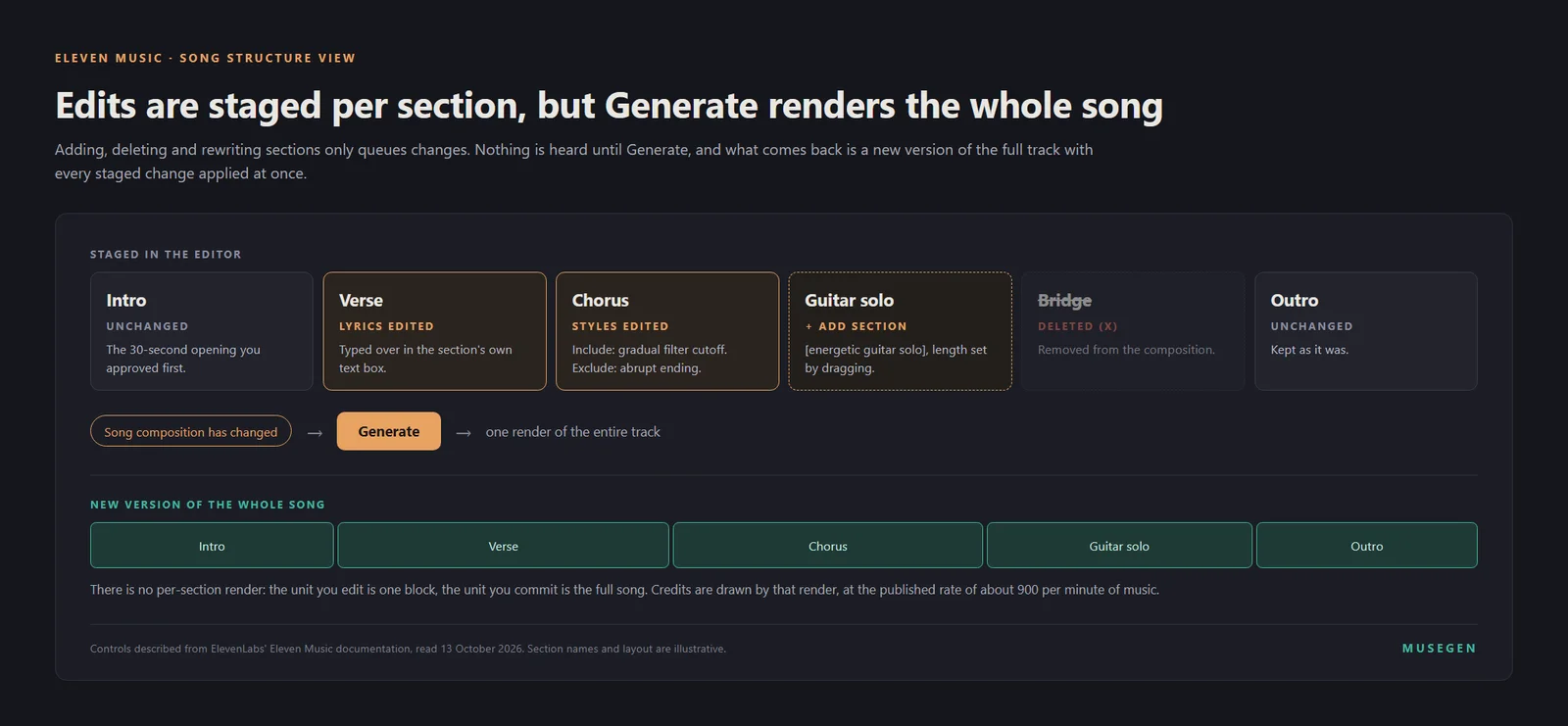
Five staged changes, one render. Edits queue up block by block, and Generate returns a new version of the whole track with all of them applied together.
Export, quality tiers and sharing
When a track is finished, the Download button is the main path out of the tool. ElevenLabs' documentation says generated audio comes out as MP3 (44.1kHz, 128 to 192kbps) and promises more formats, with no date attached to that promise — take it as a stated intention, not a schedule.
Quality does scale with your plan. The documentation gives Free, Starter and Creator standard-quality exports and Pro, Scale, Business and Enterprise what it calls high-fidelity, studio-grade exports. The Music Terms draw the same line and say what the higher tier means: their High-Quality Downloads row, which covers lossless WAV or 192 kbps MP3, is switched on only from Pro upward. Worth flagging plainly because it will not match what you see elsewhere on ElevenLabs' own site: the plan comparison on the Music product page shows Lossless WAV as included on Creator, a plan the Terms leave out. Our Eleven Music review covers that specific disagreement in more depth; here, the operating assumption should be MP3 below Pro, with a lossless file possible from Pro up, until your own account shows otherwise.
The Share button is the other way to send a track out of the tool without downloading anything. It generates a link with a customisable visualiser, meant for sending a track to a collaborator or an audience without requiring them to have an ElevenLabs account of their own — useful for a quick listen or approval pass, though it is not a substitute for a file when the destination needs one, such as a video timeline or a distributor's upload form.
Paid subscribers can also publish finished tracks to the Music Marketplace, added in March 2026, where other creators and businesses can license, download or remix them under one of three tiers — Social Media, Paid Marketing or Offline — with the original creator earning when a track gets used. That is a distribution decision layered on top of everything above, not a step every track needs to go through, and it is worth its own look only once you have something finished you would want strangers licensing.
What each action actually costs
Every ElevenLabs product draws from one shared monthly credit pool, and Music is priced against it at roughly 900 credits per minute of generated audio. That single rate is easier to reason about than it sounds, because ElevenLabs shows you the actual number before you commit: hovering over your remaining credit balance while a generation is queued displays exactly what that generation will draw, which turns a plan's monthly allowance into something you can watch spend down in real time rather than discover afterward.
The practical consequence of a shared pool is one most walkthroughs for single-purpose tools do not have to mention at all: a month spent generating narration or running dubbing jobs on the same account leaves fewer credits available for music, and the reverse is equally true. If Eleven Music is one feature among several you use inside ElevenLabs rather than the only reason you subscribed, budget the whole account, not just the music side of it.
Finetune training itself is not free to attempt, and the earlier warning is worth repeating in a cost-specific frame: a Finetune that fails the copyright compliance check is rejected, and whatever it cost to attempt is not refunded. That makes a clean, fully-owned dataset a cost decision as much as a legal one — the check happens after you have already paid for the attempt, not before.
For exactly how many minutes of generation and download a given plan includes, and why the figure ElevenLabs advertises is larger than the one in its Music Terms, our Eleven Music review is the deeper source; the credit rate above is what determines how far any given month's allowance actually stretches in practice.
When the file has to leave ElevenLabs entirely
Everything above assumes the destination is still inside ElevenLabs, or at most a shared link with a visualiser attached. Most of the time that is fine — a demo, a client preview, a track destined for the Marketplace. It stops being fine the moment the account restrictions above become the actual obstacle: a sixty-person company with no path to a self-serve plan, a film or TV placement excluded from every tier below full Enterprise, or simply a need to hand someone a lossless file on a plan below Pro.
That is a different set of trade-offs than an editing problem, and it is what MuseGen's song maker is built around: the same kind of descriptive prompt you have been writing on this page, without an eligibility table or an exclusion list attached to the plan you land on, producing a file on paid plans rather than a platform you stay inside. It has its own section editing, where you select 7 to 60 seconds and regenerate that part with new lyrics, but no equivalent of Eleven Music's Finetunes, and it carries none of the licensing agreements ElevenLabs has spent the past year assembling. If what stops you here is the editing, this page is the better guide. If it is the exclusion list, that is a licence problem, and no amount of editing fixes it.
FAQ
How do I make my first song with Eleven Music?
Open the Music tool in ElevenCreative and describe the track in a sentence or two: genre, mood, instrumentation and, if you want vocals, a language. Pick a duration, either a fixed length such as 30 seconds or 1 minute, or Auto, and choose how many variants to generate. Press generate and the model returns a complete section you can listen to immediately. ElevenLabs' own guidance is to start short, around 30 seconds, and add further sections once the first one sounds right rather than generating a full multi-minute song in one pass.
Can I name an artist or song in my Eleven Music prompt?
No. Section 2.1 of the Music Terms bans the names of artists and songwriters, real or stage, the titles of songs and albums, the names of publishers and record labels, and any recognisable chunk of lyrics from an existing song. This applies whether the person is living or deceased. The documented workaround is to describe what that reference would have sounded like: genre, era, tempo, instrumentation, vocal character and production style, which is also what ElevenLabs' own prompting guide recommends regardless of the restriction.
What is Audio Reference and how long can the uploaded clip be?
Audio Reference lets you upload a short track, up to approximately 30 seconds, to steer a Music v2 or v2.5 generation toward its sound, production style, instrumentation, tempo and mood. ElevenLabs states it does not copy or remix the upload; the result is a newly generated composition guided by, not built from, the reference. Every uploaded file is screened for copyright compliance before use, and results are less reliable the further your requested genre sits from the reference's own genre.
Is Audio Reference available on the Eleven Music free plan?
ElevenLabs' own documentation does not agree with itself on this. One section of the Music product guide states Audio Reference is available on all Music v2 and v2.5 plans, including Free. The FAQ on the same page states it is available with Music v2 and v2.5 on all paid subscriptions, with no mention of Free. We are reporting both rather than picking one, because we have no way to know which is current: test it directly on a free account before planning a workflow around it.
How do I create and use a Music Finetune?
In the Finetunes section of ElevenCreative, select Create Finetune and upload one to fifty audio tracks that represent the sound you want, each between 10 and 600 seconds and under 30MB, with a combined cap of 250 minutes. You must own the material outright; ElevenLabs screens every upload for copyright and rejects the Finetune without a refund if the check fails. Training takes roughly five to ten minutes. Once it appears in your library, select it from the Finetune selector before generating and keep writing ordinary prompts for tempo, mood, structure and language on top of it, since a Finetune shapes style, not content.
How do I fix one section of a track without regenerating the whole song?
Open the section in the song structure view and edit it directly: click into its text box to rewrite the lyrics or the instrumental prompt, or click Edit styles of this section to add characteristics to include or exclude just for that part. There is also a conversational box at the bottom of the editor for instructions in plain language, such as asking for the chorus to feel more energetic. None of this takes effect on its own; edits are staged until you click Generate, at which point the model renders a new version of the song incorporating everything you changed.
What format does Eleven Music export, and does quality depend on my plan?
Standard-quality MP3 (44.1kHz, 128 to 192kbps) on Free, Starter and Creator; Pro and above are entitled under the Music Terms to high-quality files, meaning lossless WAV or MP3 at 192 kbps. The documentation promises more formats later without a date. The product page's comparison table lists Lossless WAV on Creator as well, which the Terms contradict, so check inside your account before relying on it.
How much does one Eleven Music generation cost in credits?
It scales with the length of the track and the number of variants you generate, at a published rate of roughly 900 credits per minute of music. ElevenLabs lets you see the exact cost before committing: hover over your remaining credit balance and it shows what the pending generation will draw. Every ElevenLabs product shares one credit pool, so a heavy month of text-to-speech or dubbing use leaves fewer credits for music, and vice versa.
Keep reading
- ElevenLabs Music Review 2026 — the other half of this page: pricing, the conflicting minute limits, the exclusions, and who the tool still suits.
- How to Use Suno AI — the same kind of walkthrough for a tool with no prompt ban and a metered export instead.
- How to Use Udio — a section-editing workflow built around a timeline rather than a form.
- How to Write AI Music Prompts — the general version of the descriptive-prompting method this page leans on.
Sources
- ElevenLabs, “Music” product guide — ElevenLabs Documentation. Source of the generation workflow, duration and variant controls, Audio Reference description, section editing controls, export formats and quality tiers, and the Audio Reference free-tier contradiction between its overview and its own FAQ.
- ElevenLabs, “Music Finetunes” — ElevenLabs Documentation. Source of the upload limits, copyright screening and non-refund policy, training time, and the guidance on evaluating a Finetune's results.
- ElevenLabs, “Music Terms” (last updated 9 October 2026) — elevenlabs.io. Source of the Prohibited Prompts list, the industry and sector condition, and the Music Commercial Rights table (Exhibit A) referenced for the film, TV, radio and Studio Games exclusion and for high-quality downloads.
- ElevenLabs, “Prohibited Use Policy” — elevenlabs.io. Source of the political campaigning restriction.
- ElevenLabs — Pricing. Source of the roughly 900-credits-per-minute rate for Music and the shared credit pool across products.
- ElevenLabs — Eleven Music product page. Source of the plan comparison referenced for the Lossless WAV discrepancy.
- ElevenLabs — Introducing the Music Marketplace in ElevenCreative (19 March 2026). Source of the Marketplace description and its three licence tiers.
- ElevenLabs — Introducing Music v2 (26 May 2026).
Interfaces like this one change without notice — check the current screens inside your own account before following any step here exactly.