How to Write AI Music Prompts: 8 Rules for Better Results

MuseGen Team
9/11/2026
Two people open the same generator on the same day and type into the same box. One gets something they can use. The other gets that unmistakable AI-music smell — competent, tidy, faintly plastic. The model is almost never the variable. What separates the two is how many decisions were left unmade.
In short
A prompt is a list of decisions, and every decision you skip is made for you by whatever the model does most often. These eight rules take more of those decisions back. Almost none of them make your prompt longer.
- Describe the sound, not the feeling. Adjectives like chill or epic describe your reaction, not the audio.
- Pick one reference and commit to it. Stack four genres and the model averages them into none of them.
- Give every instrument a job, and name the lead. A list with no hierarchy plays all at once, all the time.
- Cast the vocal, or switch it off. Say who is singing and how, or say instrumental. Silence on this gets you the default.
- Write the structure as a timeline. Say what enters, what leaves, and roughly when.
- Say what to leave out. Two or three exclusions do more than ten more adjectives.
- Change one thing per generation. Change five and you learn nothing from the result.
- State the length and the ending. Endings are where unsupervised generations reliably fall apart.
Quick facts
- What a prompt is — A list of musical decisions, read as description rather than as commands.
- Most common failure — Adjectives with no sonic content: chill, epic, vibey, fire.
- Worth stating — Genre, tempo and feel, who leads, the vocal, the structure, the length and ending.
- Worth leaving open — Melody, chord voicings, mix detail — the parts you would rather be surprised by.
- Useful length — Roughly 25 to 60 words. Past that, later clauses get diluted rather than obeyed.
- How to iterate — One clause changed per generation, everything else held steady.
What a prompt actually decides
It helps to stop treating the box as a search field and start treating it as a form with invisible fields. Genre, tempo, who carries the melody, what holds the bottom, whether anyone sings, how the thing is built, how long it runs, how it ends. You are filling that form in whether you mean to or not.
The part people miss is that the blanks are not left blank. A field you skip gets the most statistically ordinary answer available — across a large training set, a mid-tempo pop-rock arrangement with a full drum kit, a clean pop lead vocal and a fade-out. That is not a hidden setting anyone published; it is just where the middle of the distribution sits, which is why unspecific prompts from different people converge on the same track.
| Vague | Specific |
|---|---|
| "Make it more emotional" — nothing here can be acted on, so the model re-rolls the parts you liked. | "Drop the drums for the second verse, vocal against a single sustained pad" — one instruction, one audible consequence. |
| Nine adjectives and no nouns: warm, nostalgic, dreamy, hazy, bittersweet, lush, intimate, timeless. | Two adjectives attached to things that make sound: a hazy tape-saturated pad, an intimate close-miked vocal. |
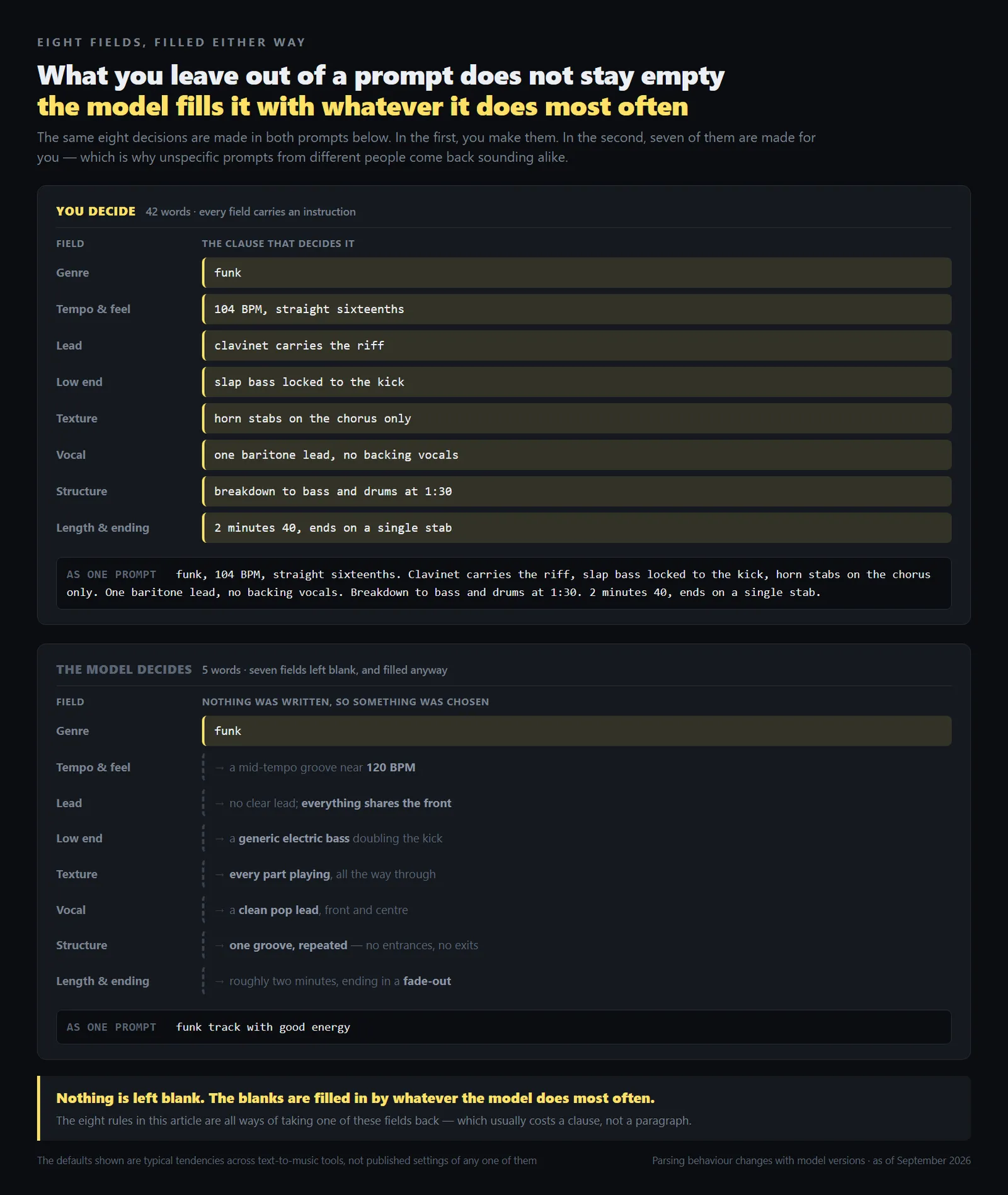
The working test: read the prompt back and ask, of each phrase, what a musician would physically do differently on hearing it. Phrases that survive are doing work. The rest are decoration.
1. Describe the sound, not the feeling
This is the most common failure and it accounts for most disappointing first attempts. Chill, epic, vibey, fire and cinematic describe how you want to feel about the result. They carry no information about the audio, so the model reaches for whatever it has most often seen labelled that way — the most generic possible version of it.
The fix is mechanical: take each adjective and ask what physically produces it. Chill is usually a slower tempo, a laid-back backbeat, fewer parts, less high end. Write those instead. Keeping one or two feeling words is fine — they are useful glue — but they should sit on top of concrete detail rather than replace it.
Weak
chill vibey soul track with good energy
Stronger
neo-soul, 88 BPM, half-time drums with a laid-back snare, muted Wurlitzer, fretless bass sitting just behind the beat, warm and unhurried
What changed: one tempo, one groove feel, two named instruments, and a placement instruction for the bass. "Warm and unhurried" survived because it now has something to attach to. The stronger version is only nineteen words.
Tempo is the cheapest specific thing you can add. If you do not know what number you want, take a reference track, measure its BPM, and write that number down. A tempo also implies a feel, so say which: 88 straight and 88 half-time are completely different records.
2. Pick one reference and commit to it
Genre stacking feels like it should widen the result. It does the opposite. Ask for four genres and you rarely get a fusion — you get whatever sits nearest the middle of all four, usually a bland pop arrangement with a token gesture at each. Every extra reference pulls the output back toward the average.
Treat it as one anchor plus at most one twist, and say which is which. The anchor sets rhythm, instrumentation and production; the twist is one element borrowed from elsewhere. Naming the hierarchy matters more than the choices, because it tells the model what to keep when the two ideas conflict.
Weak
afrobeats meets techno meets flamenco meets gospel, genre-bending experimental fusion
Stronger
afrobeats, 104 BPM, log drum and shaker groove. One twist: a gospel organ pad underneath the chorus. Everything else stays afrobeats
What changed: four equal references became one anchor and one guest. The last sentence does the real work — it says what to protect when the organ starts pulling the arrangement elsewhere.
The exception is a fusion that is itself an established genre with a name, in which case use the name. Asking for jazz-funk gets you jazz-funk; asking for jazz mixed with funk gets you an argument between two styles.
3. Give every instrument a job, and name the lead
A long instrument list with no hierarchy reads as an inventory, and inventories get played all at once, all the way through. That is why prompts naming eight instruments so often return a dense wall with nothing in front. Real arrangements are mostly about who is not playing.
So assign roles. One instrument carries the melody, one holds the low end, one or two keep time. Anything else is texture and should be given a place to appear rather than a standing invitation. This rule also makes prompts shorter, because assigning jobs exposes how many instruments were on the list for no reason.
Weak
bluegrass with banjo, fiddle, mandolin, dobro, upright bass, acoustic guitar, harmonica and washboard
Stronger
bluegrass, 132 BPM. Banjo carries the melody, fiddle answers it between phrases, upright bass and rhythm guitar keep time, mandolin enters only on the chorus
What changed: eight instruments became five, each with a job. "Answers it between phrases" asks for call and response instead of two lead instruments competing for the same space. Cutting the other three is what made room.
A sanity check: if you removed the instrument you named as the lead, would the track still have a tune? If yes, you listed a favourite rather than assigning a lead. If you genuinely want a dense ensemble, ask for one in those words.
4. Cast the vocal, or switch it off
The vocal is the loudest thing in most mixes and the field people most often leave empty. Say nothing and you get the default: a clean, mid-range, lightly processed pop lead, in front, singing all the way through. It is competent, and it is the strongest single reason unspecified tracks sound alike.
Treat it as a casting note. Roughly what range, what delivery, how close to the microphone, whether it is doubled or harmonised, and where it should stop. If you want no singing, write instrumental explicitly — that is not the default anywhere, and a prompt silent on vocals usually gets one.
Weak
gospel song with vocals
Stronger
gospel, 72 BPM. One alto lead, low and conversational through the verse, close to the mic. Full choir answering in four-part harmony on the chorus only. No ad-libs until the final chorus
What changed: "with vocals" became a range, a delivery, a distance, a second voice with its own entry point, and a limit on when the lead may improvise. Ad-libs are a default in this genre, so holding them back takes an instruction.
Two smaller things worth stating when they matter: language, and whether the lyric should be intelligible or treated as texture. Both get decided for you otherwise, and both are expensive to fix, because changing them means regenerating rather than editing.
5. Write the structure as a timeline
Most prompts describe a texture, and a texture has no reason to change. That is where the flat, loop-like result comes from: not a lack of ideas, but a prompt that never asked for a second one. Structure is the difference between a track that goes somewhere and one that merely continues.
Write it as events. What plays at the start, what joins, what drops out, and roughly when. Bar counts are unnecessary; approximate markers are enough to establish that the arrangement is meant to move. The clause doing the most work is almost always a subtraction, because removal is what makes the return feel like an arrival.
Weak
deep house track that builds
Stronger
deep house, 122 BPM, 3 minutes. Start with a filtered pad and kick only. Add sub bass and closed hats after about 30 seconds. Bring in a two-note Rhodes stab at the minute mark. Around 1:45 strip everything but the pad for a few bars, then bring the full groove back and hold it to the end
What changed: "builds" became five events in order, one of which removes rather than adds. The timings matter less than the sequence — what you are really saying is that this has sections, not a loop and a fade.
If arrangement is the part you find hardest to describe, the vocabulary is worth having first; our guide to what arrangement means in music covers the section names and what each is conventionally for.
6. Say what to leave out
Exclusions are the least-used and highest-leverage part of a prompt. Genres carry implied instruments — funk implies horns, country implies pedal steel, drum and bass implies a heavy sub — and those arrive whether you asked or not. Naming the one you do not want is often faster than describing everything you do.
How to write them varies by tool. Some generators have a separate field for exclusions; many only read the main prompt, where a plain "no drum kit" or "instrumental, no vocals" usually registers. Check your tool for a dedicated field before assuming. Either way keep it to two or three, past which exclusions compete with the positive description rather than refine it.
Weak
quiet bossa nova, nothing too busy, keep it simple and minimal
Stronger
bossa nova, 74 BPM, nylon-string guitar and brushed snare only, upright bass on the root, instrumental. No drum kit, no strings, no fade-out
What changed: three vague requests for restraint became one positive list and three specific removals. "Only" is quietly the strongest word in the second prompt — it turns an instrument list into a closed set.
One caveat: exclusions are guidance, not a guarantee, and an excluded element can still slip through. When something keeps reappearing, a stronger positive instruction usually beats a negative one — "acoustic instruments only" works better than "no synths", because it gives the model something to do rather than something to avoid.
7. Change one thing per generation
This is a workflow rule rather than a writing rule, and the one most people skip. A result comes back nearly right, so the prompt gets rewritten — new tempo, new instrument, new vocal note, new length — and the next result differs in ways nobody can attribute to anything. Two rounds of that and you are further from the good version than when you started, with no way back.
Keep the prompt fixed and replace exactly one clause. It feels slower and is not, because each attempt tells you something that carries into the next. It also keeps the good version reachable: if a change made things worse, you know precisely what to put back.
Weak
liquid drum and bass, 172 BPM, lush pads, no vocal, rolling breakbeat, 3 minutes → next attempt: soulful jungle, 168 BPM, choir pads, female vocal, chopped amen break, 4 minutes
Stronger
liquid drum and bass, 172 BPM, lush pads, no vocal, rolling breakbeat, 3 minutes → next attempt: same prompt, rolling breakbeat replaced with a chopped amen break
What changed: the first version moves six variables at once, so nothing about the outcome is interpretable. The second moves one, which turns each generation into a small experiment. Keep the earlier prompt in a note — recovering one you did not save is harder than it sounds twenty attempts in.
Watch: "Make Intentional Suno Songs, Not Generic Ones" — a walkthrough tied to one specific tool, where the rules on this page are deliberately tool-agnostic.
8. State the length and the ending
Endings are where unattended generations fall apart. Left unspecified, most tracks resolve into a fade, or stop mid-phrase because the clock ran out. Neither is usable if the track has a job to do — under a video, at the end of a set, in front of a hard cut.
So say how long, and say how it ends: cold stop, ritardando, last chord left ringing, clean loop point. Duration matters for a practical reason too — asking for four minutes when the idea supports ninety seconds produces padding, not development.
Weak
city pop song
Stronger
city pop, 108 BPM, 2 minutes 30. Slap bass and a clean chorus-guitar lead over bright electric piano. End on a single held chord that stops cold on the downbeat, no fade
What changed: a length, an ending, and an explicit refusal of the default. "Stops cold on the downbeat" beats "abrupt ending" because it names where the stop lands, which is the part that has to line up with your edit.
Looping is its own problem and mostly not a prompt problem — a track that ends cleanly is still not a seamless loop. If that is what you need, our guide to making AI game music that loops covers the editing side, which is where loops are actually made.
The common thread. None of these rules asks you to write more. Rules 3 and 6 usually make a prompt shorter. What they ask is that the words you do write carry decisions instead of adjectives — and that you hold enough of them steady between attempts to learn something from the difference.
Writing these prompts in MuseGen
The rules above are deliberately tool-agnostic, which is the whole point of writing them as rules rather than as recipes: they describe what goes in the box, not which box. The disclosure is that we make one of the boxes.
MuseGen is an AI song maker that turns a text prompt into a finished track, and its fields line up with this article. The style box is short by design, so it wants the load-bearing clauses: genre, tempo, who leads, and what to leave out. The hint under it says plainly what happens to anything you skip — filled at random — and rule 4 gets a switch of its own, a Pure Music toggle that turns the vocal off rather than arguing it away. Lyrics get their own field rather than sharing that box, so write them yourself or start from the lyrics generator. Matching a reference track? BPM detection gives you a real number for rule 1 rather than a guess. And because rule 7 is about moving one clause at a time, regenerating repeatedly is the normal way to work here, not a sign you got the prompt wrong.
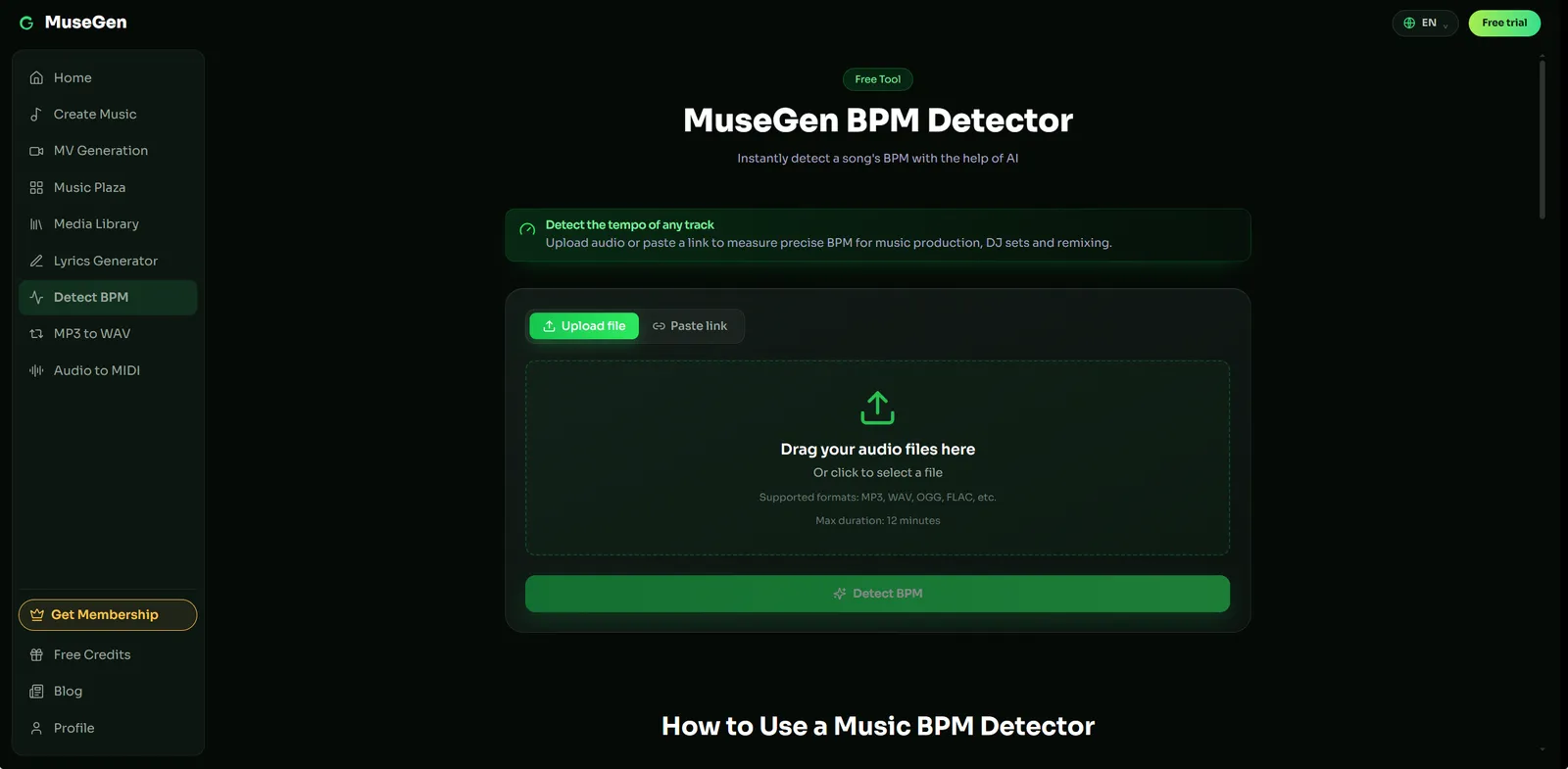
Step 1 — measure the reference tempo instead of guessing.
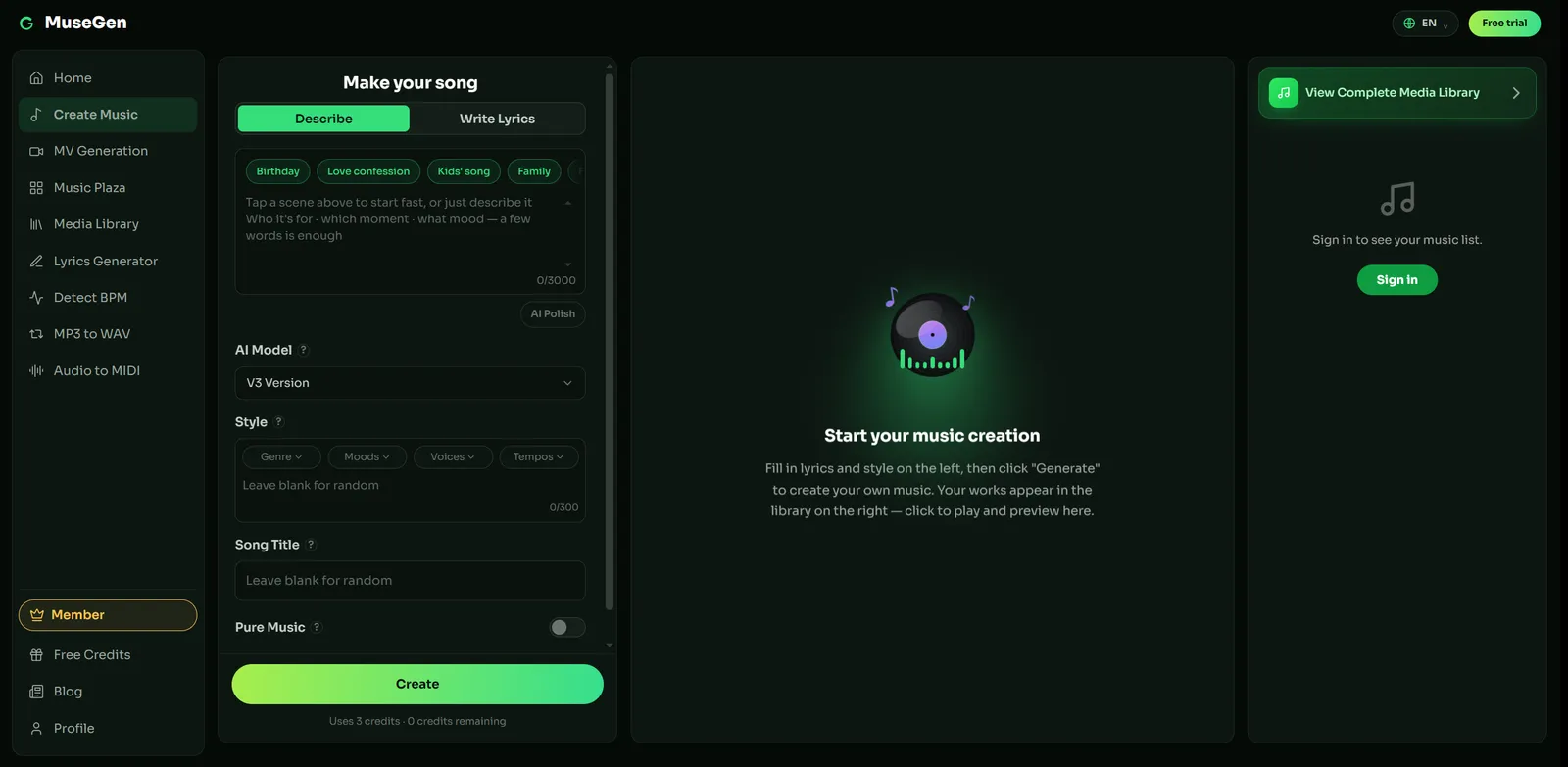
Step 2 — the style box, where blanks are filled at random.
None of these rules is a guarantee anywhere, ours included. Generators are probabilistic: a good prompt raises the floor and narrows the range, but two runs still differ, and an excluded instrument will occasionally turn up anyway. The eight rules spend fewer generations getting somewhere; they do not specify a result exactly.
FAQ
What makes a good AI music prompt?
Decisions rather than adjectives. Name the genre, a tempo and the feel that goes with it, which instrument carries the melody, what the vocal is doing or that there is none, how the arrangement moves, and how long it runs. That is usually 25 to 60 words. Mood words describe your reaction rather than the audio, which is why prompts made mostly of them come back generic.
How long should an AI music prompt be?
About 25 to 60 words. Shorter than that leaves most fields blank, and blanks get filled with the most ordinary available answer. Much longer and clauses start competing, with some quietly dropped. If a prompt is running long, the usual cause is an instrument list with no roles assigned, which is fixed by cutting rather than adding.
Do AI music generators understand BPM and key?
Tempo is the more reliable of the two. A number such as 104 BPM usually lands close, though it is worth saying whether you want it straight or half-time, since the same number implies very different grooves. Key is followed less consistently and varies by tool and model version, so treat it as a preference. If you are matching a reference, measure its tempo with a tool like BPM detection rather than guessing.
Why do all my AI songs sound the same?
Because unspecified fields collapse toward the same answer. Omit the vocal and you get a similar pop lead; omit the structure and you get a similar loop; omit the ending and you get a fade. Two people writing vague prompts converge on nearly the same track. The fastest cure is rules 4 and 5 together: cast the vocal or turn it off, and write the arrangement as a sequence of events.
Can you tell an AI music generator what you do not want?
Usually yes, though how depends on the tool. Some generators provide a separate field for exclusions; many read them from the main prompt, where a plain "no drum kit" or "instrumental, no vocals" generally registers. Check your own tool rather than assuming. Exclusions are guidance and not a hard rule, and two or three work better than a long list.
What is the difference between the prompt and the lyrics?
The prompt describes the music: genre, tempo, instruments, arrangement, how the vocal is delivered. The lyrics are the words that get sung. Most tools keep them in separate fields, and lyrics pasted into a style box are often read as description. Everything on this page is about the first field. If you need the second, a lyrics generator is the usual starting point.
Why does the AI ignore parts of my prompt?
Usually because two clauses are asking for different things and the model cannot honour both. Ten instruments with no lead, or a stack of genres that averages out, will drop whatever loses. The fix is subtraction rather than emphasis: cut the clause you care least about instead of repeating the one you care most about.
Can I name an artist or a song in the prompt?
Many tools filter artist names, and where they do not, the name is a weak instruction anyway: it tells the model nothing about tempo, instrumentation or arrangement that you could not say directly. Describe what the reference actually sounds like, which is rule 1. Check your own tool's terms before leaning on names.
Does the order of words in a prompt matter?
Typically yes, though not in a way any tool publishes. Clauses near the front tend to carry more weight, so genre, tempo and the lead instrument are worth putting first, with exclusions and length at the end. Treat that as a tendency rather than a rule, since parsing changes between tools and model versions.
Do AI music generators understand chord progressions?
Roughly, and less reliably than tempo. A progression written as symbols is read more like a preference than an instruction, the same way key is, so naming the feel you want from it usually lands better than the symbols alone. Our guide to what a chord progression is covers the vocabulary.
Keep reading
- How to Write Perfect AI Music Prompts for Cinematic Tracks — the genre-specific companion, with ten worked examples.
- How to Make AI Game Music for Any Level: Prompts and Looping — prompt recipes by level type, and how looping actually works.
- What Is Arrangement in Music? — the vocabulary behind rule 5.
- What Is BPM? — tempo, feel, and why the number alone is not enough.
Sources
- Video: "Make Intentional Suno Songs, Not Generic Ones" — youtube.com
- Prompt handling differs between tools and between model versions of the same tool. Check the current documentation for whichever generator you use — for example suno.com or udio.com — before relying on any specific parsing behaviour.
- Genre-specific worked examples: How to Write Perfect AI Music Prompts for Cinematic Tracks and How to Make AI Game Music for Any Level.
The defaults described here — the pop-leaning arrangement, the clean lead vocal, the fade-out — are typical tendencies, not published settings, and they shift as models are retrained.