How to Make AI Song Mashups: A Producer's Step-by-Step Guide

MuseGen Team
An AI song mashup combines the vocal of one song with the instrumental of another, using AI stem-separation and vocal tools to isolate and reshape those parts. A great mashup feels like the two songs were always meant to be together; a bad one feels like two radios fighting in a parking lot. The difference is rarely talent — it's process. This guide walks through the complete, seven-step pipeline for building AI-assisted mashups that hold up on a club system and on cheap earbuds. No hype, no filler — just the moves that matter.
Key Takeaways
- Song selection decides ~90% of the result — match emotional energy and phrasing before touching any tool.
- Match key and tempo first: aim for the same or an adjacent Camelot key, and within roughly 8–10 BPM.
- AI stem separation (Demucs, LALAL.AI, iZotope RX) pulls clean acapellas and instrumentals from a finished stereo file — but always clean the "bleed" afterward.
- Mixing is the glue: carve EQ space, match reverb, add light bus compression, and check in mono.
- Legality matters: a mashup uses two copyrights per song; clear both before monetizing, or keep it as a non-commercial promo piece.
- To sidestep third-party clearance, generate original royalty-free vocals or instrumentals to mash instead of extracting a copyrighted acapella.
Why AI Changed the Mashup Game
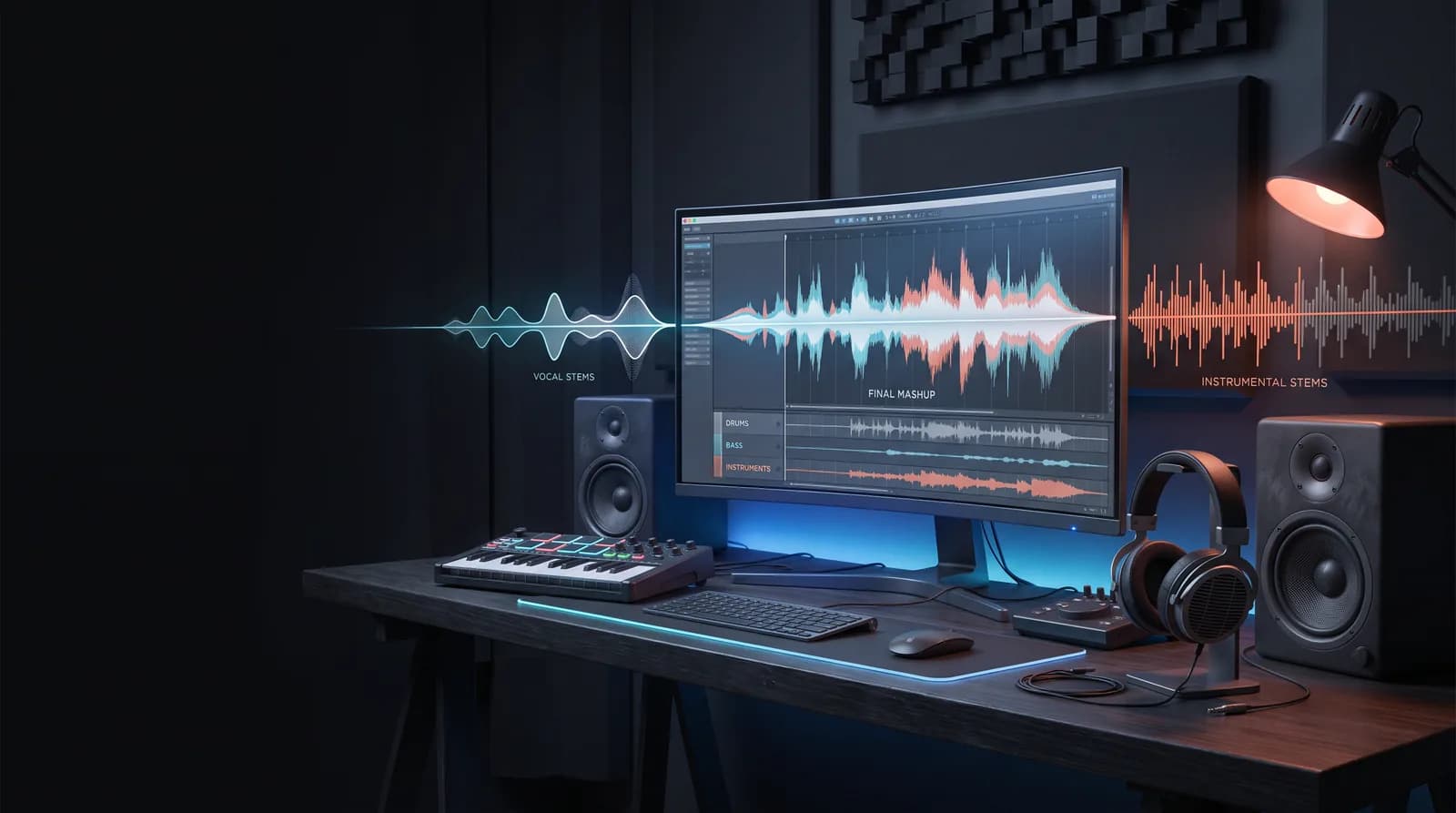
In short: AI stem separation can isolate a clean vocal, drum, bass, and instrument track from a finished stereo file in about a minute — work that used to be impossible without the original multitracks.
Ten years ago, making a mashup meant hunting the internet for a leaked acapella and praying it wasn't drenched in reverb. If the isolated vocal didn't exist, you were stuck. Today, AI stem separation can pull a clean vocal, drum, bass, and instrument track out of a finished stereo file in about a minute. That single capability rewrote the entire craft.
The tools most producers reach for now — LALAL.AI, iZotope RX's Music Rebalance, and open-source models like Demucs — use neural networks trained on large libraries of multitrack recordings. They don't just filter frequencies; they've learned what a human voice looks like versus a snare drum. That's why the results outperform the old phase-cancellation tricks by a wide margin.
But — and this is the part beginners miss — AI gives you the raw material, not the record. The mashup still lives or dies on your ear for key, groove, and arrangement. Let's build that ear step by step.
Quick definition: A mashup combines elements — usually the vocal of one song and the instrumental of another — into a new track. When you add AI stem separation and AI vocal manipulation into the pipeline, we call it an AI song mashup. The goal is the same it's always been: make two songs sound like one.
Where the real bottleneck is now
Based on established music production workflows, the process starts long before any plugin is opened. Early mashups commonly fail for the same reasons: songs are forced together on instinct, key clashes are ignored, and a limiter is used to "fix" a mix that was never balanced. What separates a track that lands from one that vanishes is rarely a specific tool — it is a repeatable process, and a clear sense of where AI genuinely helps versus where it only creates a false sense of "done."
One framing point before the steps: AI has lowered the technical barrier so much that the bottleneck has shifted almost entirely to taste and decision-making. When anyone can extract a clean acapella in seconds, the work that stands out comes from choosing the right acapella, placing it in the right instrumental, and making the hundred small arrangement and mix decisions that software will never make on its own. The tools are commodities now; judgment is not.
Step 1 — How Do You Choose Songs That Actually Fit?
Short answer: Match emotional energy first, then confirm vocal phrasing space, tempo within ~8–10 BPM, and a compatible key. Roughly 90% of a mashup's success is decided at this stage.
Most of a mashup's success is decided before you open your DAW. Picking the wrong pair means fighting the material forever. Use this selection checklist, in order of importance:
- Energy match. A whispered ballad vocal over a peak-time techno beat almost never works. Match the emotional intensity first, technical details second.
- Vocal phrasing space. The instrumental you choose needs "holes" — sections where the original vocal was sparse — so the borrowed vocal has room to breathe.
- Tempo proximity. Songs within ~8–10 BPM of each other stretch cleanly. Push past that and time-stretching artifacts creep in.
- Key compatibility. Same key is ideal; neighboring keys on the Camelot wheel work with light pitch-shifting.
A reliable test: if you can hum the vocal of Song A over the chorus of Song B in your head and it gives you chills, it's worth building. If the pairing needs to be talked into working, it usually isn't.
Step 2 — How Do You Match Key and Tempo?
Short answer: Detect both keys on the Camelot wheel and keep them the same or adjacent; set the project tempo to the instrumental, then time-stretch the other element to match, staying within about ±6% before switching to pitch-shifting.
This is the technical foundation. Get it wrong and no amount of mixing will save you.
Finding the key
Use a key-detection tool (Mixed In Key, the free Camelot system, or your DAW's analyzer) on both tracks. The Camelot wheel makes harmonic mixing visual: any two keys that are adjacent (±1) or share the same number are considered harmonically compatible. A move like 8A → 8B (same number, minor to major) is a classic energy lift.
| Relationship | Camelot move | Result |
|---|---|---|
| Same key | 8A → 8A | Perfect, no shift needed |
| Adjacent (energy) | 8A → 9A | Subtle lift, safe |
| Relative major/minor | 8A → 8B | Mood change, still harmonic |
| Distant | 8A → 2B | Avoid — dissonant clash |
Matching tempo
Set your project to the tempo of the track whose groove you want to keep — usually the instrumental. Then time-stretch the other element to match. Modern algorithms (Ableton's Complex Pro, Serato Pitch 'n Time, élastique) handle around ±6% cleanly. Beyond that, pitch-shift instead of stretch, or you'll hear the tell-tale "watery" artifacts on vocal sibilance.
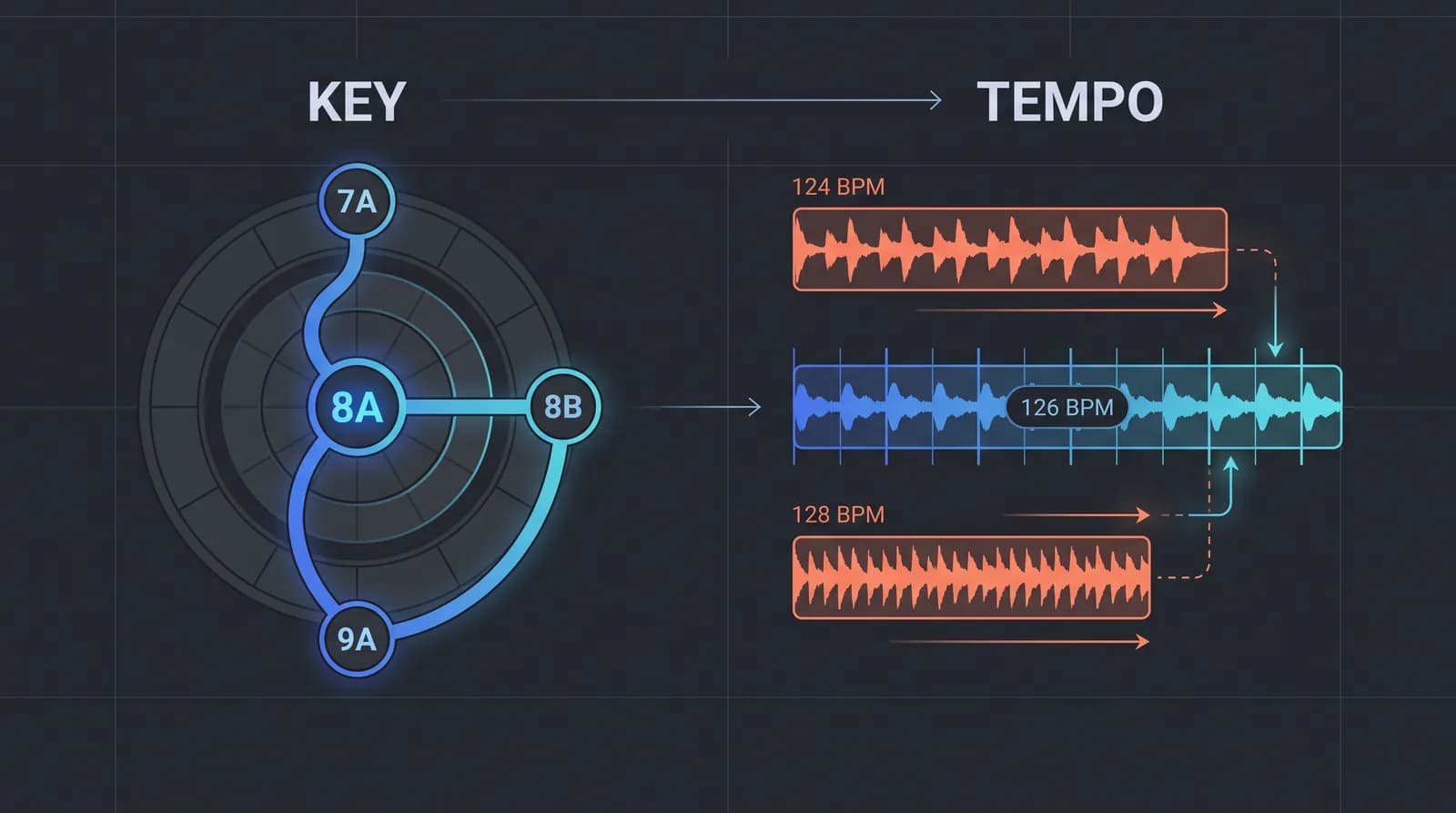
Producer's shortcut: If two songs are close in tempo but stubbornly clash in key, try shifting the instrumental rather than the vocal. The human ear forgives pitched instruments far more readily than a pitched voice — a vocal shifted more than about 2 semitones starts sounding like a chipmunk or a demon.
Step 3 — How Does AI Stem Separation Work?
Short answer: Feed the highest-quality source file into an AI separation tool, export the parts you need (typically the acapella from one song and the instrumental from another), then clean any residual "bleed" with a de-noiser or high-pass filter.
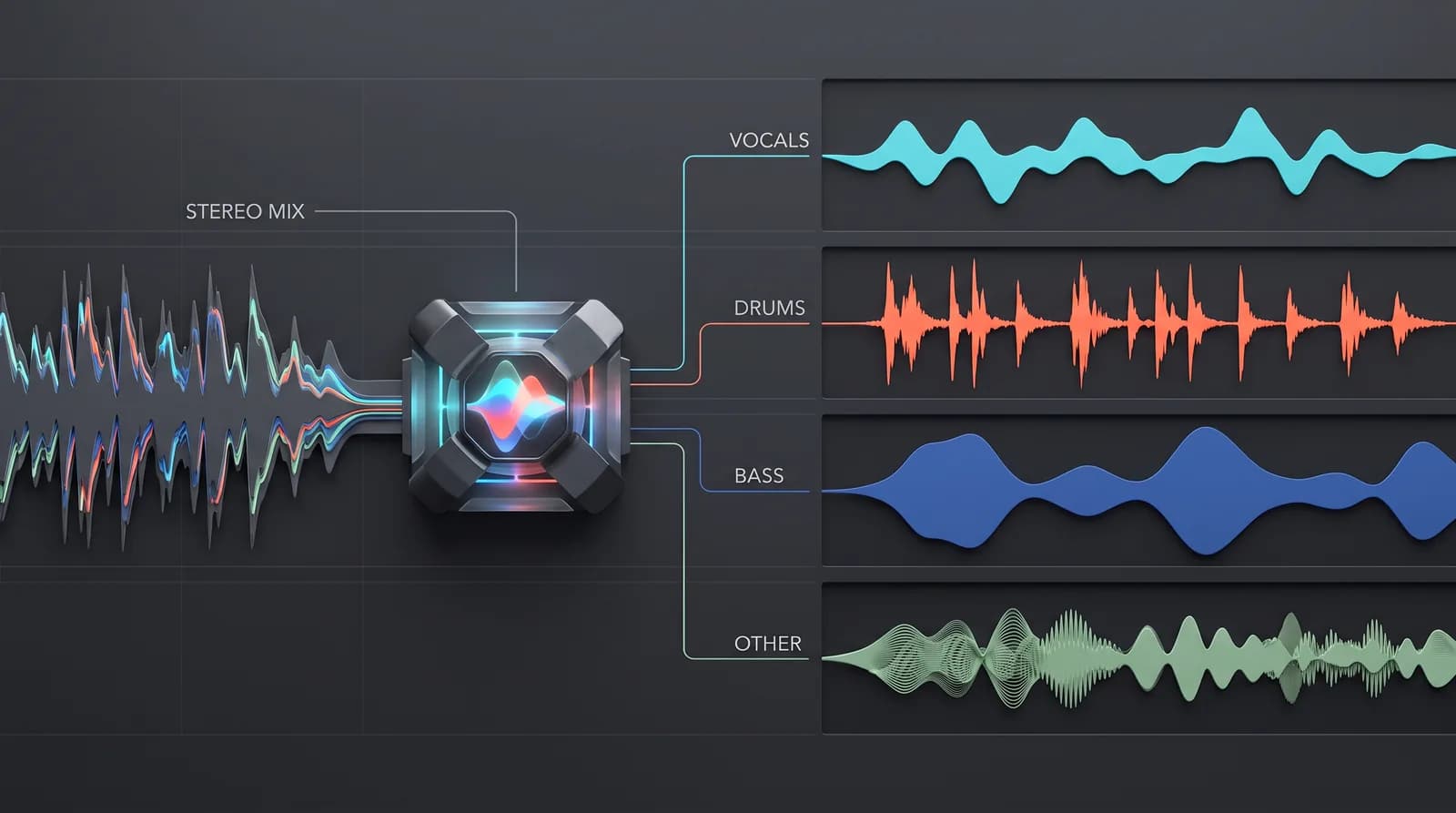
Now the fun part. Feed each source track into your stem-separation tool of choice and export the parts you need — typically the vocal (acapella) from Song A and the instrumental from Song B.
A few field-tested tips:
- Feed the highest-quality file you can. A lossless WAV or FLAC separates dramatically cleaner than a 128 kbps MP3. Garbage in, garbage out.
- Run a 4-stem or 6-stem split, not just vocal/instrumental. Having isolated bass and drums gives you options later — you can swap in a punchier kick or duck the original bass under a new one.
- Clean the acapella. Even great AI leaves faint "bleed" — ghostly reverb tails or a whisper of the original beat. A gentle spectral de-noise in iZotope RX or a high-pass filter around 100 Hz tightens it right up.
For a clear, hands-on walkthrough of the modern stem-separation and mashup workflow, this reference video is worth watching:
▶ Watch on YouTube: "Making Mashups with stems" (DJ.Studio) — a hands-on walkthrough of building a mashup from separated stems.
Which separation tool should you use?
There's no single "best" — it depends on budget, the source material, and how much cleanup you're willing to do afterward. Here's how the commonly used options compare:
| Tool | Best for | Trade-off |
|---|---|---|
| Demucs (open-source) | Free, offline, batch jobs; strong on drums and bass | Needs a bit of technical setup |
| LALAL.AI | Fast browser workflow, clean vocals | Pay-per-minute credits |
| iZotope RX Music Rebalance | Surgical control and post-cleanup in one app | Premium price |
| DAW built-in (e.g. Logic Stem Splitter) | Zero extra cost if you already own it | Quality varies by material |
For most creators, the practical recommendation is to start with a free option to learn the workflow, and only move to a premium tool once the difference a cleaner separation makes is clearly audible. Beginners routinely overspend on plugins to sidestep skills that haven't been built yet — developing the ear tends to matter more than the software.
It's also worth noting the newest angle on this problem: instead of separating an existing recording after the fact, AI generators like MuseGen build a song from a text or lyric prompt, so you can generate a royalty-free instrumental (or a purely vocal track) to mash against — sidestepping the bleed and the third-party clearance problems that come with extracting a copyrighted recording. MuseGen currently exports MP3 and WAV; direct multi-track STEM and MIDI export are on the roadmap (coming soon), so for now the cleanest workflow is generating instrumental-only and vocal-only versions separately.
Step 4 — How Do You Fix AI Vocals, Pitch and Timing?
Short answer: Align stray notes with Melodyne or Auto-Tune, nudge micro-timing with warp/flex markers, and compensate the formants whenever you pitch-shift more than a semitone or two so the voice still sounds human.
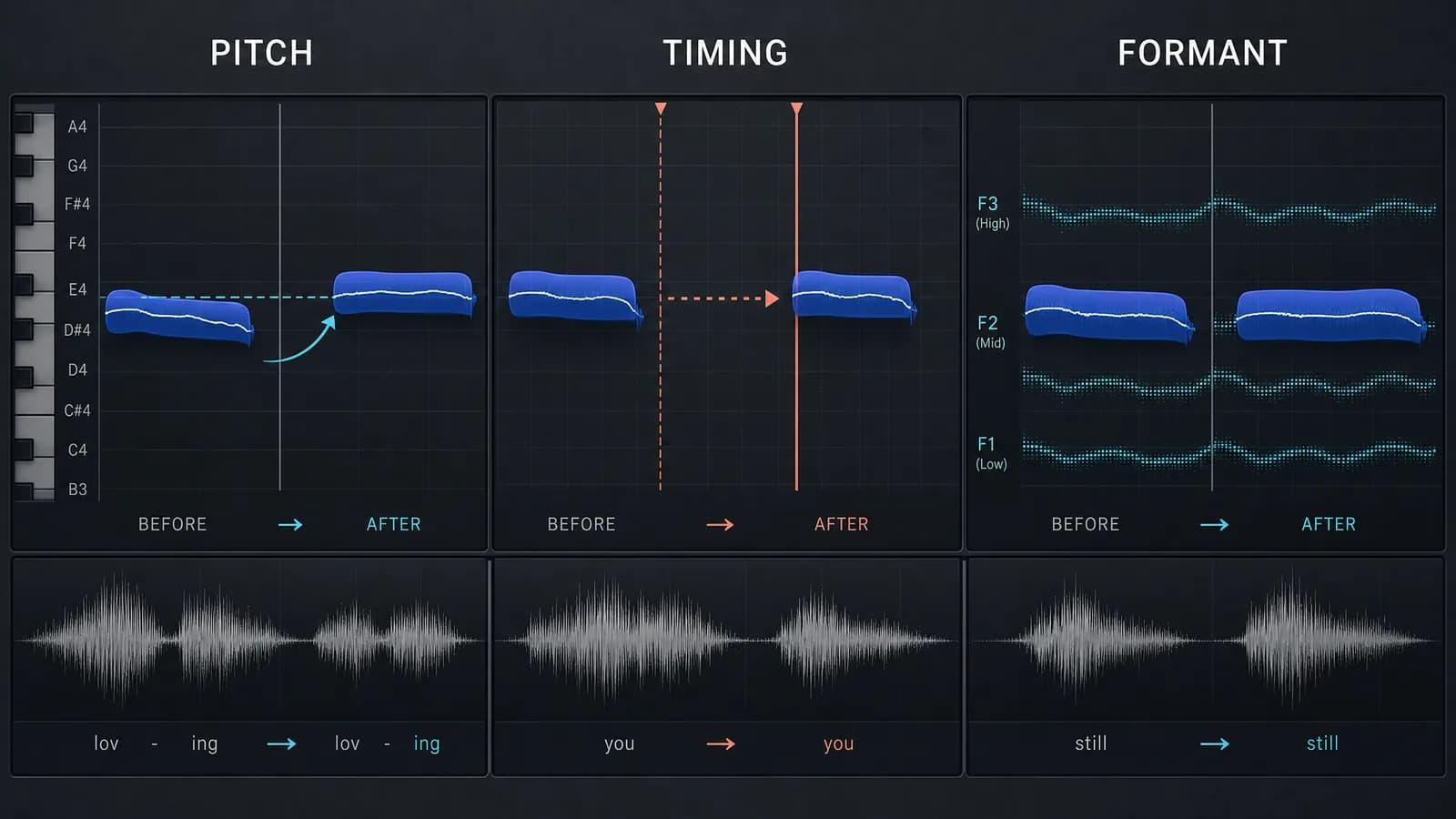
Once your acapella is sitting over the new instrumental, the small imperfections become obvious. This is where AI-era tools save hours.
Pitch alignment
If the vocal was recorded to a different key or you had to pitch-shift, use Melodyne or Auto-Tune to nudge stray notes back into the new harmonic context. Don't over-correct — a mashup that's too perfect loses the emotional grain of the original take.
Timing and groove
Even after tempo-matching, the vocal's micro-timing might sit slightly ahead of or behind the new beat. Warp markers (Ableton) or Flex time (Logic) let you tug individual syllables onto the grid. In practice, it's best to leave the vocal a hair loose — perfectly quantized vocals feel robotic.
The AI vocal frontier
Newer tools can now generate or convert vocals entirely — cloning a timbre or synthesizing a harmony that never existed. These open creative doors but also raise serious ethical and legal questions (see the legal section). Used responsibly — say, generating a backing harmony for your own voice — they're a genuinely powerful addition to the mashup toolkit. Platforms like MuseGen take this further by generating original, royalty-free vocals from text or lyrics, giving you material to build on without sampling a copyrighted acapella. For the state of the art and the debate around it, this coverage from Sound on Sound is worth your time.
Formant and energy fixes
When you pitch a vocal up or down more than a semitone or two, the formants — the resonant character that makes a voice sound human — shift with it. Most modern pitch tools have a separate "formant" control; nudge it in the opposite direction of your pitch move to keep the singer sounding like a person rather than a cartoon. It's the single most overlooked setting in vocal mashup work.
Second, watch the dynamics. A borrowed vocal was compressed and ridden to sit in its original mix, not the new one. It generally helps to re-compress the acapella lightly (a fast attack, around 3:1 ratio, a few dB of reduction) and automate the level line by line so quiet phrases don't disappear under the new drums. Ten minutes of level automation does more for "sitting right" than any single plugin.
Step 5 — How Should You Arrange and Transition a Mashup?
Short answer: Treat it like a real arrangement — intro, build, chorus payoff, breakdown — and use risers, drum fills, filter automation, and even a beat of silence to move between sections.
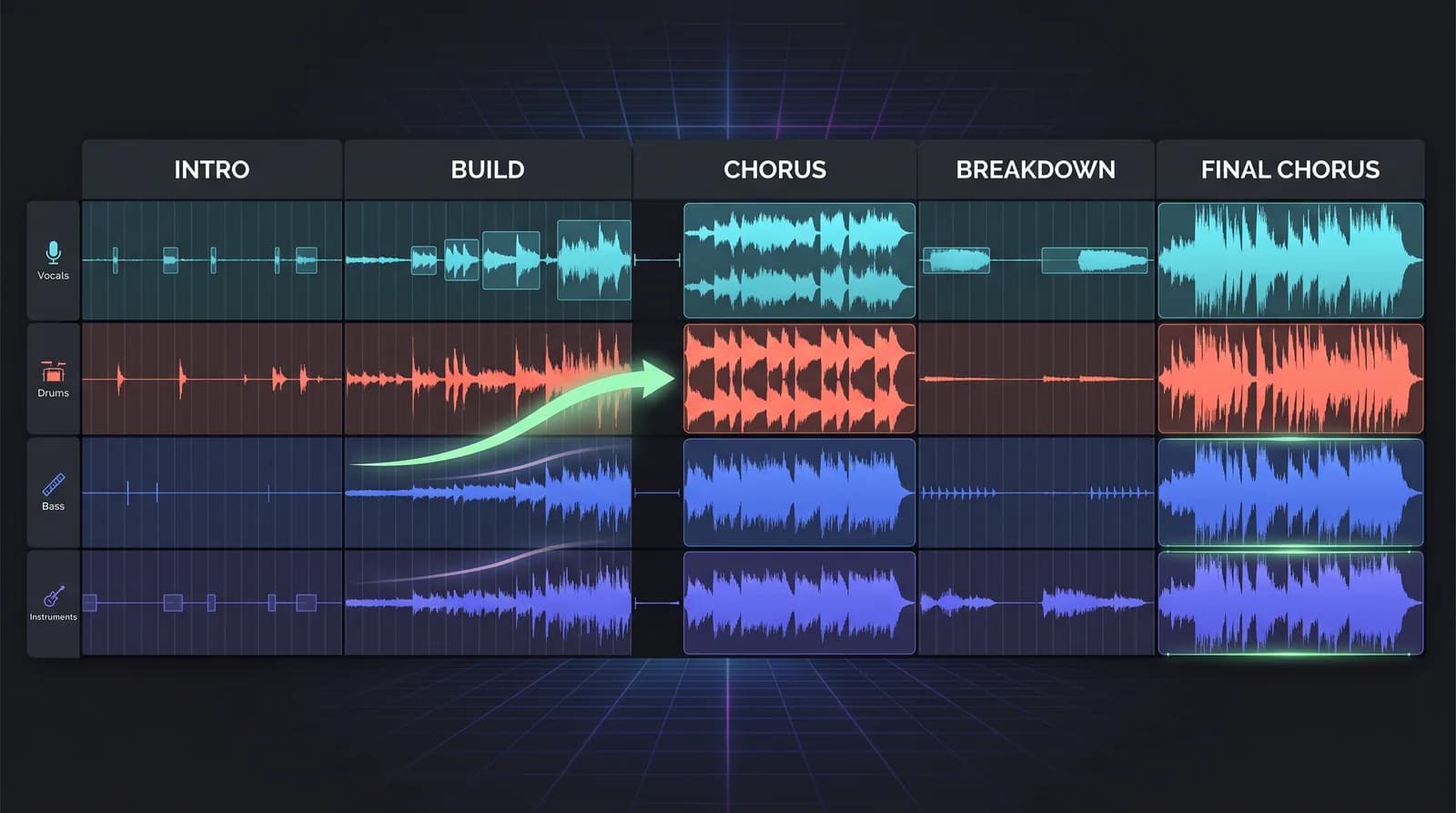
A mashup isn't just "vocal-on-beat looped for three minutes." Treat it like a real arrangement:
- Intro: Ease the listener in — maybe the instrumental alone, or a filtered vocal snippet as a teaser.
- Build: Layer elements gradually. Drop the bass in, then the full drums.
- The moment: The chorus is your payoff. This is the "always meant to be together" instant — give it full arrangement and impact.
- Contrast: Pull elements out for a breakdown so the next chorus hits harder.
Transitions are where amateurs get exposed. A few reliable tools: a sweep/riser into a drop, a drum fill to bridge two sections, and a filter automation that opens up as the new section lands. Silence — a beat of nothing before the chorus — is often the most powerful transition of all.
Step 6 — How Do You Mix a Mashup So It Sounds Cohesive?
Short answer: Because the parts come from different records, carve EQ space (especially 2–5 kHz), match the reverb, glue with light bus compression (about 2–3 dB), and always check the mix in mono.
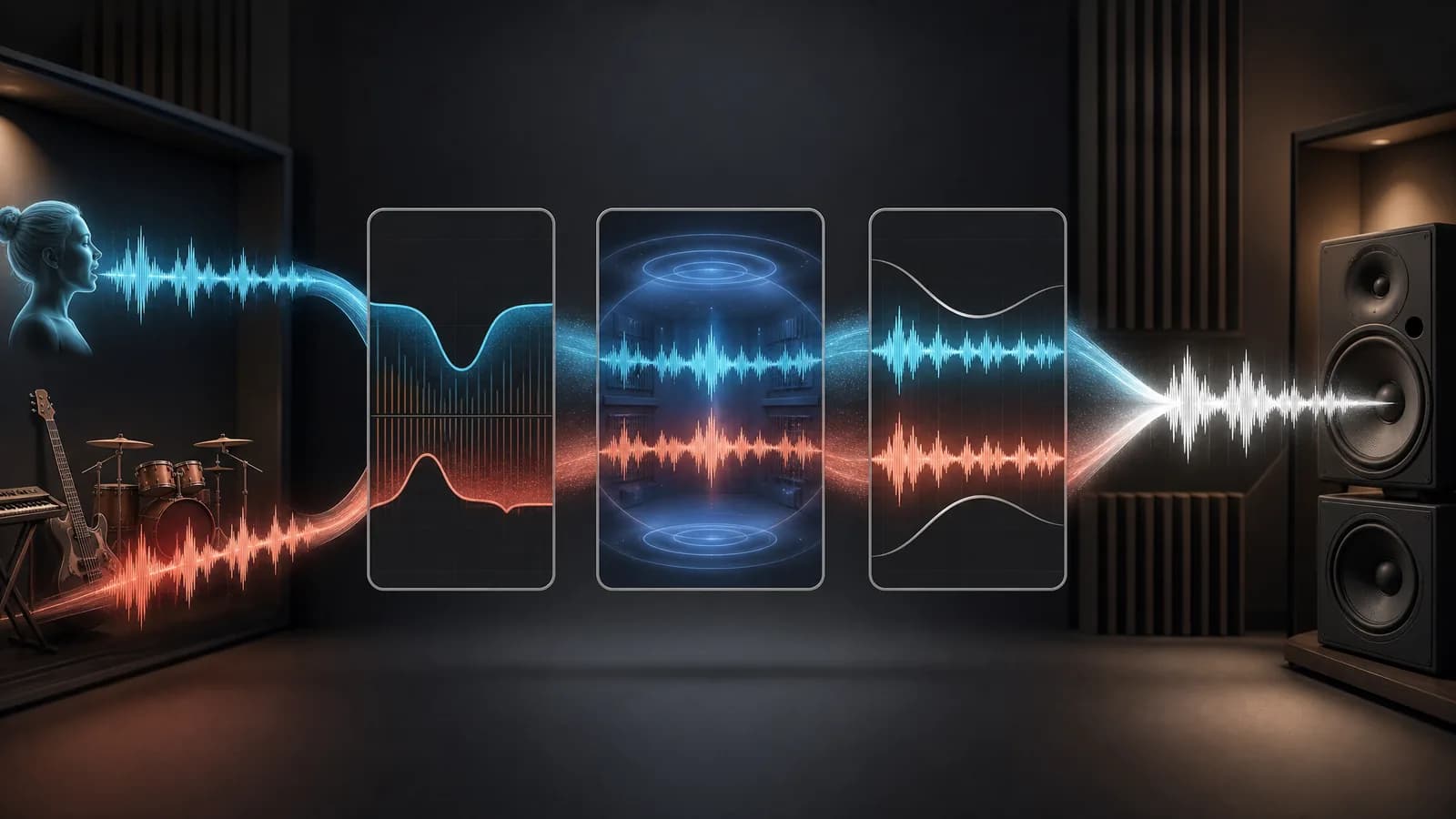
Because your elements come from different records — different studios, eras, and mastering choices — they will not automatically sit together. Mixing is the glue.
- Carve EQ space. The borrowed vocal and the new instrumental often fight in the 2–5 kHz range. A gentle dip in the instrumental there lets the vocal shine through.
- Match the reverb. A dry acapella over a roomy instrumental sounds pasted-on. Add a touch of reverb/delay to the vocal so it shares the same "space."
- Glue with bus compression. A light compressor across the whole mix (2–3 dB of gain reduction) makes the parts breathe as one.
- Reference constantly. A/B against a professionally mixed track in the same genre. Your ears lie after 30 minutes — trust the reference, not your fatigue.
For a deeper foundation on mixing fundamentals that apply directly here, the free guides at iZotope Learn are among the best resources online.
A reliable mashup mix chain
A common question is what "chain" to use. A dependable starting point is deliberately simple:
- On the acapella: high-pass at ~100 Hz → subtractive EQ to remove bleed resonances → light compression → matched reverb/delay send.
- On the instrumental: a narrow EQ dip around 3 kHz to open a "pocket" for the vocal → optional saturation to add warmth if it's a clinical modern master.
- On the master bus: gentle glue compression (2–3 dB) → a broad tone-shaping EQ → a limiter set for headroom, not loudness. Most streaming platforms normalize playback to around −14 LUFS integrated (−16 to −18 LUFS suits wide-dynamic-range material), so mastering much louder than that is pointless — the platform simply turns it down, and over-compressing to chase volume just kills your punch.
That's it. If a mashup needs a rack of twelve plugins to sound coherent, the real problem is almost always upstream — a bad song pairing or an untamed stem — and no amount of processing will truly fix it.
Loudness and translation
Check your mix in mono. A huge amount of mashup "magic" is actually stereo-width trickery that collapses the moment your track plays on a phone speaker, a club's mono sub, or a Bluetooth boombox. If the vocal and the groove still hold up in mono, you've built something durable.
Step 7 — Are AI Song Mashups Legal, and How Do You Stay Safe?
Short answer: A mashup uses two copyrights per song — the master recording and the composition/publishing. A commercial release needs both cleared; without clearance, keep it as a non-commercial promo or portfolio piece. This is general information, not legal advice.
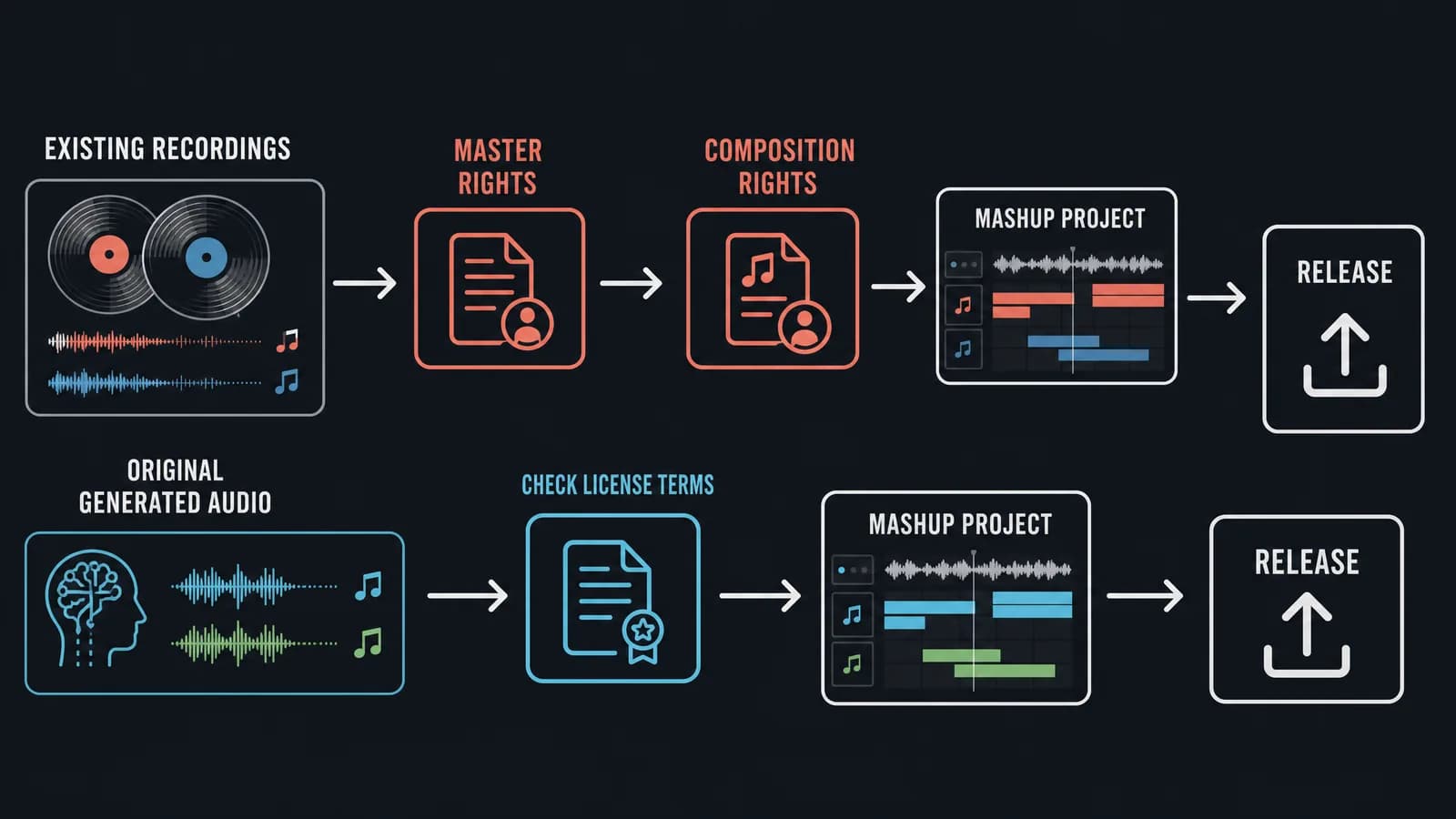
Licensing issues derail more releases than any mixing mistake, so it's worth understanding.
A mashup uses two copyrights per song: the master recording (owned by the label) and the composition/publishing (owned by the songwriter/publisher). Because a mashup reuses the actual recording, both must be cleared for a commercial release — obtaining only the publishing license (as with a cover) is not enough. Combining them without permission is, technically, infringement — even if you're not charging money.
- Promotional / non-commercial edits: Many producers share mashups on SoundCloud or as free DJ tools. This exists in a gray area and is often tolerated, but it is not "legal" by default and can be taken down.
- Monetizing: To sell or officially stream a mashup, you need clearance for both copyrights. That's a real, sometimes expensive, process.
- AI-generated vocals of real artists: Cloning an identifiable artist's voice raises additional "right of publicity" issues on top of copyright. Tread very carefully here.
For a plain-English breakdown of the law around remixes and sampling, the U.S. Copyright Office and legal explainers like those on LANDR's blog are solid starting points. When in doubt, keep it as a portfolio/promo piece and don't monetize until it's cleared.
A few practical realities are worth keeping in mind. Platforms like YouTube and SoundCloud run automated content-ID systems that will often detect the source recordings and either mute, block, or redirect the ad revenue to the original rights holders — sometimes without warning. That's not necessarily a takedown, but it isn't something creators control; a mashup that gains traction should expect a claim. Second, "transformative use" and "fair use" are frequently misunderstood: they are legal defenses argued in court, not a checkbox that makes uploading safe, and they shouldn't be the basis of a business plan. For most creators, the practical approach is to treat mashups as calling cards — proof of skill that leads to paid production work — rather than products in themselves.
The pragmatic path: Use mashups to build your name and demonstrate skill — not as a primary revenue stream. The exposure and portfolio value are real; the licensing headaches for a paid release rarely pay off unless you've got a hit on your hands and a budget to clear it. To avoid third-party clearance altogether, build your mashup from original, royalty-free material you generate yourself.
The 30-Minute Starter Recipe
In short: pick a matching vocal and instrumental, check key and tempo, separate stems, layer and align, clean and mix, then sleep on it before calling it done.
To just build one tonight, here's the condensed pipeline. Follow it top to bottom and you'll have a rough but real mashup in about half an hour:
- Pick a vocal you love and an instrumental with energy that matches it. Trust your gut on the pairing.
- Detect both keys and tempos. Note whether they're Camelot-compatible and within ~10 BPM.
- Set your project tempo to the instrumental. Time-stretch the vocal source to match.
- Run AI stem separation on both. Pull the acapella from one, the instrumental from the other.
- Drop the acapella onto the instrumental. Pitch-shift whichever element is smaller to reach a shared key.
- High-pass the vocal, clean obvious bleed, add a matching reverb send.
- Line up the choruses first — that's your emotional anchor — then build an intro and a breakdown around it.
- Add one riser and one impact hit at the main transition. Automate a filter opening into the chorus.
- Glue the master bus lightly, check it in mono, and A/B against a reference.
- Sleep on it. Listen fresh in the morning before you call it done — every time.
The first attempt won't be perfect, and that's expected. Finishing a rough mashup teaches more than over-planning a "perfect" one that never gets exported.
Common Mistakes to Avoid
- Skipping key detection. A vocal and instrumental in clashing keys is instantly, painfully obvious. This is the #1 killer.
- Trusting the raw stem. AI separation is great, not perfect. Always clean the bleed.
- No arrangement. Looping the same 8 bars for three minutes is boring. Build and release tension.
- Over-loud mastering. Crushing the mashup to "match Spotify" destroys the dynamics that make it exciting.
- Ignoring the vocal's original reverb. That leftover room tone fights your new instrumental — tame it early.
Skip the acapella hunt — generate your own. Build clean, royalty-free vocal and instrumental tracks from a single text prompt, then mash them however you like — no copyrighted recording to clear. → Try MuseGen Free
Frequently Asked Questions
Are AI song mashups legal to release?
Not automatically. Mashups use copyrighted masters and compositions, so a commercial release requires licensing both. Most producers keep them as non-commercial promo/portfolio pieces, which lives in a tolerated gray area but can still be removed by rights holders.
What key and tempo range works best?
Same key or an adjacent Camelot key, and within roughly 8–10 BPM. Beyond that, time-stretching artifacts and pitch clashes creep in.
Do I actually need AI tools?
No — classic mashups predate AI. But AI stem separation and vocal tools save enormous time and unlock clean acapellas that simply weren't obtainable before. They're an accelerator, not a requirement.
What's the single most important step?
Song selection. If the two tracks genuinely belong together in energy and phrasing, everything downstream gets easier. If they don't, no plugin will save you.
How do I avoid the copyright problem of using a real acapella?
Instead of extracting a copyrighted acapella, generate original, royalty-free vocal or instrumental tracks with an AI music generator such as MuseGen and mash those. Because the material is generated rather than sampled, it avoids the need to license a third-party recording (always check the generator's own terms of use).
How long does it take to make an AI song mashup?
A rough but listenable mashup can be built in about 30 minutes once you know the workflow, because AI stem separation removes the slowest old step — hunting for or making a clean acapella. A polished, release-ready mashup usually takes several hours of arrangement and mixing on top of that. Most of the time goes into taste-level decisions, not the technical extraction.
What software or DAW do I need to make a mashup?
You need two things: a DAW to arrange and mix in (Ableton Live, Logic Pro, FL Studio, or a free option like GarageBand or Cakewalk all work), and an AI stem-separation tool such as Demucs, LALAL.AI, or iZotope RX to isolate vocals and instrumentals. Key-detection software like Mixed In Key is helpful but optional. You do not need expensive plugins to start — the workflow matters far more than the tool.
Can I upload an AI song mashup to YouTube or Spotify?
You can upload it, but platforms run automated content-ID systems that will often detect the original recordings and may mute, block, or redirect ad revenue to the rights holders — even without a formal takedown. To distribute or monetize a mashup safely you need both copyrights cleared. A lower-risk alternative is to build the mashup from original, royalty-free tracks you generate yourself, so it contains no copyrighted third-party recording in the first place.
Sources
- Noah Feasey-Kemp, The DJ's Guide to the Camelot Wheel and Harmonic Mixing, DJ.Studio.
- Do you need permission to remix songs?, House of Tracks.
- Meta AI (Facebook Research), Demucs — Hybrid Spectrogram and Waveform Source Separation, GitHub (MIT License).
- Loudness normalization on Spotify, Spotify for Artists.
- Ian Stewart, How to master for streaming platforms: normalization, LUFS, and loudness, iZotope.