The 10 Best AI Music Video Generators of 2026 (Compared & Ranked)

MuseGen Team
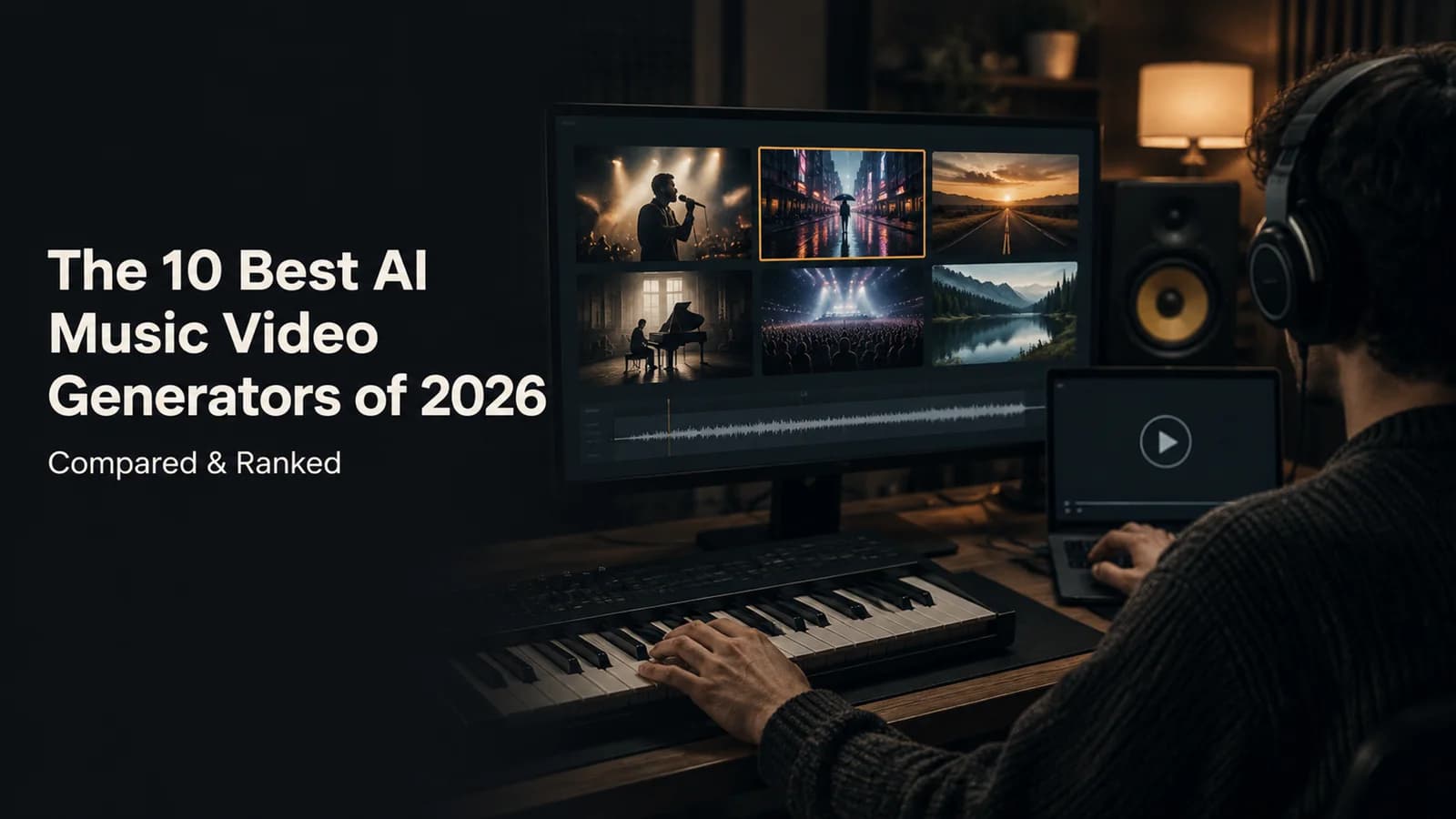
A music video used to mean a crew, a location and a budget. Now a finished song can go in one end of an AI tool and an MP4 can come out of the other, but the tools are not interchangeable. Some take a whole song and return a full video. Some only make short clips you then have to cut together yourself. One does not generate anything and cuts stock footage instead. This guide ranks the 10 best AI music video generators of 2026 on how well they turn a song into a watchable video: workflow, audio sync, editing control, output limits, price and rights, using each vendor’s own pages.
The short answer
Best overall: Neural Frames. Best one-click from a link: Freebeat. Best song-first MV, with a review step and a free preview before you pay: MuseGen. Best budget: Renderforest. Best for short social clips: Kaiber. Full 10-tool ranking and scores below.
Neural Frames is the most capable tool here: it analyses a song in stems, writes a storyboard and renders videos up to 10 minutes, at a price that suits working artists. Freebeat is the fastest route from a Spotify, YouTube or Suno link. MuseGen ranks #3 as the best song-first option: you review and regenerate the first frames and watch a free 15-second preview before you pay for the video. Kling and Runway are general video tools rather than music video generators, and the list says so.
Transparency note: MuseGen is the publisher of this guide and one of the ten tools in it. We show the prices and limits we read rather than the ones we would have liked to find. We did not render a video in every tool, so the scores rest on published specifications and not on a viewing test, and MuseGen’s own flow is described from its live Create MV page and interface text rather than from a paid render. Where a vendor did not publish a figure we say “not stated” instead of guessing.
Quick Verdict: The Best AI Music Video Generator by Use Case
- Best overall for artists → Neural Frames — Autopilot song-to-video with stems, up to 10 minutes.
- Best one-click from a link → Freebeat — Spotify, YouTube or Suno link in, full video out.
- Best song-first MV you can review → MuseGen — fix the first frames and see a free preview before you pay.
- Best budget all-rounder → Renderforest — from $9 a month billed yearly.
- Best for short, beat-synced clips → Kaiber — Beat Sync batches of up to ten variations on Pro, two on Creator.
- Best stock-footage lyric video → Rotor Videos — pay per download, no generation.
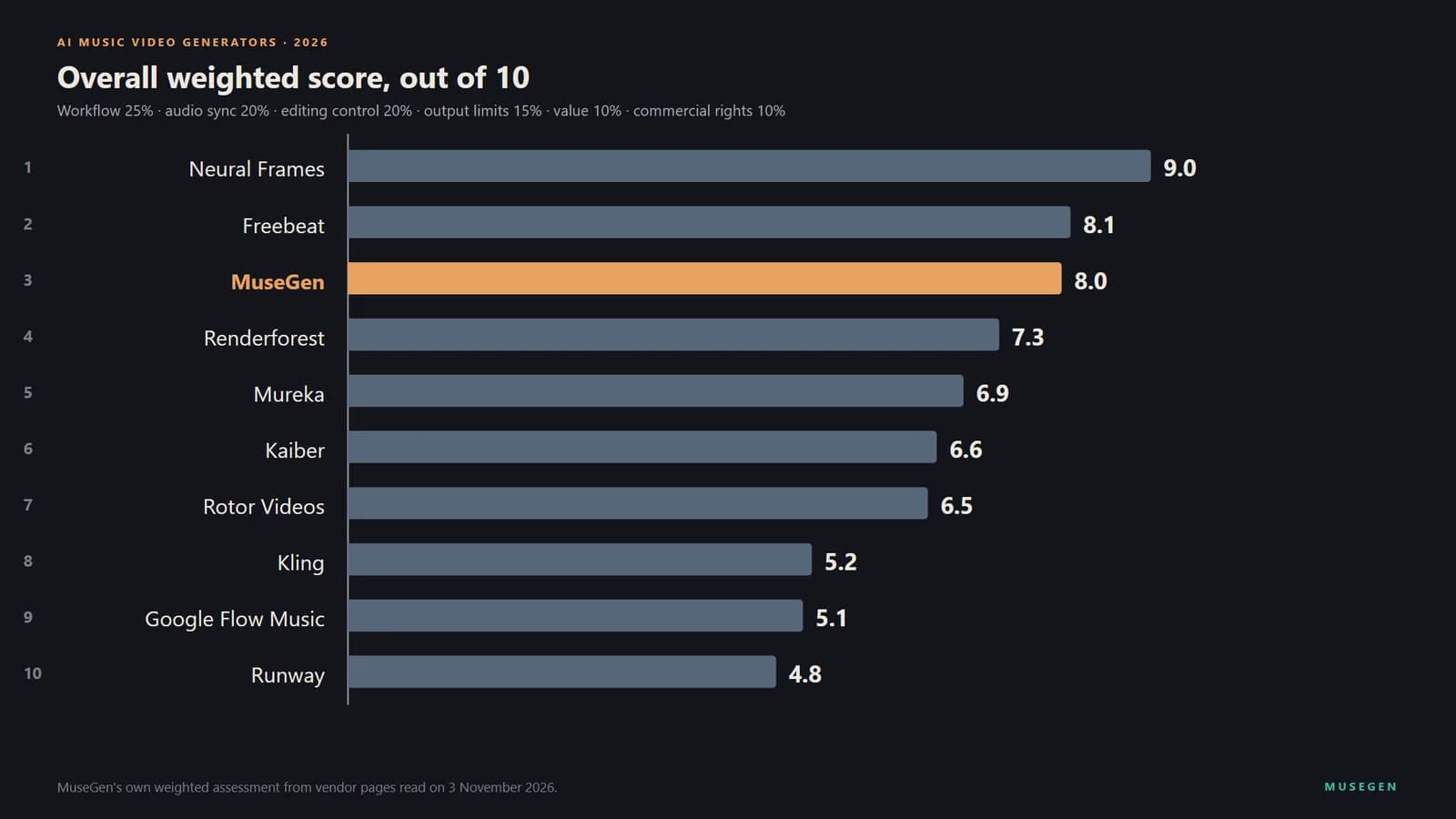
Overall weighted scores across workflow, sync, control, limits, value and rights (as of 3 November 2026).
How We Ranked Them (Methodology)
Each tool gets the same test: its own home page, pricing page, documentation and terms, read on 3 November 2026, scored 0 to 10 on six weighted factors. A music video generator should turn a song into a video, so the weighting starts there:
- Song-to-video workflow — 25%. Does a finished song go in and a whole video come out?
- Audio sync — 20%. Beat, lyric and lip-sync support, as the vendor documents it.
- Editing control — 20%. Storyboard, shot-level regeneration, character consistency, your own photo.
- Output limits — 15%. Length, resolution and aspect ratios.
- Value and transparency — 10%. Free tier, price clarity, credit rules.
- Commercial rights — 10%. What the vendor says you may do with the video.
A tool with no song input, such as Kling or Runway, scores low on workflow by design: it is a building block for editors, not a music video generator, and we include it because many people reach for it anyway. Scores are comparable within this guide only, not with the scores in our other roundups, because each guide scores a different set of tools on different factors. Looking for the song first? See our guides to the best AI music generators and the best AI lyrics generators.
Here is how the top three score on each factor, so you can see where each one wins and where it gives ground:
| Factor (weight) | Neural Frames | Freebeat | MuseGen |
|---|---|---|---|
| Song-to-video workflow (25%) | 9.5 | 9.0 | 9.0 |
| Audio sync (20%) | 9.5 | 8.5 | 8.0 |
| Editing control (20%) | 9.0 | 7.5 | 8.5 |
| Output limits (15%) | 9.5 | 8.0 | 5.5 |
| Value and transparency (10%) | 6.5 | 6.5 | 8.0 |
| Commercial rights (10%) | 8.5 | 7.5 | 8.5 |
| Weighted total | 9.0 | 8.1 | 8.0 |
MuseGen leads Freebeat on editing control, value and commercial rights and trails it on sync and output limits; the largest gap to Neural Frames is output size.
If you want to see what the clip-based, assemble-it-yourself route involves, this independent September 2026 tutorial makes a full music video with free tools: it generates a song, plans the story with a chatbot, creates the scene clips with Google Flow’s Veo 3.1 and assembles them in a free editor. It is the by-hand version of what the tools below automate. (Google Flow, the video tool, is not Google Flow Music.)
▶ Watch on YouTube — “I Made a Music Video Using ONLY Free AI Tools | Step by Step Tutorial 2026”
An independent 2026 walkthrough of a clip-by-clip AI music video made with free tools (opens on YouTube).
#1 Neural Frames — Best Overall for Artist-Grade, Stem-Reactive Videos
Neural Frames is the most complete song-to-video tool we found. Its Autopilot turns an uploaded song into a character-consistent music video or lyric video, writes an AI storyboard, and lets you re-render a single scene by changing its prompt. It analyses the track in eight stems and, by its own description, reads lyrics, key and tempo; lip sync and beat sync are listed too. The pricing calculator offers song lengths up to 10 minutes, and the two higher plans add 4K upscaling. The catch is price and onboarding: the pricing page shows no free tier, the entry plan, Neural Knight ($39 a month, $26 billed yearly), is marked “Not recommended for Autopilot”, and the plan built for it, Neural Ninja, is $99 ($66 billed yearly). Its pricing FAQ says you own the videos you make.
Pros
Song-to-video Autopilot up to 10 minutes, 8-stem analysis, scene-level re-rendering, 4K upscaling, character consistency, you own the videos
Cons
No free tier on the pricing page; entry plan not recommended for Autopilot; cost per video depends on model and length; no blanket refund guarantee
Best for: working artists who want a full-length, audio-reactive video and will pay for control.
★ Editor's Choice 2026
#2 Freebeat — Best One-Click Full Music Videos from a Link
Freebeat takes an MP3 or a link from Spotify, SoundCloud, YouTube, Suno, Udio or TikTok and returns a full music video, with story and stage-performance modes, lyric videos and lip-sync singing. It says visuals sync to BPM, beats, drops and song structure, with an automatic lyric timeline, and it lets you view the storyboard, adjust direction and regenerate scenes. Videos run from 15 seconds to about six minutes. Basic and Pro stop at 720p; Ultimate and Creator reach 1080p. The free tier gives 500 permanent credits for non-commercial use only. On 3 November the pricing page still showed promotional prices, Pro at $26.99 a month (list $34.99) and Ultimate at $39.99 ($49.99), while the homepage FAQ still quotes older figures, so check the pricing page on the day. Credits expire at the end of each billing period.
Pros
Accepts music links, full videos up to about six minutes, adjustable storyboard, lip-sync and lyric tools, 1080p on higher plans
Cons
Sync and lip-sync claims are marketing copy we could not test; free tier is non-commercial; credits expire each period; homepage and pricing page disagree
Best for: creators who start from a Spotify, YouTube or Suno link and want a finished video fast.
#3 MuseGen — Best Song-First MV You Can Review Before the Video Is Rendered
MuseGen’s Create MV page takes a finished song and returns a music video, and the redesigned flow puts a review step in the middle. You choose Music to Video, which uses the song alone, or Image to Video, which adds one photo as the lead and runs a face check, falling back to a scene-only mode when no usable face is found. You can add a description or pick a style template from the gallery (Arena Rock, Cliff Piano, Paris dusk, Street Rap and others), choose 16:9 or 9:16, and press Create script, which costs 10 credits once any free generation is used up. The director splits the song into scenes and writes a six-part story you can edit; each scene’s first frame is generated as an image you can regenerate. Before you pay for the full video you can watch a free 15-second preview, and the full version is unlocked for 2 credits a second in Standard or 4 in HD, shown before you confirm (a 100-second video is 200 or 400 credits, about $4.80 or $9.60 by the pricing page), and if creation fails, the credits are refunded. The expensive step therefore comes after you have seen the shots. The song can come from your library, an upload or an imported link, from 30 seconds to 6 minutes by the upload dialog’s limits, and if you do not have one yet you can write the words in the lyrics generator and make the track in the song maker, in the same place. Lyrics can be burned in as subtitles, and the membership page lists HD music video creation and watermark-free music video downloads as member benefits. The limit is output size: resolution is Standard (480P) or HD (768P).
Pros
Song-first, review the first frames and watch a free 15-second preview before you pay, regenerate single images, your own photo as the lead, style templates, subtitles from your lyrics, make the song in the same place, a published price per second, credits that never expire
Cons
Output tops out at HD (768P), below the 1080p and 4K of the two tools above it
▶ Try it yourself — from a finished song to an MV
Pick a song, then give the director a direction in plain words, for example:
Late-night drive through a rain-soaked city, neon reflections on wet streets, a lone singer in a leather jacket, slow handheld camera, warm amber and teal
- Choose music from your library, upload a file or import a link, then pick Music to Video or Image to Video and add a photo for the lead.
- Create script (10 credits) and edit any of the six story parts that is not what you meant.
- Review the first frames: regenerate a single image, edit a scene, or adjust the story and replan.
- Watch the free 15-second preview, then unlock the full video once the credits quoted for its length look right, and download the MP4.
Step-by-step settings, the length limits and the YouTube and Spotify rules are in our walkthrough of making an AI music video. Check the current terms before you monetize.
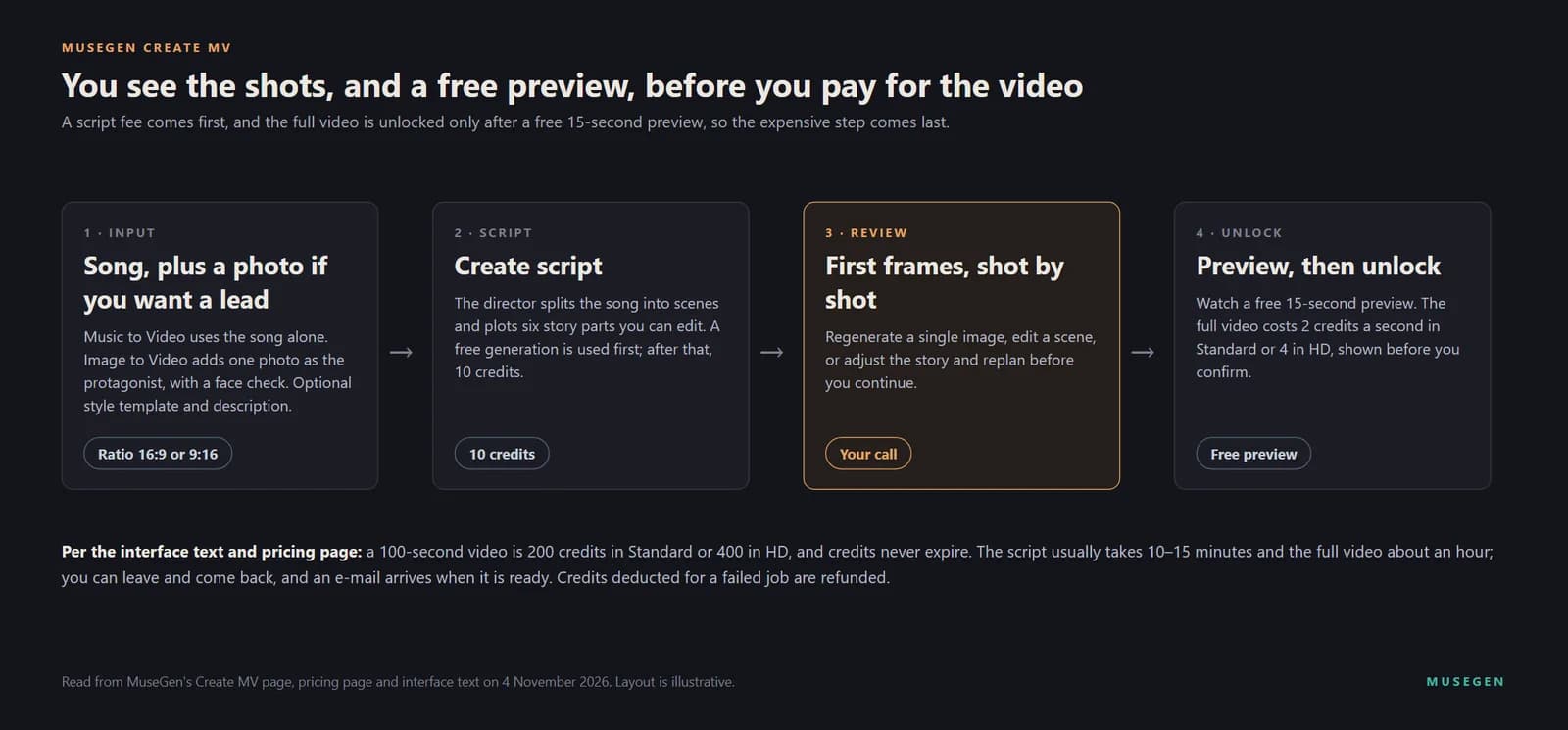
MuseGen’s Create MV flow, read from the live page, pricing page and interface text: the review step and a free 15-second preview come before the full video is unlocked.

Image to Video: a song, a photo for the lead, an optional description, then Create script (10 credits).
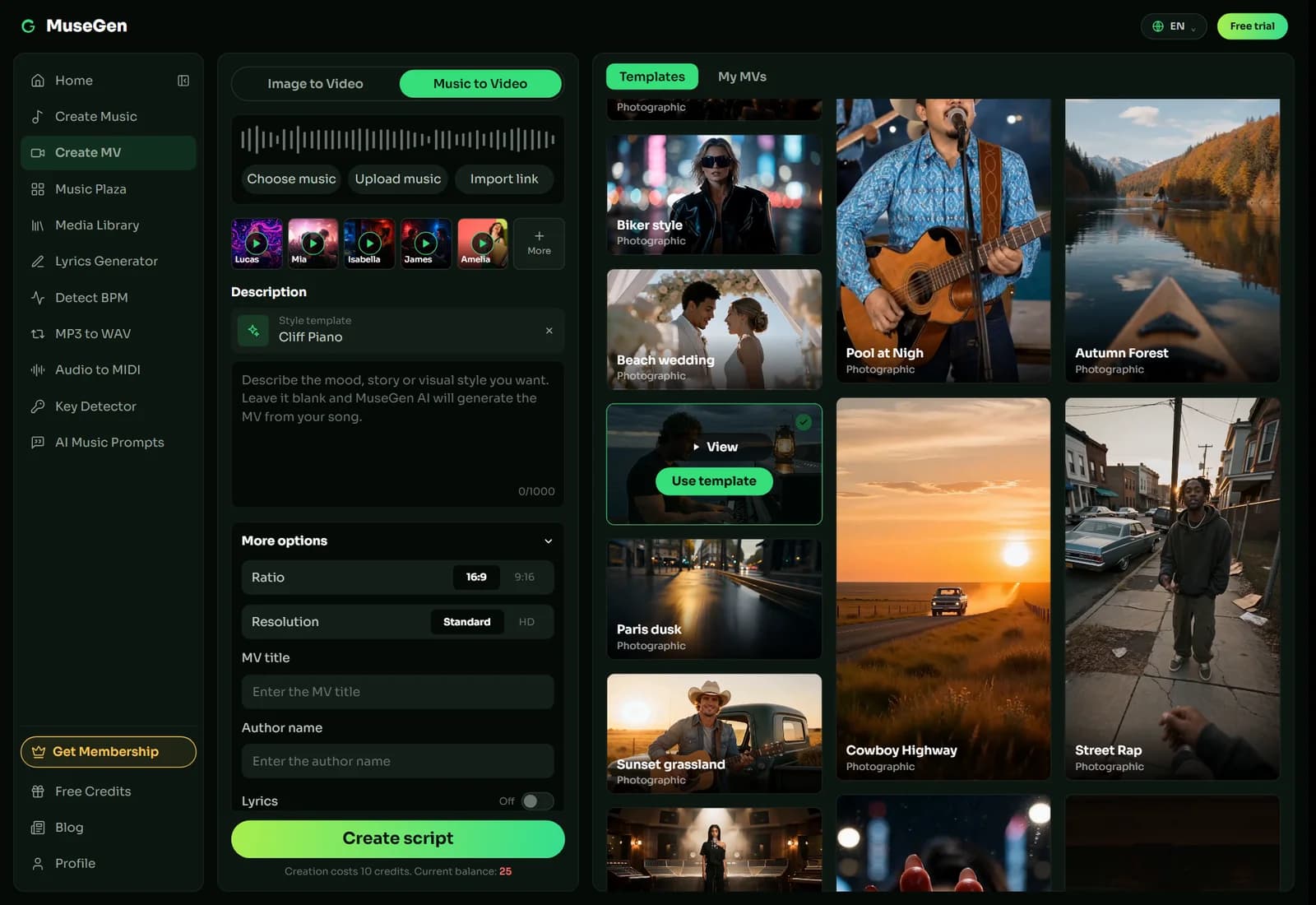
Music to Video with a style template from the gallery, plus the ratio and Standard or HD resolution options.
Best for: anyone with a finished song who wants to see and fix the shots before paying for the video.
♪ Best song-first MV with a review step
#4 Renderforest — Best Budget All-Rounder
Renderforest’s AI music video page takes an MP3 or WAV, an optional prompt and reference images (a face, a logo or a location), and says it reads tempo, energy, transitions and lyrics so scene changes follow the rhythm. Several video models sit behind it, including Gemini Omni Flash, Kling 3.0, Seedance 2.5, MiniMax H3 and Pixverse, with storyboard control and a way to lock a performer’s look from up to seven reference images. Among the tools that build a video from a whole song, its paid plans are the cheapest here: Lite is $9 a month billed yearly ($15 month to month), Pro $19 ($39) and Business $39 ($59), with 720p AI generation on Lite and Pro and 1080p on Business. Paid plans carry no watermark and include commercial rights; free exports are watermarked. Credits go quickly on premium models: the plan table counts 12 Seedance 2.5 clips at 1080p on Lite.
Pros
Lowest entry price among whole-song tools, several video models, reference images, no watermark and commercial rights on paid plans
Cons
Maximum track length not stated; credits burn quickly on premium models; no lip-sync claim; free exports watermarked
Best for: budget-conscious creators who want one subscription for music videos and general video.
#5 Mureka — Best If You Already Make Songs in Mureka
Mureka’s MV Director starts from a finished song in your Mureka library and offers a one-click mode and a storyboard mode, where a shot-by-shot plan lets you regenerate only the images you do not like. It supports lyric-aware shots, automatic lyric subtitles and lip sync for characters with a clear face. The hard limits are in Mureka’s own documentation: the song clip must be 10 to 90 seconds, the visuals are fully AI-generated and there is no manual timeline editor, and generation costs 40 Gold per second. A Mureka blog post says the feature can export a “Full-Length Music Video”, which does not fit that cap. Music video creation is listed on Pro, at $8 a month on yearly billing or $10 month to month. Our Mureka review covers the quality numbers, the plan page and the lawsuit.
Pros
One-click and storyboard modes, shot-level regeneration, lyric subtitles, lip sync for clear-face characters, included from Pro
Cons
Song clip capped at 90 seconds; 40 Gold per second; no timeline editing; output resolution not stated; open lawsuit against its maker
Best for: Mureka users who want a short video or teaser without leaving the platform.
#6 Kaiber — Best for Stylised Social Clips
Kaiber is now a suite of three tools: Canvas for generating video, Beat Sync and an Editor. Beat Sync is the music-video-adjacent one: upload audio and one or more images or videos and it generates variations in a batch (two at once on Creator, up to ten on Pro), synced to the beat and auto-captioned, with no prompts. It is built for Reels, TikTok and Shorts rather than a four-minute video; a longer music video means generating clips in Canvas, with models such as Veo and Kling, and assembling them in the Editor with your audio. Plans are Starter $10 a month ($8 billed yearly, no Beat Sync), Creator $29 ($23) and Pro $99 ($79), with a $5, five-day trial. Maximum length and resolution are not stated in the help pages we read.
Pros
Beat Sync batches of up to 10 variations on Pro (2 on Creator), auto captions, many video models in Canvas, uploads your own images and clips
Cons
Clip-oriented rather than full-song; no Beat Sync on Starter; credit-expiry rules conflict between help centre and terms; any free tier is non-commercial under its terms
Best for: musicians who want several beat-synced vertical clips from one track.
#7 Rotor Videos — Best for Stock-Footage Lyric and Music Videos
Rotor does not generate footage. You upload a song and it cuts a video from a library of stock clips or your own images and video, with more than 150 edit styles, audio-reactive effects and text overlays, and it also makes lyric videos, Spotify Canvas and Apple Music Album Motion loops. Because it is not generative there is no face to keep consistent and no prompt to write, and the video runs as long as your song. Previews are free and you pay to download. The Artist Unlimited subscriptions are $9.99, $14.99 and $19.99 a month billed annually, or you can pay per download in credits: a music video is three credits, about $18 to $30 depending on the pack. Rotor is owned by LyricFind. Its FAQ says a video you create is yours to use commercially, but its terms restrict reuse of the stock footage, so read both.
Pros
Free previews, pay only to download, watermark-free exports, any song length, 150+ edit styles, lyric videos
Cons
Not generative, so visuals are stock footage; subscription covers one artist only; no refunds; export resolution and lyric-sync method not stated
Best for: independent artists who want a quick, low-risk lyric or performance-style video from stock footage.
#8 Kling — Best Raw Clip Quality, Assembled by Hand
Kling is a general video generator, not a music video tool: it has no input for a finished song and no beat or lyric sync, and its documented audio inputs are voice references and a text description of the music. What it gives is clip quality: Kling 4.0 makes 3 to 30 second clips at 720p, 1080p or 4K, with up to 10 keyframes and up to 15 references per task, including image and voice elements to keep a character consistent. A full music video therefore means generating many clips and cutting them to your track in an editor; extension to two minutes is marked “coming soon”. On 3 November the membership page showed Standard at $8.80 a month after a $6.99 first month and Pro at $32.56 after $25.99; paid plans include commercial use and watermark removal.
Pros
Up to 4K, clips to 30 seconds, keyframe and reference control, character consistency, commercial use on paid plans
Cons
No song input, no beat or lyric sync, full-length video is manual assembly, prices shown as first-month offers
Best for: video editors who want the best raw shots and will cut the music video themselves.
#9 Google Flow Music — Best Free Route for Google AI Subscribers
Flow Music’s Music videos tab lets you describe a video, choose a model and optionally add your own audio or images as references, then make the video, which you can publish, share and download. Google’s May announcement says you work with an agent to guide the styles, subjects and scenes so they match “the narrative and pacing of your track”, and that Gemini Omni music videos are available to Google AI subscribers. What Google has not published on its Flow Music pages is the length, resolution or credit cost of a music video, any beat or lyric sync claim, or commercial-use wording, so we score it on what is documented. Plans are Free, Starter $6, Plus $18 and Member $48 a month. Our Flow Music review covers the rest.
Pros
Conversational direction with an agent, accepts audio and image references, a free tier exists, publish and share from the same place
Cons
Length, resolution and per-video cost unpublished; no documented sync; no commercial-use wording found; music-video access tied to Google AI plans
Best for: Google AI subscribers who want to experiment with a music video inside Google’s ecosystem.
#10 Runway — Best for Cinematic Single Shots, Assembled by Hand
Runway is a general AI video platform with no song-to-video pipeline. Gen-4.5 takes text or an image and returns clips of 2 to 10 seconds at 720p, at 12 credits per second; Act-Two transfers a recorded performance to a character for up to 30 seconds; and its workflows can stitch clips and add audio, one clip at a time. Nothing in the Runway documentation we read covers beat sync or a song timeline. A three-minute video at 12 credits per second is 2,160 credits before any retakes, our arithmetic from the stated rate, against 625 monthly credits on Standard ($15 a month, $12 billed yearly) and 2,250 on Pro ($35, $28). Runway’s terms do not restrict commercial use of outputs, subject to the agreement.
Pros
Strong cinematic single shots, image-to-video and performance transfer, no restriction on commercial use of outputs, upscaling on paid plans
Cons
No song input or beat sync; 10-second clips at 720p; full video is manual stitching; credits burn on every re-roll
Best for: filmmakers who want a few high-quality shots, not an automatic music video.
Quick Comparison Table
| Tool | Score | Best for | Song in, full video out? | Longest video or clip stated | Top resolution stated | Free option |
|---|---|---|---|---|---|---|
| Neural Frames | 9.0 | Artist-grade full videos | Yes | Up to 10 min | 4K upscaling (top two plans) | None on pricing page |
| Freebeat | 8.1 | One-click from a link | Yes | About 6 min | 1080p (Ultimate, Creator) | 500 credits, non-commercial |
| MuseGen | 8.0 | Song-first, review before video | Yes | Up to 6 min (song) | HD (768P) | 25 one-time credits; free 15-second preview |
| Renderforest | 7.3 | Budget all-rounder | Yes | Not stated | 1080p AI (Business); 720p (Lite, Pro) | Free test credits, watermarked |
| Mureka | 6.9 | Existing Mureka users | Clips only | 90 s song clip | Not stated | Video from Pro |
| Kaiber | 6.6 | Short social clips | Clips (Beat Sync) | Not stated | Not stated | $5 trial |
| Rotor Videos | 6.5 | Stock-footage videos | Yes (cuts stock footage) | Length of your song | High-res, not specified | Free preview, pay to download |
| Kling | 5.2 | Raw clips, edited by hand | No | 30 s per clip | 4K | Basic plan, non-commercial |
| Google Flow Music | 5.1 | Google AI subscribers | Prompt plus audio reference | Not published | Not published | Free plan; video tied to Google AI plans |
| Runway | 4.8 | Cinematic single shots | No | 10 s per clip (Gen-4.5) | 720p (4K upscaling on paid plans) | 125 one-time credits |
Scores and figures reflect our assessment of vendor pages read on 3 November 2026. Verify every tool’s current prices, limits and terms on its own site.
The Verdict
The best AI music video generator depends on what you are starting with. Neural Frames is our #1 for a full-length, audio-reactive video if you will pay for control, Freebeat is the fastest from a streaming or Suno link, and MuseGen ranks #3 as the best song-first option: you review and regenerate the first frames and watch a free 15-second preview before you unlock the full video, in the same place where you write the lyrics and make the track. Kling and Runway are strong video tools that leave the assembly to you, and Google Flow Music is worth a look for Google AI subscribers once Google publishes its video limits. For the step-by-step process, including aspect ratios, length limits and the YouTube and Spotify rules, read our walkthrough of making an AI music video.
Have a finished song? Turn it into a video.
Bring it into MuseGen’s Create MV, review the first frames, and generate the video when the shots look right.
FAQ
What is the best AI music video generator in 2026?
Neural Frames is our top pick for artists who want a full-length, stem-reactive music video, scoring 9.0 out of 10 on our weighted scale. Freebeat is second for one-click videos from a Spotify, YouTube or Suno link, and MuseGen is third as the best song-first option, with a review of the first frames and a free 15-second preview before you pay for the video. The scores weigh workflow, audio sync, editing control, output limits, value and commercial rights, using each vendor's own pages read on 3 November 2026.
Is there a free AI music video generator?
Partly. Freebeat gives 500 permanent credits for non-commercial use, Renderforest offers free test credits with watermarked exports, Kling has a free Basic plan that is not for commercial use, and Runway gives 125 one-time credits. MuseGen gives new users 25 one-time credits and a free 15-second video preview before you pay to unlock the full video; HD music video creation and watermark-free music video downloads are listed as membership benefits. Free outputs are limited or non-commercial on most of these tools, so check the plan before you publish.
Can AI make a full-length music video from a finished song?
Yes, but only some tools do it. Neural Frames offers song lengths up to 10 minutes in its Autopilot, Freebeat says videos run to about six minutes, and MuseGen, Renderforest and Rotor Videos build a video from an uploaded song. Mureka limits the song clip to 10 to 90 seconds, Kaiber is built around short Beat Sync clips, and Kling and Runway take no song at all and return clips of 30 and 10 seconds, so a full video from them means cutting clips together yourself.
What resolution do AI music videos reach?
It varies from 480P to 4K. Neural Frames offers 4K upscaling on its two higher plans, Freebeat reaches 1080p on Ultimate and Creator, Renderforest generates 720p on Lite and Pro and 1080p on Business, and Kling makes clips at up to 4K. MuseGen offers Standard (480P) and HD (768P), Runway Gen-4.5 outputs 720p, and Mureka, Kaiber and Google Flow Music do not state a music video resolution on the pages we read.
Can I use my own photo or character as the lead?
Yes, on several tools. MuseGen's Image to Video mode takes one photo, runs a face check and falls back to a scene-only mode if no usable face is found. Neural Frames trains custom models from 10 to 20 images, Renderforest can lock a performer's look from up to seven reference images with Kling 3.0, Mureka builds characters from an uploaded image (lip sync needs a clear face), and Kling accepts up to 10 image references per task.
Can I use an AI music video commercially?
It depends on the tool and the plan. Freebeat's free tier is non-commercial, Kaiber's terms limit any free tier to non-commercial use, Renderforest and Kling grant commercial use on paid plans, Neural Frames says you own the videos you create, and Rotor says the video is yours but restricts reuse of its stock footage. MuseGen's commercial licence covers music and related assets generated while you hold an eligible subscription, works generated on a free plan are for personal use, and its terms say you keep ownership of generated MV outputs. Read each tool's current terms before you monetize.
Do I have to label an AI music video on YouTube or Spotify?
On YouTube, yes where the music or visuals are AI-generated: YouTube's own examples of content creators need to disclose include AI-generated music, and the disclosure is a yes-or-no question in YouTube Studio during upload. Spotify has its own delivery and labelling rules for music videos. We cover both in our walkthrough of making an AI music video.
How do I choose the right AI music video generator?
Match the tool to the job. For a full-length, audio-reactive video choose Neural Frames, for a fast video from a link choose Freebeat, and for a song-first video you can review shot by shot and preview before you pay choose MuseGen. For the lowest price choose Renderforest, for short social clips choose Kaiber, for stock footage choose Rotor Videos, and for raw shots you will edit yourself choose Kling or Runway. Test a free tier first and confirm current prices and limits on each tool's own site.
Keep Reading
- How to Make an AI Music Video
- The 10 Best AI Music Generators of 2026
- The 10 Best AI Lyrics Generators of 2026
- Mureka Review 2026: Real Metrics, Messy Plan Copy
- Google Flow Music Review 2026: Free Tier, Open Lawsuit
Sources
- Neural Frames: pricing, Autopilot, terms
- Freebeat: pricing, terms of service
- Renderforest: AI music video generator, pricing, terms of service
- Mureka: Knowledge page, features blog, plan page
- Kaiber: pricing, help centre, terms
- Rotor Videos: pricing, terms
- Kling: Kling 4.0 guide, membership plans
- Google Flow Music: Google announcement, 19 May 2026, pricing
- Runway: pricing, Gen-4.5 guide, terms of use
- Video: “I Made a Music Video Using ONLY Free AI Tools | Step by Step Tutorial 2026” (Ai Lockup, 14 September 2026) — YouTube
- MuseGen: Create MV, pricing, commercial license and terms