What Is a Sequencer? Step Sequencers, Piano Rolls and MIDI Explained

MuseGen Team
9/9/2026
Someone drags a small rectangle across a screen until it sits where they want it. In 1981, someone else presses one of sixteen buttons on a drum machine and the pattern changes. A century before either of them, a music editor sits with a printed score and a blank paper roll, punching the holes in by hand, note by note. Three people, a hundred years apart, doing an identical job: writing down which note, when it begins, how long it lasts, how hard it is struck — and leaving the sound itself to something further down the chain. That is a sequencer, and not one of the three has ever held a second of audio.
In short
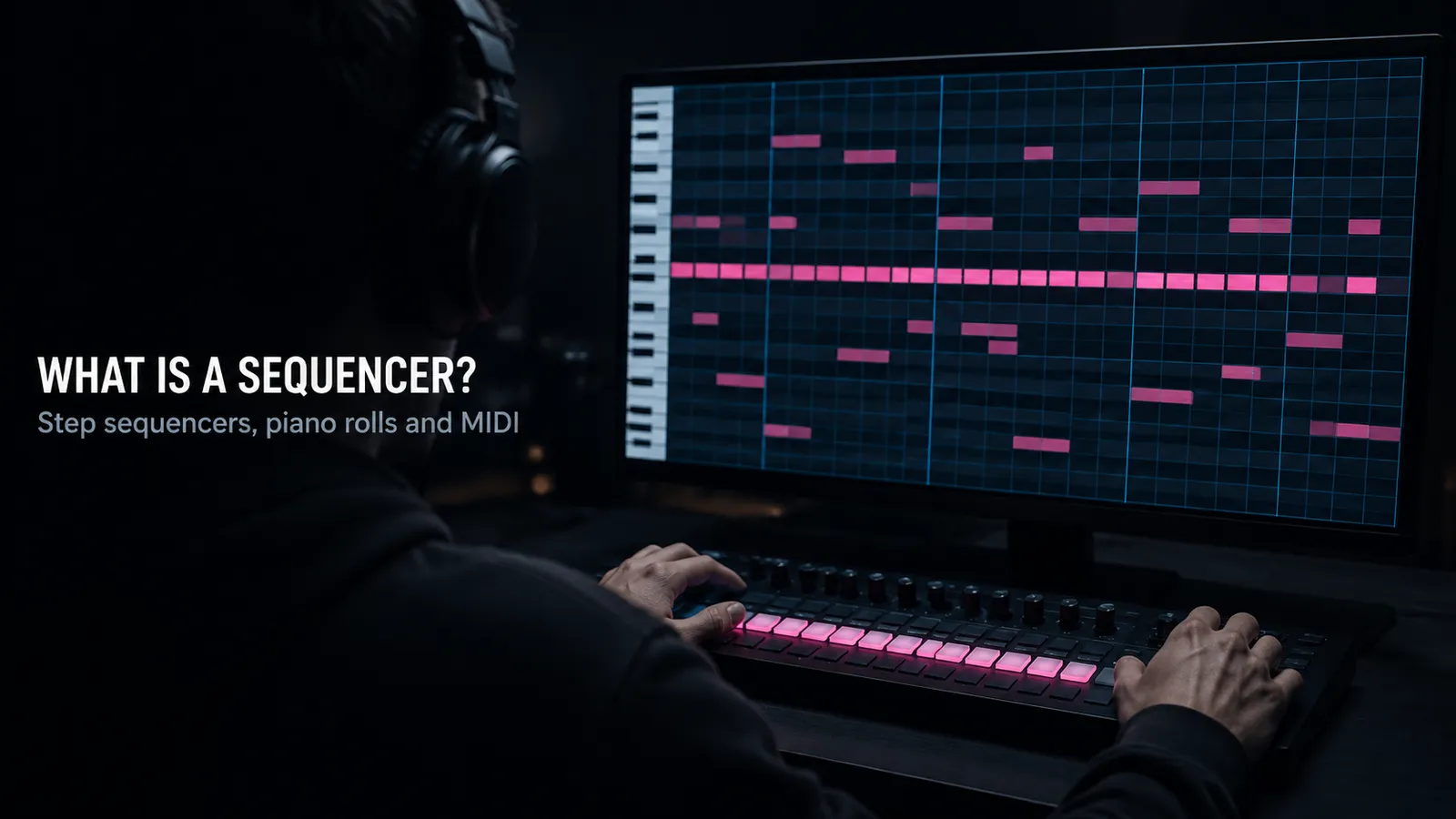
A sequencer is the part of a music setup that stores note events — which note, when it starts, how long it lasts, how hard it was struck — and plays them back in time. It records no audio and makes no sound of its own. It sends instructions, and something else turns those instructions into sound.
That single fact explains almost everything a sequencer can do. Because the stored material is a list of decisions rather than a recording, the instrument can be chosen after the part is written, the key can move, and a wrong note can be corrected without touching the others. It also explains the cost: the file carries no tone, so the same sequence on two setups is two different pieces of music.
Quick facts
- What it is: The timing component that stores note events and plays them back in order.
- What it stores: Pitch, start time, length, velocity, channel — roughly eight bytes per note.
- What it does not do: Record audio, and generate sound.
- Forms you will meet: Step grid, piano roll, drum grid, tracker, clip and scene.
- Two timing controls: Quantise moves the notes; swing moves the grid.
- Easily confused with: Recorders, samplers, synthesisers — often housed in the same box.
What a sequencer actually is
Strip away the screens and the buttons and a sequencer is a list. Each item is an event: a note number, a moment to begin, a moment to stop, how hard it was struck, and a channel saying who the message is for. The sequencer holds the list, counts time, and pushes each event out on schedule. Nothing in that involves sound: the noise happens elsewhere, in a synthesiser or a sampler or a drum machine's voice circuits.
The size difference is the clearest way to see it. Three minutes of stereo audio at CD quality occupies about 31.7 MB as an uncompressed WAV, because all 44,100 samples per second per channel have to be written down. The same three minutes as note events is a fourteen-byte file header, eight bytes of overhead per track, and roughly eight bytes per note. A busy arrangement lands around 30 KB — three orders of magnitude apart, and the gap is entirely what is missing.
That absence is what makes the format useful. A piano part can become a marimba part after the fact, a song can move up a tone in one operation, and a wrong note can be dragged to pitch without disturbing its neighbour. None of it survives being flattened into audio, which is why an arrangement stays in event form as long as possible.
The same property is the trap. A note number is not a timbre, so nothing in the file says what it should sound like. Open an old sequence and a string arrangement can come back as a church organ. It is one reason a DAW keeps audio and event data side by side.
Sequencer, recorder, sampler: three different jobs
A recorder captures a waveform. Sound arrives, gets measured tens of thousands of times a second, and the measurements are written to disk. What comes back is what went in, tone and room and all, and none of it can be renegotiated.
A sampler stores fragments of sound and waits. It holds a kick drum, a vocal phrase, a violin note, and does nothing until triggered — a sound source with a memory instead of an oscillator.
A sequencer stores when to trigger what, and holds no waveform anywhere. Point it at a sampler and you have a drum machine; point it at a synthesiser and you have an arrangement; point it at nothing and it runs silently.
The combinations blur the words: an MPC is a sampler and a sequencer in one case, a drum machine is voices and a sequencer, a DAW is all three plus a mixer. The division still matters when you export, since a stem is audio and a MIDI file is not.
The one-line test. If unplugging it makes the music silent, it was a sound source. If unplugging it makes the music stop happening, it was the sequencer.
Where the sequencer came from
This history is usually told as a relay race of firsts, and it holds up poorly: almost every machine called the first of something turns out to have a predecessor or a rival claim.
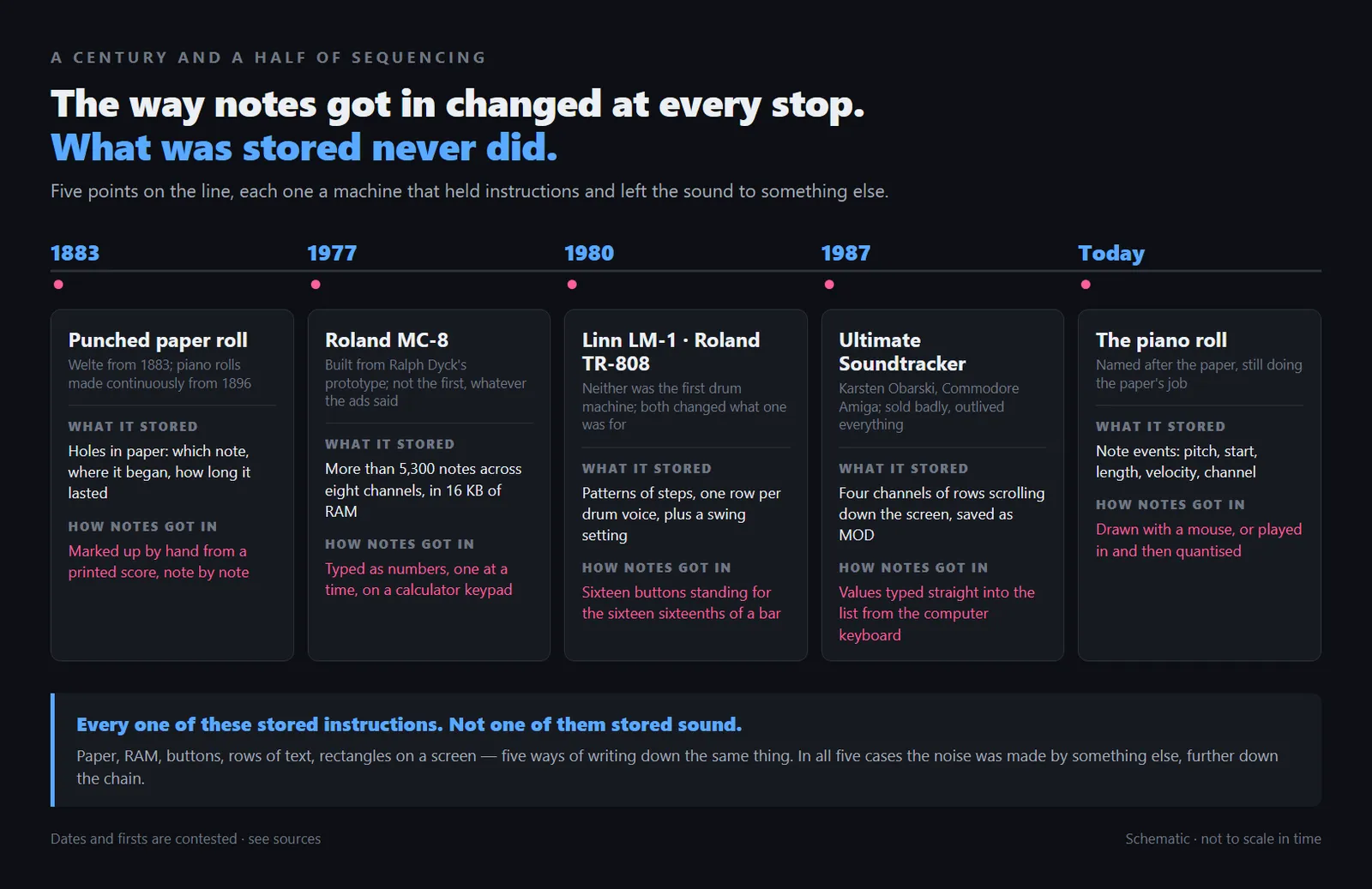
Five points in a century and a half of sequencing. The input method changed at every stop; what was stored did not.
Paper, from 1883. Welte began selling instruments driven by perforated paper rolls in 1883, and piano rolls were manufactured continuously from 1896. What matters is how the holes got there: most rolls were not recorded from a performance at all — a music editor read the printed score and marked up the roll by hand, note by note. The first sequencing humans did was step entry, which makes clicking squares into a grid the older practice rather than the modern shortcut. The window in your DAW is called a piano roll because of that paper.
Roland MC-8 Microcomposer, 1977. Built from Ralph Dyck's prototype, the MC-8 ran an Intel 8080A with its memory raised to 16 KB, held more than 5,300 notes across eight channels, was programmed by typing numbers into a calculator keypad, and cost $4,795. Only a few hundred were made, and sources disagree on how many. It is often called the first microprocessor-controlled sequencer, and that claim does not survive contact with the record: EMS had a Sequencer 256 in 1971, New England Digital had ABLE by 1975, and Sound On Sound notes that Emu, EMS and Oberheim all had sequencers at the time.
Specifications and the counter-claim: Sound On Sound, Roland MC8 MicroComposer.
1980, twice over. The Linn LM-1 was the first drum machine to use digital samples of real drums, storing twelve eight-bit sounds and a hundred rhythms for close to $5,000. The Roland TR-808 arrived the same year at $1,195 with its TR-REC interface: sixteen buttons standing for the sixteen sixteenth notes in a bar, one row per drum sound, so a user could write a whole pattern instead of choosing a preset. Neither was the first drum machine — programmable and preset machines both predate them by years. The 808 was a commercial disappointment in its day, discontinued after around twelve thousand units when the semiconductors it relied on ran out.
Ultimate Soundtracker, 1987. Karsten Obarski's program for the Commodore Amiga scrolled four channels vertically down the screen, labelled Melody, Accompaniment, Bass and Percussions, and saved to what became the MOD format. It sold badly, became the platform's de facto standard anyway, spawned decades of tracker software, and passed into the public domain.
Read together, these are not a chain of inventions but one idea rebuilt with whatever technology was to hand. What changed was the way notes got in: punched, typed, tapped, drawn, launched. What was stored stayed exactly the same.
The five shapes a sequencer takes
Every sequencer you are likely to meet is one of five interfaces. Each makes a particular kind of musical thought quick and a different kind awkward, and none is a more advanced version of another; they have coexisted for decades.
- Step grid. A row of buttons or squares, each one an equal slice of a bar. It is fast, it can be read at a glance, and it loops by nature. What it resists is anything that does not divide evenly: held notes, triplets against sixteenths, a phrase that runs past the end of the pattern.
- Piano roll. Pitch on the vertical axis, time on the horizontal, notes drawn as rectangles whose width is their length. It expresses any duration and any velocity without argument, which is why it became the default for melodic and harmonic writing. For pure rhythm it is slower than a grid.
- Drum grid. A step grid stacked into rows, one sound per row, so a whole kit is visible at once. It keeps the speed of the step grid while showing how the parts interlock, and it inherits the same limitation: everything lands on the same set of divisions.
- Tracker. Time runs down the screen instead of across it, one row per tick, with values typed in rather than drawn. Entry is extremely fast from the keyboard and the result is readable as text, which suits version control and collaboration. Long curves and slow sweeps are awkward to write.
- Clip and scene. Patterns sit in a grid of slots and are launched by hand rather than by position on a timeline. It suits performance and trying arrangements out loud, and it is the only form here that is not linear. Sooner or later the result still has to be committed to ordinary time.
The last of those bears most directly on how a track ends up shaped: launching sections by hand is a way of auditioning structure before committing to it — another route to the destination our guide to arrangement describes.
What one note event actually contains
Select one note in a sequencer's editor and the fields you can change are the whole vocabulary of the format.
The note number is an integer from 0 to 127, with 60 as middle C — more than ten octaves, past the ends of a piano. It is a pitch name rather than a frequency; the tuning is decided by whatever plays it. Velocity is how hard the note was struck, a seven-bit value in MIDI 1.0, so again 0 to 127. It is not volume, though most instruments map it partly to volume; on a good sampled instrument it also selects a different recording, since a piano struck hard is not a louder piano struck softly.
Start and length are counted in ticks against the project tempo rather than in seconds, which is why a sequence can change speed without anything being resampled — and why a tempo change moves every note you carefully nudged. Channel is the address: sixteen per port, so one cable carries sixteen parts. Running alongside the notes are controller messages, carrying what the note itself cannot say — a modulation wheel moving, a pedal going down, a filter opening.
MIDI 2.0, published in 2020, widens all of this: velocity becomes a sixteen-bit value with 65,536 steps, controllers move to thirty-two bits, and per-note attributes allow microtuning down to a five-hundred-and-twelfth of a semitone. Two qualifications matter. The protocol negotiates, so a MIDI 2.0 device talking to a 1.0 device falls back to 1.0 resolution and a mixed setup runs at the lower one. And most keyboards cannot report meaningfully more than 128 distinct velocities, whatever the wire carries. The gain is real in generated and automated data, largely theoretical for a person playing keys.
Resolution figures: MIDI Association, The State of MIDI 2.0 and Sound On Sound, Introducing MIDI 2.0.
Quantise and swing are the same mechanism
Two controls decide how a sequenced part sits in time, and they are usually taught as unrelated. They are not. One moves the notes, the other moves the grid, and seeing them as a pair is what stops swing being a mystery knob.
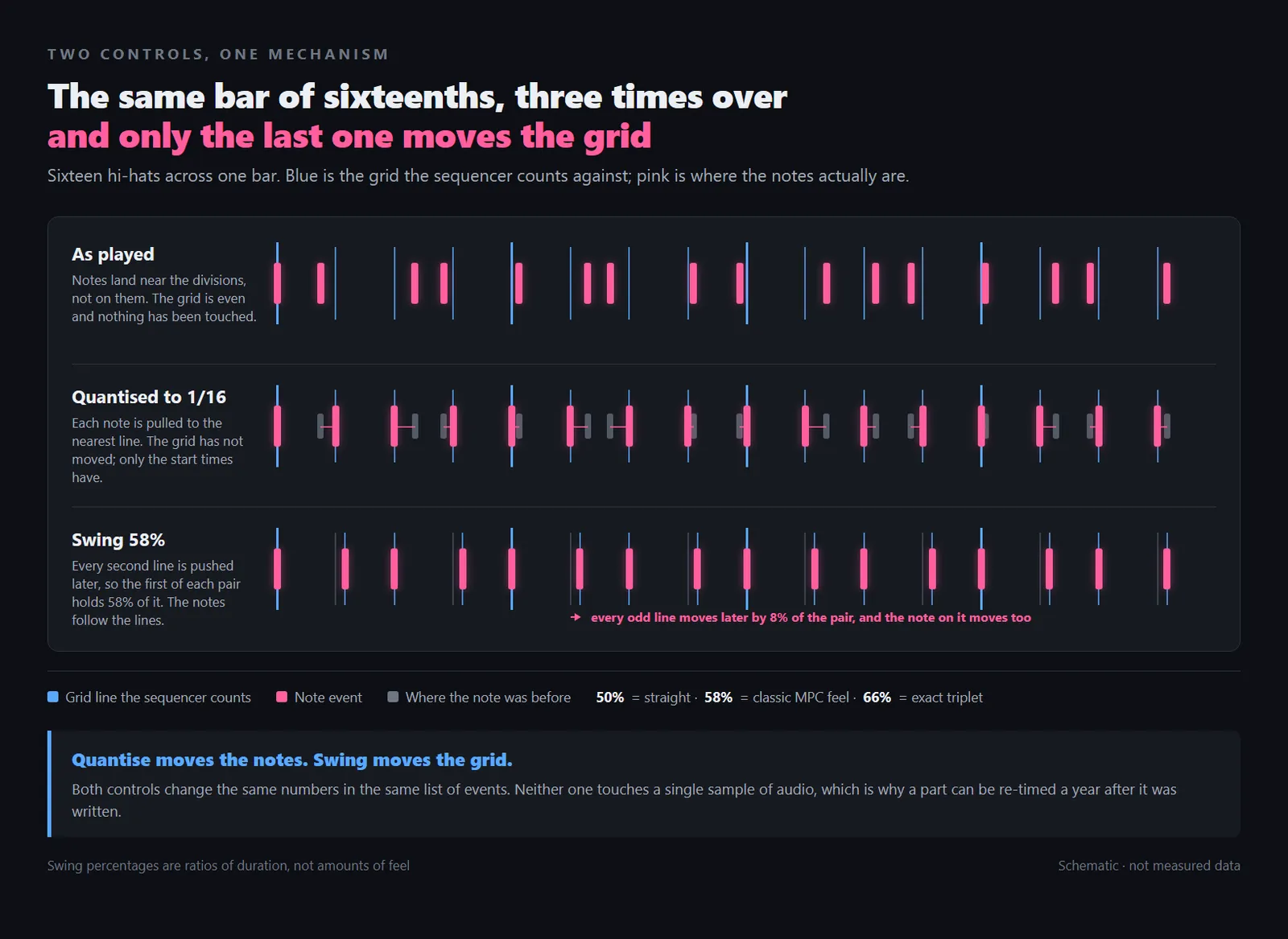
Quantise moves the events onto the lines. Swing moves the lines, and the events follow.
Quantise moves each note's start to the nearest line on a division you choose. Quantise to sixteenths and a note that arrived late gets pulled back to the sixteenth it was closest to. Nothing about the sound is touched; only the timing numbers change. Most sequencers also offer a strength setting, moving each note a stated proportion of the way to the line rather than all of it.
Swing leaves the notes where they fall relative to the grid and moves the grid instead. Every second subdivision is pushed later, so pairs of sixteenths stop being equal halves and become long-short.
The number attached to it is where most confusion lives. On the machines that established the convention, swing is a percentage, and the percentage is a ratio of durations, not an amount of feel: it states how much of each pair of sixteenths the first one occupies. At 50% the two are equal and the rhythm is straight. At 66% the first takes two thirds of the pair, an exact triplet feel. Everything interesting sits between those numbers. Roger Linn, who introduced both quantise and swing on the LM-1 in 1979, has said that about 54% loosens a straight sixteenth-note pattern without it reading as swing at all, and that somewhere between 50% and roughly 70% there is a value that turns a rigid beat into one people move to, depending on the beat and the tempo.
Percentages and their meaning: Attack Magazine, Roger Linn On Swing, Groove & The Magic Of The MPC's Timing.
Two things follow. Both arrived as side effects of a memory-saving decision: allotting one byte per sixteenth note meant the LM-1 was correcting timing whether or not anyone asked, and its entire swing control was six red LEDs stepping from 50% to 70% in increments of four. And the percentage is itself quantised by the machine's own clock, so on a sequencer counting 96 ticks to the quarter note neighbouring percentages land on the same tick and sound identical. Swing values are not portable between machines.
Why it matters. A fully quantised part reads as mechanical because every event has been moved onto a mathematically even grid, not because computers lack some ineffable quality. The aesthetic argument — when that is the point and when it is a problem — runs through our guide to lofi.
How it stays in time with everything else
A sequencer counting on its own is straightforward. Counting alongside three other machines is where the engineering shows.
Internally, resolution is measured in PPQN: pulses per quarter note, or how finely one beat is divided before anything can be placed. A machine running 96 PPQN can put a note on any of 96 positions per beat and nowhere between; modern software runs into the thousands, which is why hand-nudged timing survives editing.
Externally, MIDI clock sends 24 pulses per quarter note, a figure inherited from Roland's earlier DIN sync — Roland helped draft the MIDI specification, and the number came with them. The interval is 60,000 divided by the tempo times 24, so at 120 BPM a pulse arrives every 20.83 milliseconds. Three single-byte messages carry the transport: start, continue and stop. Because the pulses carry no position information, a fourth message, the Song Position Pointer, counts in sixteenth notes — six clock pulses each — so a device joining at bar forty-nine can jump there instead of counting from the top.
Clock resolution and message set: Wikipedia, MIDI beat clock.
The cost is small but measurable. MIDI is serial, so clock bytes queue behind everything else on the cable and a pulse can arrive a few hundred microseconds later than the DIN sync pulse it replaced; some machines offer a clock offset for it. None of it changes the tempo itself, which our guide to BPM covers.
Step entry versus playing it in
There are two ways to get notes into a sequencer, and the older one is not what most people assume.
Step entry means placing events one at a time with the clock stopped: punching a hole, typing a number, clicking a square. It is how the piano rolls of the 1890s were made, how the MC-8 was programmed in 1977, and what you do every time you draw a note into a grid. Playing ability stops being a requirement, so parts nobody could perform — a line faster than hands can move, a rhythm that would take four limbs — are no harder to enter than any other. The cost is that every value is a decision: nothing supplies your timing or velocities.
Real-time entry means playing the part while the sequencer records. Timing and velocity arrive for free, carrying whatever the performance had in it. So do the mistakes, and correcting them is where quantise gets reached for — often further than it needed to be.
Reading these as a beginner method and an expert one is tempting; the history does not support it. Hip-hop and electronic production grew up around machines whose entire interface was step entry; studio and songwriting traditions grew up around keyboards. Most people use both inside one project, and the choice comes down to whether you already hear the part or are looking for it — the same distinction that shows up when writing a chord progression by ear rather than by construction.
How to actually use one
Most sequencer trouble is not a knowledge problem about the interface but an ordering problem: things done in a sequence that makes later work harder than it needed to be.
- Set the tempo before you write anything. The grid takes its width from the tempo, so every step you place is measured against it. Change the tempo afterwards and the sequencer drags all your hand-adjusted timing along with it, which is how a groove that took an hour stops feeling like itself at a different speed.
- Get one bar working before you think about length. A sequencer is a loop machine by nature and will repeat whatever you give it without complaint. Prove that a single bar is worth hearing a second time, then build outwards, rather than writing thirty-two bars of something that was never right in the first one.
- Treat velocity as part of the writing, not as polish. A part where every note sits at the same velocity announces itself immediately on any sampled instrument, because playing never lands twice in exactly the same place. Vary it while you are entering the notes, not in a pass at the end once the part has already set.
- Quantise by percentage rather than by switch. Most sequencers will pull notes part of the way to the grid instead of snapping them all the way onto it. A partial setting keeps the shape of what you played while removing the errors that were actually bothering you, and it is worth trying before the full one.
- Judge swing over a whole section, never over two beats. Swing only becomes audible as a continuous feel, so a two-beat loop tells you almost nothing about whether the value is right. Play a full section at the volume you will really listen at, and move the setting in small steps rather than sweeping it end to end.
- Export a MIDI file once the part is finished. Note events are portable in a way that project files are not. A MIDI file opens in almost anything; a session opens in one program at one version, with one set of plugins installed. Keeping a copy next to the project costs nothing and lets the writing outlive the software.
That last step matters most if you work across more than one program: the event list is the durable artefact, the session wrapping it the perishable one, for reasons the DAW guide goes into.
Where MuseGen fits
MuseGen has no piano roll, no row of steps, and nowhere at all that asks you to place a note — which makes it the odd one out in an article about sequencers. It is also the only tool here that can hand you the thing a sequencer actually eats.
The generator works from description rather than note entry. You write what you want in AI Song Maker — style, mood, instrumentation, tempo feel — and a finished track comes back. The Lyrics Generator writes words separately so you can revise before anything is sung, and MV Generation builds a video around the finished audio. Pure Music gives an instrumental, the better starting point if you plan to write over the top.
The link back to this article is Audio to MIDI. It reads a finished audio file and estimates the notes inside it, returning a MIDI file that opens in any sequencer — so a generated idea can become editable events rather than a fixed recording. Treat it as a transcription: it works backwards from a mix, sparse material comes back more reliably than dense, and expect corrections.
What comes back today
- Lyrics — written separately, editable before you generate.
- Full song — vocals and backing together, or instrumental with Pure Music on.
- Music video — generated from the finished track.
Run Detect BPM on the audio before you import the MIDI file. If the sequencer's tempo does not match the source, the notes land correctly in seconds and incorrectly on the grid, and every quantise decision after that is wrong.
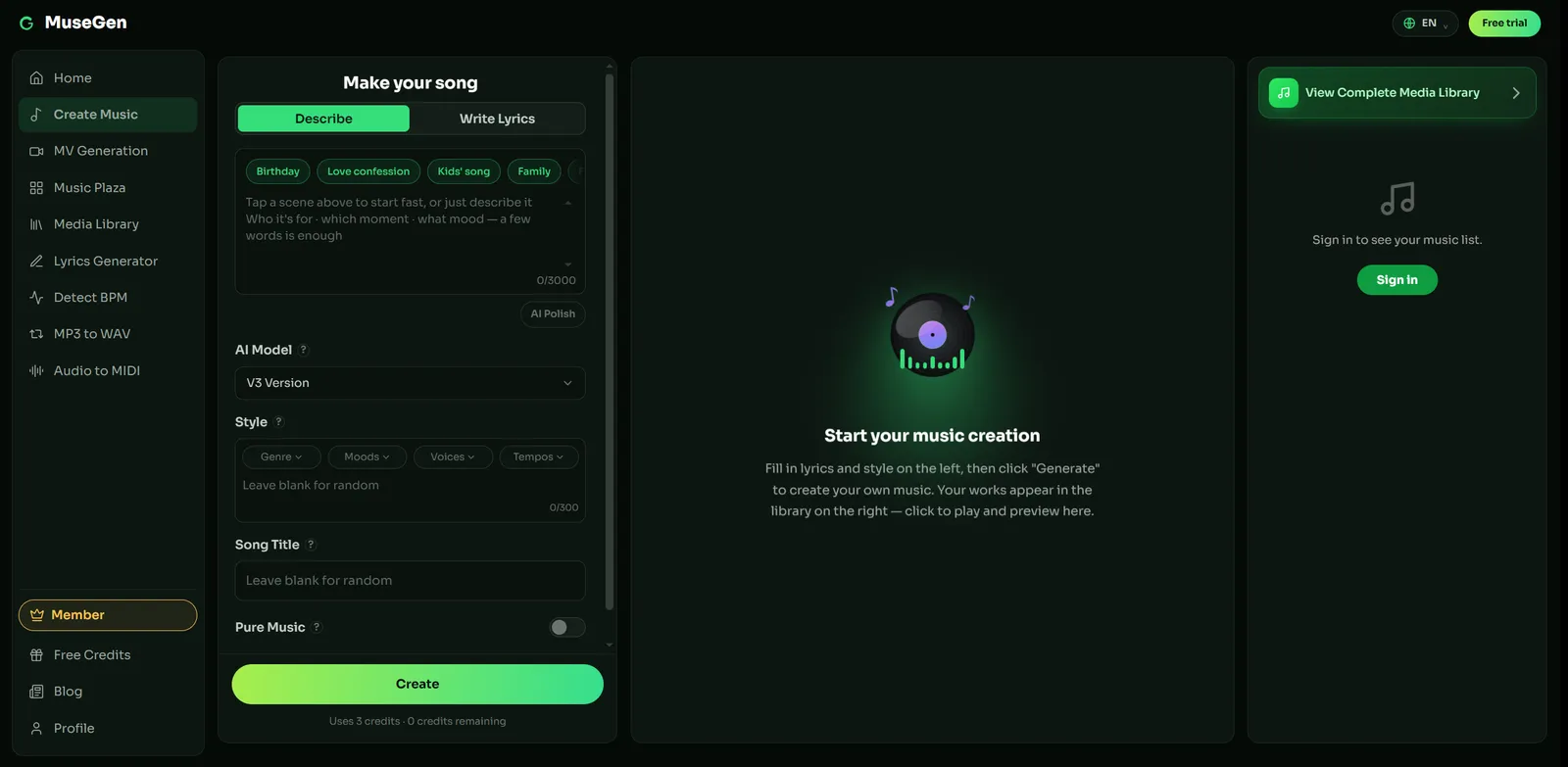
AI Song Maker: the track is described rather than sequenced.
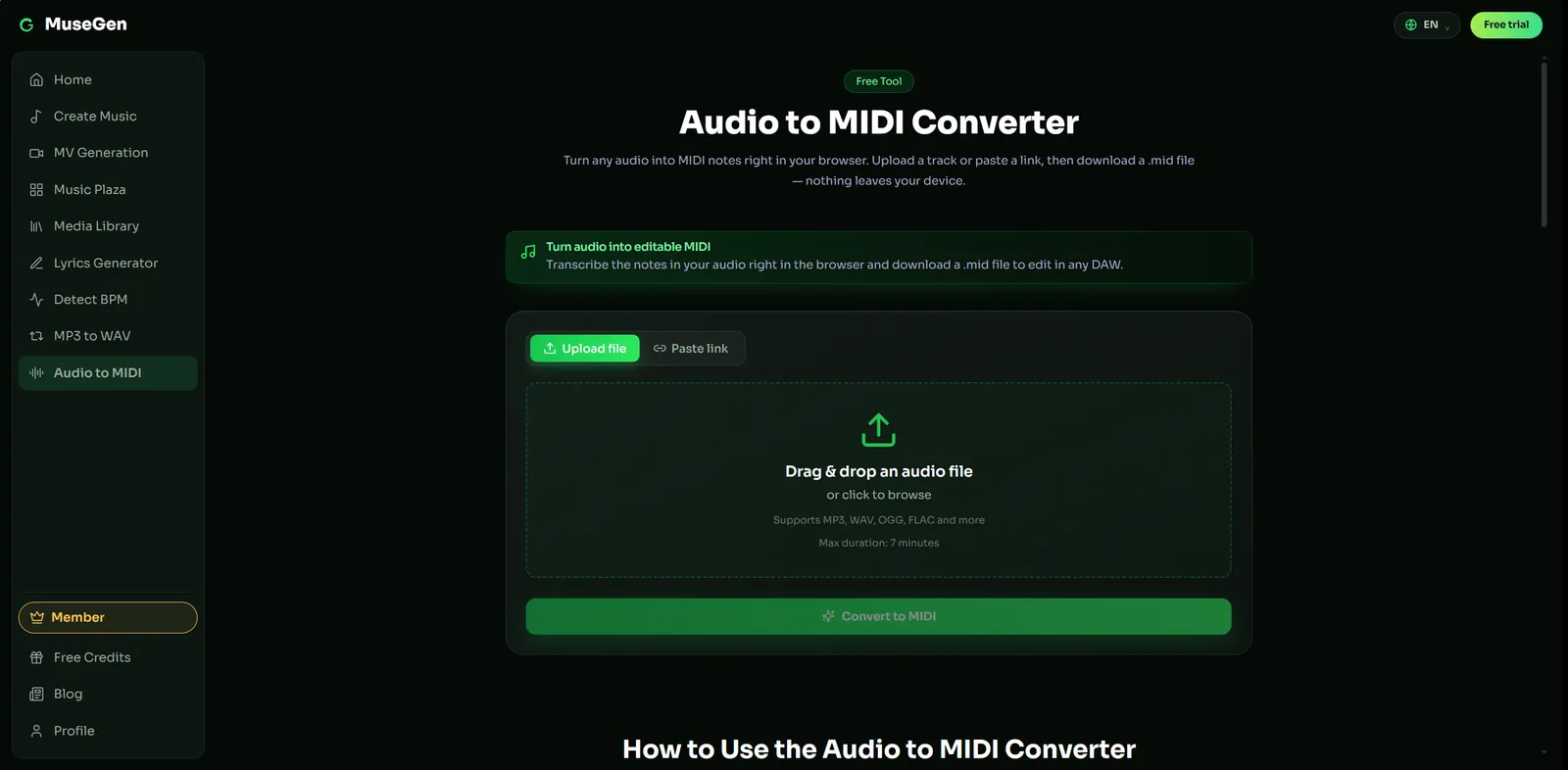
Audio to MIDI turns a finished recording back into note events you can edit.
Exports come as royalty-free WAV or MP3 — check MuseGen's current terms before commercial use.
Start from a finished track, then edit the notes — generate something, pull it into MIDI, and take it into your own sequencer. → Try MuseGen
FAQ
What is a sequencer in music?
It is the part of a setup that stores note events in time and plays them back. An event says which note, when it starts, how long it lasts and how hard it was struck. The sequencer holds a list of those instructions and sends them out on schedule; something else, a synthesiser or a sampler, turns them into sound. That division is the whole point of it: because the stored material is instructions rather than audio, you can change the instrument, the key or a single wrong note long after the part was written.
What is the difference between a sequencer and a DAW?
A DAW is the whole environment: recording, editing, mixing, effects and sequencing in one program. The sequencer is the timing component inside it, the part that holds note events and plays them back in order. Sequencers existed as standalone hardware for decades before DAWs did, and they still do, which is why the two words are not interchangeable even though most people meet a sequencer for the first time as a window inside a DAW.
Does a sequencer record sound?
No. A sequencer records the decisions that produce sound, not the sound itself. If you play a part into one, what gets saved is a list of pitches, start times, lengths and velocities, weighing a few kilobytes. Nothing about the tone is captured, which is both the strength and the cost: the same file will sound like a completely different piece of music on two machines with different instruments loaded.
What is a step sequencer?
A step sequencer divides a bar into a fixed number of equal slices and lets you switch each one on or off. Sixteen steps to a bar is the common arrangement, one step per sixteenth note, which is where the familiar row of sixteen buttons on drum machines comes from. It is quick to use and easy to read, and it works best for parts that sit neatly on those divisions rather than for phrases with irregular lengths.
What does quantise actually do?
It moves each note to the nearest line on a grid you choose. If you quantise to sixteenths, a note that landed slightly late gets pulled back to the sixteenth it was closest to. Nothing about the sound changes, only the start times, and possibly the lengths. Most sequencers also offer partial quantisation, which moves each note a set proportion of the way to the line instead of all of it.
What is the difference between a sequencer and a drum machine?
A drum machine is a sound source and a sequencer in one box. The sound source holds the drum voices, whether synthesised or sampled; the sequencer holds the pattern that triggers them. Take the sequencer out and you have a set of drum sounds waiting to be played by something else. That is why a standalone sequencer can drive a drum machine, and why the two words end up describing overlapping objects.
Can I get a MIDI file from an AI-generated song?
Not directly, because what comes back from a generator is audio. MuseGen's Audio to MIDI tool exists for exactly this gap: it analyses a finished audio file and estimates the notes in it, producing a MIDI file you can open in a sequencer. Treat the result as a transcription rather than a transfer. It is an estimate made from a mixed recording, and dense arrangements are harder to read than sparse ones, so expect to correct it.
Sources
- Roger Linn On Swing, Groove & The Magic Of The MPC's Timing — Attack Magazine. Where the swing percentage comes from and what it actually measures.
- Roland MC8 MicroComposer — Sound On Sound. MC-8 specifications and the "first microprocessor sequencer" counter-claim.
- Introducing MIDI 2.0 — Sound On Sound. The 2020 protocol and its higher-resolution velocity and controllers.
- The State of MIDI 2.0 — MIDI Association. Resolution figures and the fallback to 1.0 in mixed setups.
- Roland MC-8 Microcomposer — Wikipedia. Note capacity, price and keypad programming.
- Piano roll — Wikipedia. Perforated paper rolls and hand-marked step entry.
- MIDI beat clock — Wikipedia. 24 pulses per quarter note and the Song Position Pointer.
- Roland TR-808 — Wikipedia. The TR-REC step interface and the machine's commercial history.
- Ultimate Soundtracker — Wikipedia. The first tracker and the MOD format.
Dates and firsts in sequencer history are contested — several machines have a claim on being first, and the sources cited here disagree with each other. Swing percentages behave differently from one machine to the next, because each one quantises them to its own clock.