Audio Quality Checker
Check the loudness, true peak, clipping, stereo image and frequency bandwidth of any song — upload a file or paste a Suno or Udio link
Is your song ready to release?
Drag your audio file here
Or click to select a file
Supported formats: MP3, WAV, M4A, FLAC, OGG
Max duration: 8 minutes
Uploaded files are analyzed in your browser and never leave your device.MuseGen is an independent tool and isn't affiliated with Suno or Udio.
How to Check the Audio Quality of a Song
Get a full quality report in three steps.
Add a song
Upload an MP3, WAV, M4A, FLAC or OGG file, or paste a Suno or Udio song link.
Run the check
The checker measures loudness, peaks, clipping, stereo, bandwidth and silence, and scores the result.
Fix and release
Review each flagged item and its suggested fix, then re-export your master before uploading it to streaming services.
Why use MuseGen's Audio Quality Checker?
Broadcast-standard measurements with plain-language advice, made for AI music.
Built for AI music
Paste a Suno or Udio song link and check it without downloading the file first.
Standard loudness metering
Integrated loudness, loudness range and true peak follow ITU-R BS.1770 and EBU R 128.
Spots lossy sources
The bandwidth check finds the high-frequency cutoff left by MP3 or AAC encoding, even inside a WAV file.
Streaming preview
See how much Spotify, YouTube, Apple Music and other services will turn your song down.
Private file checks
Uploaded files are analyzed on your device and never leave your browser.
Clear fixes
Every warning explains what it means and what to change, in plain language.
Explore more music tools
Save, adjust and share your AI songs.
Audio Quality Checker Guide: Get AI Songs Ready for Streaming
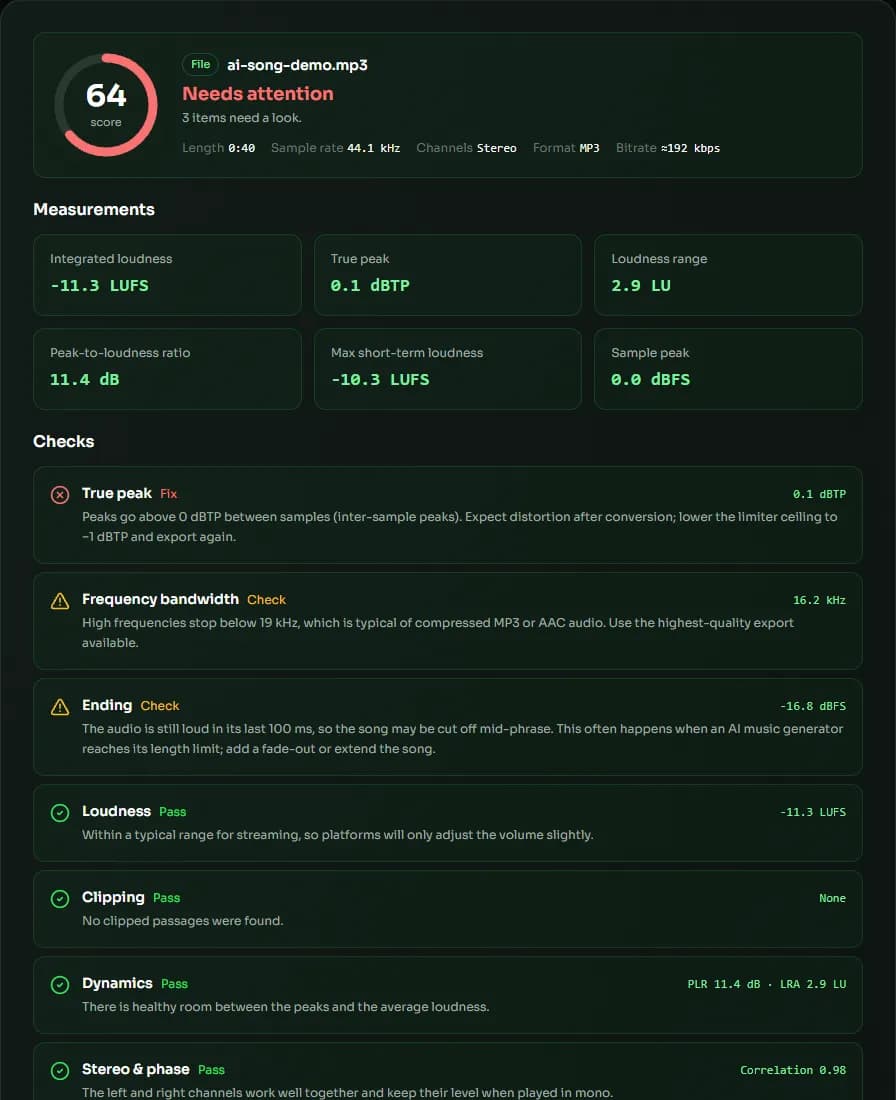
An audio quality checker reads the technical properties of a finished track and tells you whether it will hold up on streaming services, social apps and different speakers. AI music generators such as Suno and Udio produce complete songs in seconds, but their exports can be very loud, clipped, cut off at the end or encoded with a lossy codec. MuseGen's free audio quality checker measures each of these issues with broadcast-standard methods and explains what to fix. It's made for AI music creators, independent artists and producers who want a quick technical check before release. Unlike a loudness meter plugin, this online LUFS meter runs in your browser without a DAW, checks Suno and Udio links directly and explains each problem in plain language.
Loudness: LUFS and streaming normalization
Loudness is measured in LUFS (loudness units relative to full scale) with the K-weighted method from ITU-R BS.1770, the same measurement streaming services rely on. Integrated loudness is the average over the whole song, ignoring quiet passages; loudness range (LRA) shows how much the level changes between sections. Because Spotify, YouTube, TIDAL and Amazon Music normalize to around −14 LUFS and Apple Music to around −16 LUFS, a master at −8 LUFS is simply turned down by 6 dB or more — it won't sound louder, only more compressed.
True peak, clipping and dynamics
Digital audio can't go above 0 dBFS, and clipping happens when a waveform is pushed past that limit and flattened. The checker counts runs of three or more consecutive full-scale samples as clipping, and measures true peak with 4× oversampling to catch inter-sample peaks that ordinary meters miss. It also reports the peak-to-loudness ratio (PLR): values below about 6 dB point to heavy limiting that can make a song sound flat once its volume is normalized.
Bandwidth: spotting MP3 and AAC sources
Lossy codecs save space by removing high frequencies that are hard to hear — often everything above about 16 kHz at 128 kbps, and around 20 kHz at 320 kbps. The checker averages the spectrum across the song and looks for a sharp drop above 10 kHz. If a WAV or FLAC file shows that kind of cliff, it was most likely converted from an MP3 or AAC file and won't sound better than the original. When you download a Suno song, choose the highest-quality format available to you.
Stereo, phase and AI song endings
The correlation meter compares the left and right channels: values near +1 mean a narrow image, values near 0 a very wide one, and negative values mean the channels cancel each other when summed to mono — which is how many phone and smart speakers play music. Finally, the checker looks at the edges of the file: long silence at the start or end, and endings that stop while the music is still loud, a common sign that an AI generator cut the song off at its length limit.
| Check | Target | What a warning means |
|---|---|---|
| Integrated loudness | −20 to −7 LUFS (−14 is typical for streaming) | Very loud masters are turned down and can sound flat; very quiet ones play softer than other songs |
| True peak | ≤ −1 dBTP | Peaks may distort after MP3, AAC or Opus encoding |
| Clipping | No clipped passages | Audible crackles or harsh distortion |
| Peak-to-loudness ratio | ≥ 6 dB | Heavy compression or limiting |
| Stereo correlation | Above 0 (0.2 or higher is safer) | Lost level or a hollow sound in mono |
| Bandwidth | ≥ 19 kHz | Lossy source or low-bitrate encoding |
| Silence | Start ≤ 2 s, end ≤ 5 s | Gaps between songs in playlists |
| Ending | Fade-out or silence | The song may be cut off |
Audio Quality Checker FAQ
Sources & further reading
The concepts, formats and algorithms behind this tool, with their original references.
- ITU-R BS.1770: Algorithms to measure audio programme loudness and true-peak audio level – ITU — the K-weighted loudness and 4× oversampled true-peak measurements this checker uses
- EBU R 128: Loudness normalisation and permitted maximum level of audio signals – EBU — the loudness normalization recommendation behind LUFS targets and the −1 dBTP peak limit
- EBU Tech 3342: Loudness Range – EBU — how loudness range (LRA) is calculated
- Loudness normalization – Spotify for Artists — Spotify's playback loudness target and its advice on true peak
- Clipping (audio) – Wikipedia — what clipping is and why it causes distortion
Last updated:
 MuseGen
Create original music in any genre using advanced MuseGen technology.