How to Make a Thank You Song with AI, Step by Step

MuseGen Team
A thank-you card is read once and put on the shelf. A thank-you song can be played at the table, sent to a phone and played again in the car. The hard part is not the music. It is saying something specific enough that the person knows it is about them: the lift to school, the extra shift, the dish that was always on the table. This guide shows how to find that detail, turn it into a song with an AI song maker, and get it sung clearly, with descriptions, style lines and lyrics you can copy.
The short answer
Pick one person and one thing they did, write down three small details, and describe the song in a sentence or two. Add a style line and generate. In MuseGen each run returns two versions, so you can choose the warmer one, or write the chorus yourself so the thank you lands exactly where you want it.
- One song, one person. A song for the whole family says thanks to nobody in particular.
- Name the thing they did. “Thank you for everything” is the sentence every card already has.
- Add three small details. A place, an object, a habit. They are the lines the person will remember.
- Say thank you once or twice, not twenty times. The phrase works best at the end of the chorus.
- Match the sound to the relationship. A song for a nurse and a song for a best friend should not sound alike.
Quick facts
- Tool: MuseGen’s AI Song Maker. Its Describe tab writes the words for you; its Write Lyrics tab sings the words you bring.
- Your input: Either a description or finished lyrics (3,000 characters at most), plus a short style line (300 at most) and a title.
- Result: Two sung takes of the song each time, or backing music only when Instrumental is on.
- Price of a run: 3 credits, printed next to the Generate button. Welcome credits are granted once when you sign up.
- If the words stall: The free AI Lyrics Generator turns a theme of up to 1,000 characters into a lyric with labelled sections.
- Rights: Giving the song to the person you are thanking counts as personal use, which the free plan covers. The songs you make are yours on every plan; commercial use and file downloads sit with the paid plans.
Why a thank you song works
People say thank you all day, so the words have little weight left. A song carries them differently. It gives the thanks a tune, a length and a reason to stop and listen, and it can hold the details that a card has no room for. Most people have never been given one, which is part of why one lands.
It is also a modest thing to make. Gratitude songs do not have to be grand: Andrew Gold’s “Thank You for Being a Friend”, which reached number 25 on the US Billboard Hot 100 in 1978, is a plain song about a friend. What makes any of them work is the same as what makes a good toast: it is about one person, it is short and it is meant.
On the song: Thank You for Being a Friend, Wikipedia.
In the United States there is a day built around the idea: Thanksgiving falls on the fourth Thursday of November. But nobody needs a holiday to thank a teacher at the end of term, a colleague who covered a shift, a host after a long weekend or a parent on the day of a wedding. The steps below work the same for all of them.
Who it is for, and how each one differs
The person decides almost everything: the length, how funny it can be, how plainly the thanks is said. This table is a starting point of our own, built from what usually works rather than from any rule.
| Who you are thanking | What to put in | Sound to try |
|---|---|---|
| A parent or grandparent | One habit of theirs, a place from your childhood, a thing you only noticed later | Acoustic folk, warm piano, 80–95 BPM |
| A teacher or coach | The moment it clicked, a phrase they used, what you can do now | Upbeat acoustic pop, handclaps, 105–120 BPM |
| A friend | An in-joke, the time they showed up, a nickname | Indie pop or light folk, 100–115 BPM |
| A host or the cook | The dish, the table, the noise, the washing-up nobody wanted | Cosy jazz or folk, brushed drums, 85–100 BPM |
| A nurse, carer or doctor | One kindness, a night, what it meant, no names of patients | Gentle piano and strings, 65–80 BPM |
| A team or colleague | The project, the date, a joke the whole group is in on | Bright pop, claps, 115–128 BPM |
| Parents at a wedding | The house, a rule they kept, the thing they never said | Slow ballad, piano, strings, 60–75 BPM |
Step 1: Pick one person and one thing they did
Write one sentence in this shape: “Thank you to ___ for ___.” If you cannot finish it with a specific action, the song will come out as a list of compliments.
- Weak → “Thank you to Mum for everything.”
- Better → “Thank you to Mum for driving me to swimming at six every morning for four years.”
- Weak → “Thank you to the team for a great year.”
- Better → “Thank you to the team for finishing the launch while the office was being moved.”
If you want to thank several people, make more than one song, or keep one song for the group and give each person a verse. One song that tries to thank everyone at once usually thanks nobody in a way they can feel.
Step 2: Collect the small details
Songwriters talk about the difference between the big idea, which is the point of the song, and the small details, the scene that proves it. The thank you is the big idea. The details are what make it believable.
Andrea Stolpe, a songwriter and teacher, uses exactly this split in her start-to-finish songwriting lesson. She suggests free-writing for five minutes about a person or place, then highlighting which lines state the big idea and which are small details: the big ideas go to the chorus and the details to the verse. It is a good way to sort your own notes, and the video below covers it along with how verses and choruses are built.
Watch: “How to Write a Song (Start-to-Finish)” — Andrea Stolpe on free-writing, big ideas versus small details, and building a verse and a chorus. Published October 2025
For a thank you song, set a timer for five minutes and write down everything you remember about the person and the thing they did, without editing. Then sort it:
- Where. A kitchen, a car, a classroom, a hospital corridor, a street.
- Objects. A thermos, a whistle, a yellow raincoat, a battered notebook.
- Habits and sayings. What they always said, hummed or did with their hands.
- The turning point. The day or moment when their help changed something for you.
- What is different now. The result, said plainly: you passed, you moved, you stayed well, you finished.
A practical rule: pick three details and drop the rest. A song has room for about three. Ten details become a list and the listener loses the thread.
Check the details for anything the person would not want played in front of others. A song may be heard by the whole table. Keep out private health matters, family arguments and anything that is not yours to share.
Step 3: Describe the song
Go to the song maker and leave it on Describe, the first tab. Above the text area sits a strip of scene chips: Birthday, Love confession, Kids’ song, Family, Funny song, Teasing and Rap. None of them is for saying thanks, so we type into an empty box. Whatever you write there becomes the brief, and MuseGen drafts the words itself.
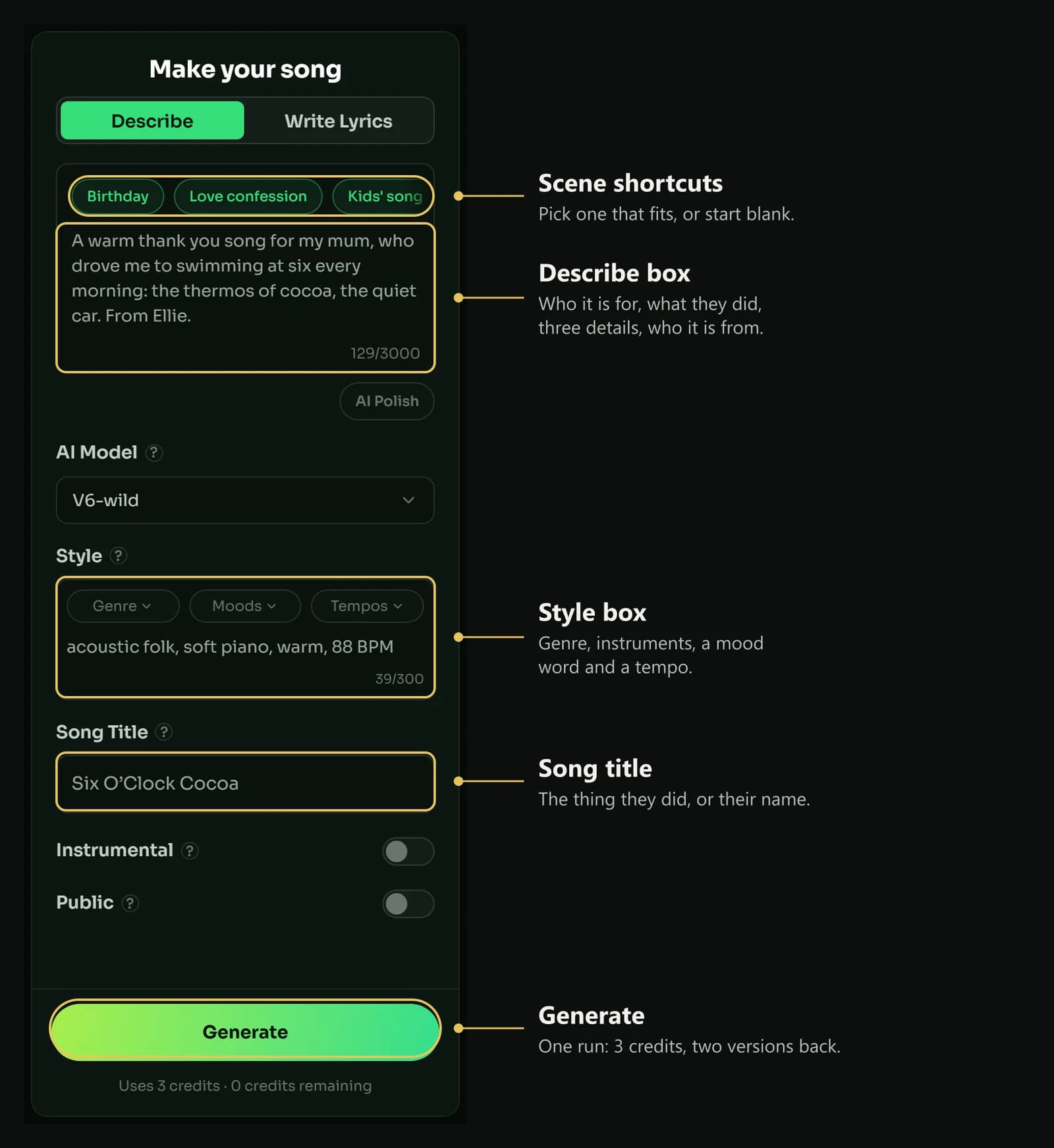
The Describe tab filled in for a thank-you song: the person, the thing they did, three details, and a style line. The gold outlines and labels are ours.
Here are five briefs you can borrow. Swap the names and details for your own:
▶ Descriptions to adapt
A warm thank you song for my mum, who drove me to swimming at six every morning
for four years: the thermos of cocoa, the heater on full, the quiet car, from Ellie
A thank you song for Mr Okafor, my maths teacher, who never gave up on me:
the whiteboard pen that squeaked, "try it a different way", and the day it finally clicked
A funny thank you song for Dad, who cooks the Thanksgiving turkey every year
and still sets off the smoke alarm: the apron, the burnt rolls, everyone clapping anyway
A thank you song for our team: the office move, the launch that went out on time,
the coffee machine that finally got fixed, upbeat and sincere
A gentle thank you song for the night nurse who stayed with us:
the soft lamp, the cup of tea, a kind voice at three in the morning, no names
Say who the song is from, even if it is only a first name. “From Ellie” changes the point of view of the whole lyric.
Think of the description as a brief rather than a script: the more concrete it is, the more concrete the song. Our guide to writing AI music prompts goes through the habits behind this.
Step 4: Or write the lyrics yourself
If you already know what you want to say, use the second tab, Write Lyrics. You paste or type the lyric into the large box (3,000 characters), and an AI lyrics button beside it will draft something if the page is blank. This tab also asks you to choose the singer with Vocal Gender: Male voice or Female voice.
Mark each section with a bracketed label, as MuseGen’s own lyrics generator does: [Verse 1], [Chorus], [Bridge]. These four habits suit a thank-you lyric:
- Put the details in the verses and the thanks in the chorus. That is the big-idea and small-detail split from Step 2.
- Say thank you at the end of a line. The last word of a line is held longest and heard best.
- Say it once or twice in the chorus, not in every line. A line that has to be said eight times is a line that has not found its detail.
- Finish with the result. The last verse or the bridge is where you say what is different now because of what they did.
▶ A sample verse and chorus
[Verse 1]
Six o'clock and the car was warm,
a thermos of cocoa, a gray sky storm,
you never said that it was hard,
you just kept turning into the pool car park.
[Chorus]
So this is for the mornings, Mum,
for every lap I never counted,
every dark road you drove me through,
I got here because of you, thank you.
Use these lines freely, but replace the people, the place and the objects with real ones.
The AI Lyrics Generator is free, and it helps when the page is blank. You type a theme (up to 1,000 characters) and choose a type, a mood, a language and a structure. When we gave it the theme “A thank you to my mum, who drove me to swimming at six every morning for four years: the thermos of cocoa, the quiet car” on 19 November 2026, it returned a lyric titled “The Quiet Car”, with two verses, a pre-chorus and a chorus, each labelled in brackets. Its chorus opened: “You drove me to the water when the world was still asleep, / a thermos full of cocoa and a silence I could keep.” Read the result as a first draft and replace its images with your own, line by line.
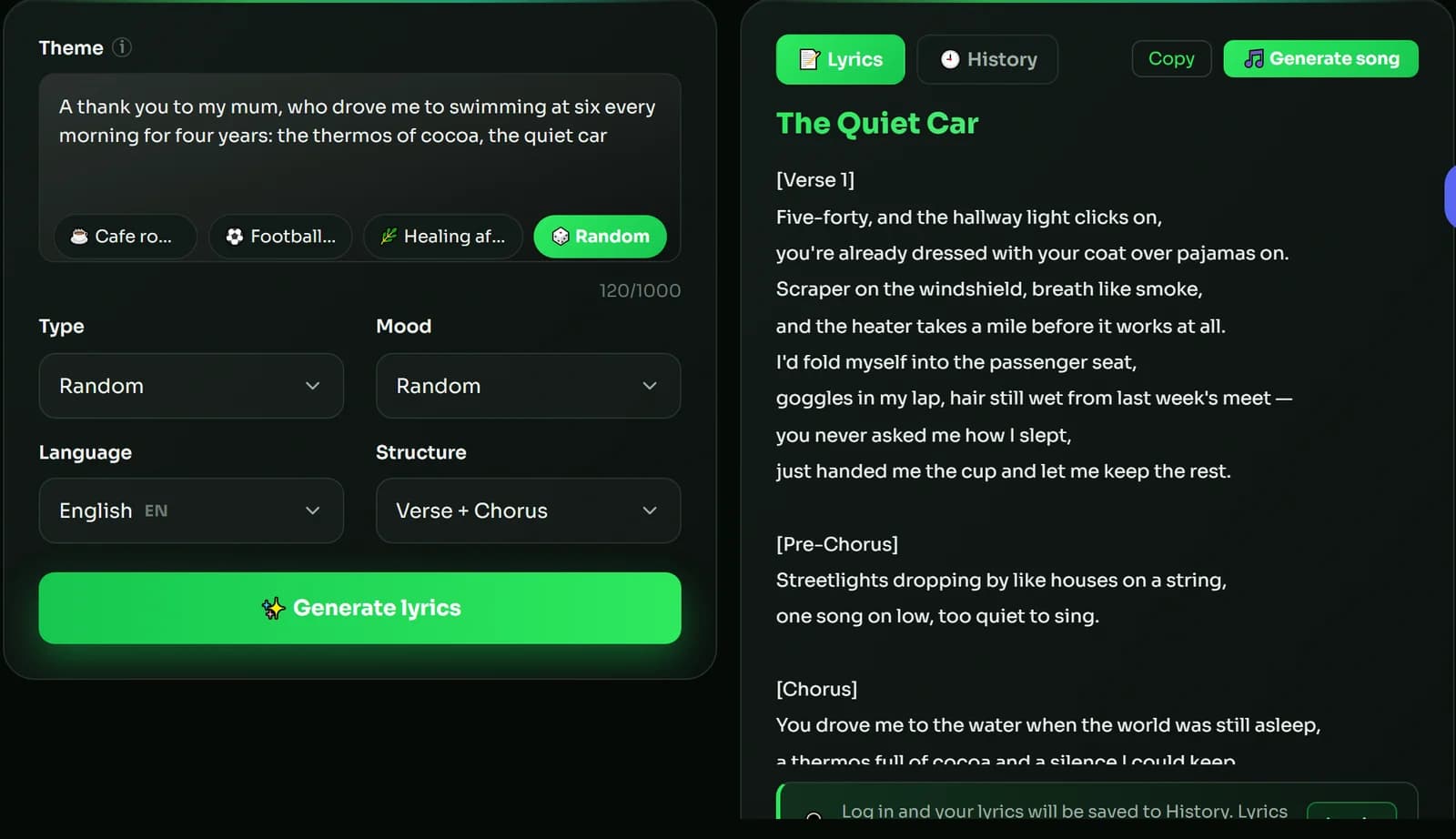
A one-line theme about a thank you goes in; a lyric with labelled sections comes out.
Press Generate song on the result to carry the lyric into the song maker. Logged-in users find the lyric again under History; if you are not logged in, copy it first.
Step 5: Choose the sound
Under Style you will find three menus (Genre, Moods, Tempos) and an open line of up to 300 characters. For a thank you song this line carries the tone as well as the genre: the same words can come out tender or comic depending on what you type here.
Write it in this order: genre, two or three instruments, one mood word, then the tempo.
▶ Four style lines for thank-you songs
acoustic folk, fingerpicked guitar, soft piano, warm, heartfelt, 88 BPM
upbeat acoustic pop, handclaps, ukulele, bright, grateful, 112 BPM
gentle piano ballad, strings, intimate, tender, 68 BPM
cosy jazz, brushed drums, upright bass, warm piano, playful, 94 BPM
The prompt formula guide gives the reasoning behind that order, plus a word bank of moods and instruments.
Next, the title. Leaving it empty gets you a random one, but a title that names the person or the deed, like “Six O’Clock Cocoa”, is already half of the thank you. For a card or a slideshow with no singing, turn on Instrumental. Then press Generate; the price, 3 credits, is printed under the button.
Step 6: Generate, compare and fix
You get two takes per run. Play both all the way through before choosing, and ask three questions:
- Is the thank you clear? You should be able to say in one sentence what the song thanks them for.
- Do the details come through? If the objects and places you gave are missing, add them to the lyrics or to the description.
- Does it sound like the relationship? If a song for your teacher sounds like a love song, the style line needs to be lighter.
If the words are right but the feel is wrong, leave the lyrics alone and rework the style line. If only one stretch is off, the paid plans include Edit song section, which redoes 7 to 60 seconds with new words and offers two replacements. If a name or an important word is swallowed, put it last in its line or respell it phonetically, then generate again.
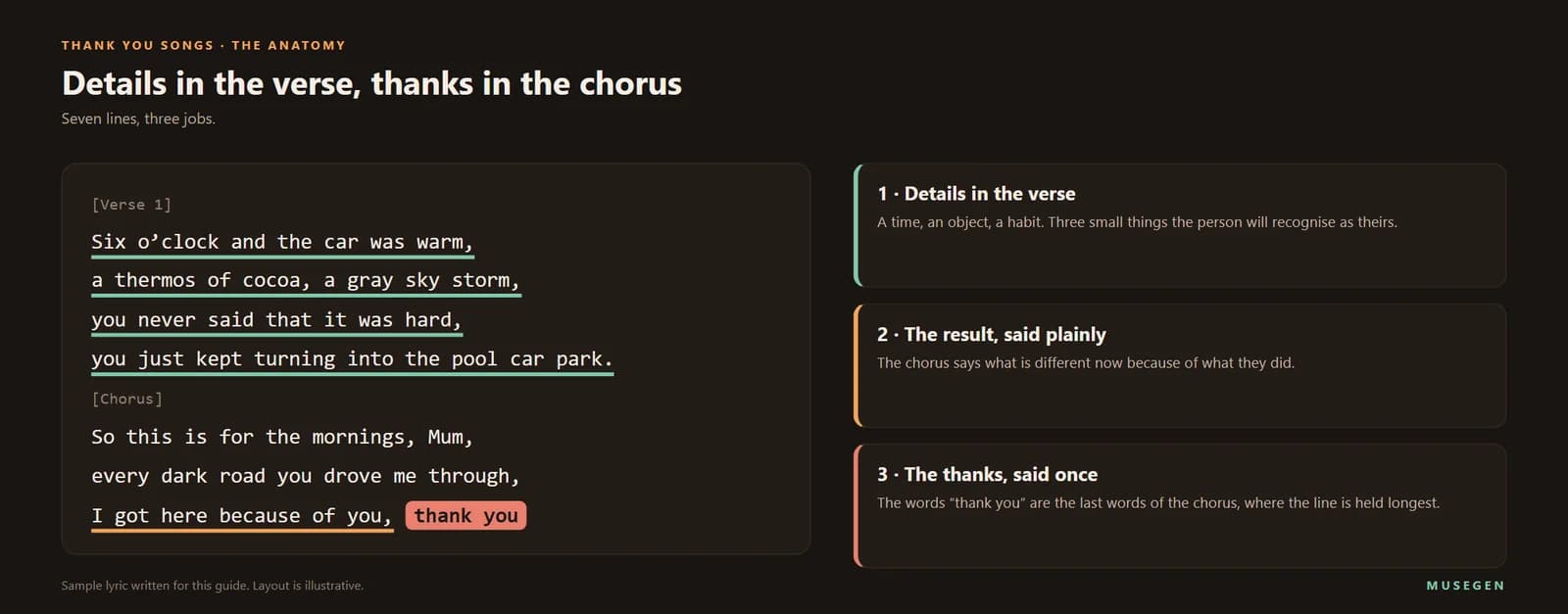
One short thank-you song, taken apart: where the details go, where the thanks goes, and the result at the end.
Three thank you songs, planned from start to finish
Below, the whole process is applied to three occasions. Each plan lists the choice we would make at every step, so you can see how one decision feeds the next. They are ready to run once you substitute your own names.
A song for a teacher at the end of term
- Person and thing → Mrs Alvarez, who stayed after school every Thursday so a nervous reader could practise out loud.
- Details → the beanbag in the corner, the stack of picture books, her saying “one more page”.
- Description → “A thank you song for Mrs Alvarez, who stayed after school every Thursday so I could read out loud: the beanbag in the corner, the stack of picture books, ‘one more page’. From Sam, age eight.”
- Style line → children’s folk pop, ukulele, glockenspiel, handclaps, sweet, 108 BPM
- What to check → that “one more page” appears in the chorus and that the name Alvarez is clear.
A song for the host after a long family weekend
- Person and thing → Aunt Rosa, who fed eleven people for three days in a small kitchen.
- Details → the folding table that wobbled, the pot that was never empty, the kids asleep on the sofa under coats.
- Lyrics → use Write Lyrics for the chorus so that “thank you, Rosa” closes a line, and ask the AI Lyrics Generator for verse drafts built on the details.
- Style line → cosy folk, acoustic guitar, upright bass, brushed drums, warm, 96 BPM
- What to check → that the humour about the wobbly table stays affectionate and that Rosa is the hero of every verse.
A song from a team to their manager
- Person and thing → the manager who defended the deadline and covered the weekend.
- Details → the Friday pizzas, the whiteboard that was never erased, the day the launch went out.
- Description → “A thank you song from the team to our manager: the Friday pizzas, the whiteboard nobody dared erase, the launch that went out on time. Warm and a little funny.”
- Style line → bright indie pop, claps, warm bass, gang vocals on the chorus, 118 BPM
- What to check → that no joke leaves anyone out. A song for a client, or one posted publicly as marketing, is commercial use and calls for a paid plan with commercial rights.
Giving it: the table, a message or a video
How you hand it over matters almost as much as the song. A few ways that work:
- At the table. Play it before the meal or after the plates are cleared, when people are sitting and can hear. Put the chorus on a card so everyone can join the second time round.
- As a message. Send the song with two lines of your own. Sending needs a file, and the MP3 and WAV downloads belong to the paid plans; playback from your library works everywhere.
- With a photo. Open Music Video Maker and pick Image to Video: one uploaded photo makes that person the star of a video in landscape or portrait, and you see a free 15-second preview first. Only upload photos you have permission to use.
- In person, if you can. Watch their face. It is the only review that counts.
The full flow is covered in making an AI music video and starring in one with your own photo. If the occasion is a birthday rather than a thank you, see how to make a birthday song with a name in it.
If you are looking for a thank you song that already exists
Many people who search for a thank you song want a track that already exists, for a church service, a school assembly or a playlist. The best-known examples include Andrew Gold’s “Thank You for Being a Friend” (1978), Alanis Morissette’s “Thank U” (1998) and Dido’s “Thank You”, which first appeared on a film soundtrack in 1998 and on her 1999 debut album.
Those songs are still in copyright. Do not paste their lyrics into a song maker and do not post a copy of the recording as your own. What you can do is write a new song with the same intention, which is what the rest of this guide is for.
On the songs: Thank U and Thank You (Dido song), Wikipedia.
Rights: who may hear it and where it may go
Giving it to the person is personal use. Free-plan songs may be used for personal, non-commercial purposes: a thank-you at the table, a message to a friend, a card for a teacher. You own what you generate on every plan.
Using it to make money is commercial use. A song for a client, a thank-you that works as marketing on a company page, or a track under a monetised video all need commercial rights. MuseGen includes these in its paid plans, and a single track can also be licensed alone.
A song about someone is about someone. Let them hear it first. If it names a child, a patient or a colleague, check that they are comfortable with others hearing it, and use photos only of people who have agreed.
When it does not sound right
| What you hear | What to change |
|---|---|
| It sounds like a greeting card | Add three concrete details and remove any line that could be said about anyone. |
| It is too sugary | Lighten the style line and cut one adjective from every line of the lyrics. |
| It is too jokey for the person | Remove the comic details, choose a slower tempo and a piano or acoustic guitar style. |
| The thank you is lost | In Write Lyrics, end the chorus on “thank you” and repeat the chorus where it should return. |
| A name comes out wrong | Write it phonetically, end a line on it, and generate again. |
| It is too long for the moment | Cut a verse and keep the chorus and the last line. |
| You wanted music only | Turn Instrumental on and run it again. |
Say it in a way they will keep.
Start with one name and one deed, add three small details in the song maker, and choose between the two versions.
FAQ
Can AI make a thank you song?
Yes. Give an AI song maker a few sentences about the person, or lyrics you wrote, and it returns a sung track in minutes. In MuseGen you describe who it is for and what they did, add a style line, and receive two versions for 3 credits.
What should I put in a thank you song?
One person, one specific thing they did, and about three small details such as a place, an object and a habit. The thank you itself works best as the last words of the chorus, and a line about what is different now because of them gives the song an ending.
Is there a free AI thank you song generator?
You can begin without paying. Sign-up brings one-time welcome credits, each song costs 3, and the lyrics generator is free. Free-plan songs are for personal use, so playing one to the person you are thanking is fine, and the songs are yours on every plan.
How do I write a thank you song for my mom or dad?
Choose one habit or one journey, such as the early drives to practice or the dish they always made, and give three details from it. A slow acoustic or piano style with the words clear in front suits most parents. Say who the song is from, even if it is only a first name.
How do I make a thank you song for a teacher?
Name the moment it clicked, a phrase the teacher used and what you can do now. An upbeat acoustic pop style works well for a class song, and a short chorus that children can learn is easier to sing along to than a long lyric.
Can I make a funny thank you song?
Yes, as long as the joke is one the person would tell about themselves. Add one comic detail, such as the burnt rolls or the wobbly table, and keep the chorus sincere. If it sounds too jokey, slow the tempo and switch to piano or acoustic guitar.
Can I use the lyrics of a famous thank you song?
No. Songs such as Thank You for Being a Friend, Thank U and Thank You are still in copyright, so do not paste their words into a song maker. Write your own lyrics about your own person, which is what makes the song personal.
Can I turn the thank you song into a video?
Yes. In MuseGen's Music Video Maker, choose Image to Video, upload one photo and the person in it becomes the star, in landscape or portrait. A free 15-second preview comes before the full video, and you need permission to use any photo you upload.
Can I use a thank you song for my business or my customers?
Playing one to a colleague or a friend is personal use. A song for a client, a marketing post or a monetised video is commercial use, which MuseGen covers through its paid plans or through a licence for a single track.
How long should a thank you song be?
Between one and two minutes is enough for most occasions: one verse, a chorus, a second verse and a final chorus. If it is played in front of a group, shorter is better, because the thanks should end while everyone is still listening.
Keep reading
- How to Make a Happy Birthday Song with a Name in It — getting a name sung clearly.
- How to Write AI Music Prompts — eight rules for descriptions and style lines.
- The 10 Best AI Lyrics Generators of 2026 — more tools for the words.
- How to Star in Your Own AI Music Video — put a photo of the person in it.
Sources & notes
- MuseGen — AI Song Maker, AI Lyrics Generator and Music Video Maker, read on 19 November 2026. Source of the tabs, the scene shortcuts, the field limits, the cost shown for a run, the lyrics generator’s output and the video options.
- MuseGen — Pricing, Terms of Service and Commercial License Terms. Source of the plan benefits and the ownership, personal-use and input-permission wording.
- How to Write a Song (Start-to-Finish) – A Repeatable Process — Andrea Stolpe, YouTube, October 2025. The big-idea and small-detail method and the five-minute free-write.
- Thank You for Being a Friend, Thank U and Thank You (Dido song) — Wikipedia, read 19 November 2026. The release years and chart position of the three songs.
- Thanksgiving (United States) — Wikipedia, read 19 November 2026. The fourth Thursday of November.
The advice on choosing the person, the details and the sound, the table of recipients, and the sample descriptions, style lines and lyrics are our own. Results vary from run to run. In the song-maker screenshot, the empty space inside the form is trimmed, and the gold outlines and labels are ours.
 MuseGen
Create original music in any genre using advanced MuseGen technology.