How to Make a Happy Birthday Song with a Name in It

MuseGen Team
A birthday song lands differently when it says the person’s name, mentions the bike they got last year and gets their age right. An AI song maker can write and sing one in a few minutes. The part that needs your attention is the name: where it sits in the line, how it is spelled, and how often it comes round. This guide covers that first, then the steps in MuseGen from a blank box to a song you can play at the table.
The short answer
Tap the Birthday shortcut in the song maker, type the name over “someone special”, add two or three details only they would recognise, and generate. For a name that is sung clearly every time, write the chorus yourself and put the name at the end of a line.
- Put the name last in the line. The final word of a line is held longest and heard best.
- Say it more than once. Twice in the chorus, and the chorus two or three times.
- Spell an unusual name the way it sounds. Niamh becomes Neev for the singer.
- Add what only they would recognise. The age, a habit, a place, a joke.
- Match the style to the person. A seven-year-old and a seventy-year-old want different songs.
Quick facts
- Starting point: The Birthday shortcut on the Describe tab of MuseGen’s song maker.
- What the shortcut does: Fills the box with a ready-made birthday request and selects the words “someone special” so you can type the name over them.
- Inputs: Either a description or lyrics of your own, each with room for 3,000 characters, plus a style line of 300 and a title.
- Output: Every run gives you two sung versions to choose between.
- Credits: One run takes 3, and the page shows that before you press Generate.
- Rights: A song played at home or at the party counts as personal use and is covered on the free plan. Every plan includes ownership of the songs you make; a paid plan adds the file download and commercial rights.
- The traditional song: “Happy Birthday to You” is in the public domain in the United States and the European Union.
Two kinds of birthday song with a name
People who search for a birthday song with a name usually mean one of two things. The first is the tune everyone knows, with the name dropped into the third line. The second is a new song written about one person: their age, their habits, the year they have had.
An AI song maker makes the second kind, and it is the better present. The traditional tune takes fifteen seconds and belongs to everybody. A song that mentions the yellow bike and the dinosaur phase could only have been made for one child, and that is what gets played again in the car.
How to get the name sung clearly
A generated singer treats a name like any other word, which means the rules that make any word clear apply to it. These six are our own working advice, not settings in the tool.
- End the line with the name. The last word of a line is usually held and followed by a pause. A name buried in the middle of a long line is the one most likely to be rushed.
- Give it a rhyme. When the next line ends on a word that rhymes with the name, the listener hears it twice.
- Repeat it. Twice in a four-line chorus is enough, because the chorus itself returns.
- Spell it the way it sounds. Write the name as the person says it, not as it appears on their passport.
- Keep the line short. Six to eight syllables with the name at the end leaves it room.
- Use the name they answer to. If everyone calls her Lottie, a song for Charlotte will sound like it is about someone else.
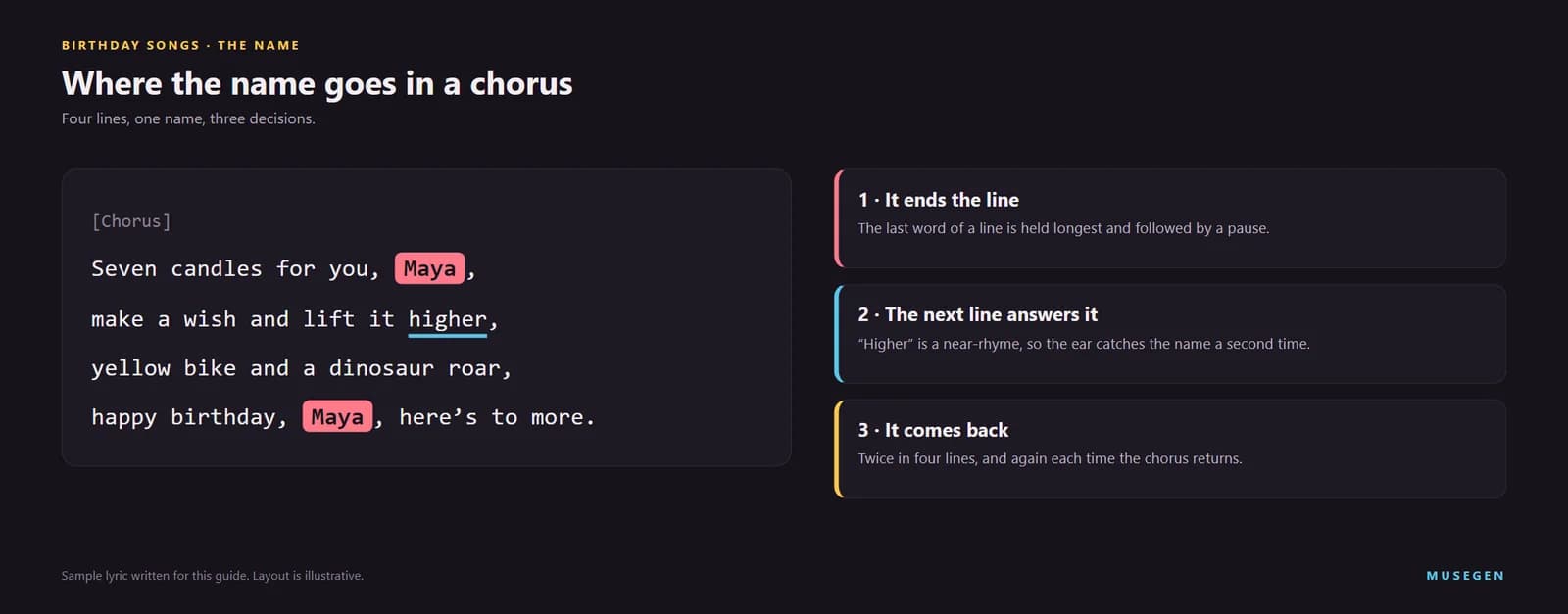
One chorus, with the name at the end of a line, answered by a near-rhyme, and heard twice.
Spelling a name for the singer
| Written | Type it as | Why |
|---|---|---|
| Niamh | Neev | The spelling gives no clue to the sound |
| Aoife | Ee-fa | A hyphen marks where the syllables break |
| Joaquin | Wah-keen | The first letter is not pronounced as written |
| Xavier | Zay-vier | Two common pronunciations; choose the one the family uses |
Use the real spelling in the song title, where it is read and not sung.
Finding a rhyme for the name
| The name ends like | For example | Words to answer it |
|---|---|---|
| “-ee” | Lily, Charlie, Sophie, Henry | me, see, three, free, be |
| “-en” or “-an” | Ben, Megan, Dan, Ethan | again, ten, then; plan, can, began |
| “-o” | Leo, Theo, Arlo, Jo | go, know, glow, show |
| “-ay” | Kay, Ray, Mae, Jay | day, today, way, stay |
| “-ake” or “-ack” | Jake, Jack, Zac | cake, wake, awake; back, track |
| “-a” | Maya, Mia, Ella, Sophia | No clean rhyme. Use a near-rhyme such as higher or brighter, or let the name close a line on its own |
Names that are harder to sing, and what to do
Some names sit easily in a line. Others need help. These are the cases that come up most often, with a fix for each. As with the rules above, they are our own working advice.
- A long name, such as Maximilian or Alexandria → give it a short line of its own, or use the name the family calls them in the chorus and save the full name for one moment in a verse.
- A one-syllable name, such as Sam, Kate or Jo → it passes in a single beat, so end the line on it and leave a pause after it, or sing it twice in a row: “Sam, Sam, the day is yours.”
- A name that is also a word, such as Rose, Grace, Will or Summer → a listener may hear the word instead. Put “happy birthday” straight before it so the meaning is clear, or play on the double meaning on purpose.
- Two names, for twins or a couple → join them with “and” in one line and keep the same order every time, or give each name its own line ending. Check that the singer does not run them together.
- A name stressed in an unusual place → say the line aloud and clap on the strong words. If a clap lands on a weak syllable of the name, move the name or change the words around it until the stressed syllable falls on the beat.
The stress test in the last point works for every line, not only the ones with a name in them. Words that move the way people talk are the ones a singer can deliver and a listener can follow.
If you want to write more of the words yourself, 12tone’s video goes deeper into the two techniques above: rhymes, including near-rhymes, and putting stressed syllables on the beat.
Watch: “The Secret To Writing Lyrics” — 12tone on perfect and slant rhymes, and on putting stressed syllables on the beat. Published August 2018
Step 1: Start from the Birthday shortcut
Open the song maker. On the Describe tab, a row of scene shortcuts sits above the box, and Birthday is the first of them. Tap it and the box fills with a ready-made request: a joyful birthday song for someone special, with a favourite shared memory and an uplifting pop style. The words “someone special” arrive already selected, so the first thing you type replaces them with the name.
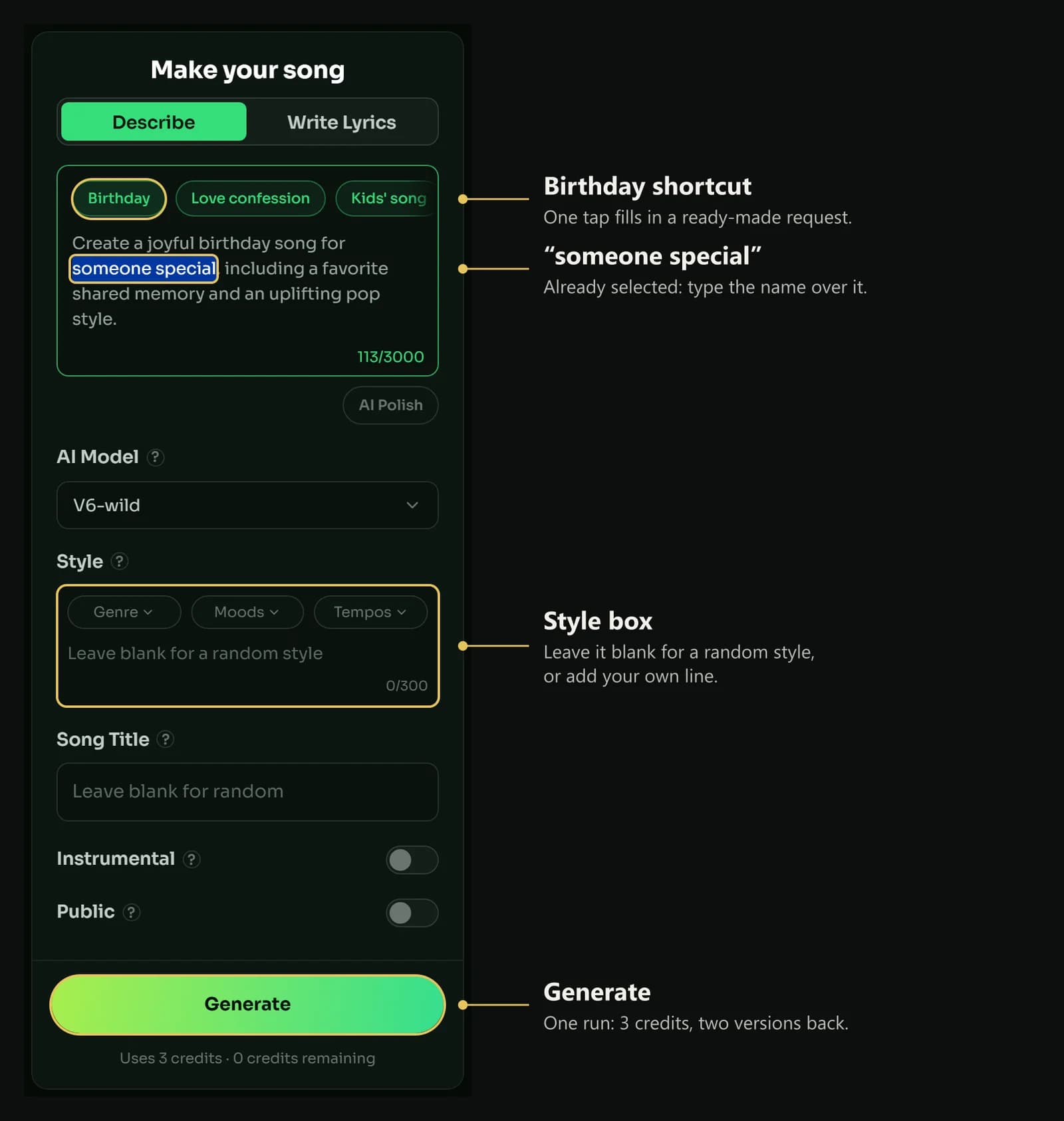
The Birthday shortcut: a starting sentence, with “someone special” selected and waiting for a name. The gold outlines and labels are ours.
The Funny song and Teasing shortcuts sit in the same row if the birthday calls for a roast rather than a toast. In Describe mode MuseGen writes the lyrics from your description, so this is the fastest route. It is the quickest route; when you want the name on an exact beat, switch to Write Lyrics and place it yourself, as Step 3 shows.
Step 2: Add what only they would recognise
Replace the general request with a specific one. The pattern that works is the name, the age or the milestone, and then two or three details that would mean nothing to a stranger.
▶ Descriptions to adapt
A joyful birthday song for Maya, turning seven: her yellow bike,
the dinosaur names only she can pronounce, pancakes shaped like stars
A birthday song for Daniel from his wife: thirty-five today, still singing in the car,
the coffee he brings me every morning
A birthday song for Mum, turning sixty: forty years of Sunday roasts, her garden,
the way she hums when she thinks nobody hears
A funny birthday song for Priya: late to her own party again,
world champion of losing her keys, the best friend anyone could have
A birthday song for Grandad Joe at eighty: his shed, his terrible jokes,
the football scores he still shouts at the radio
A cheerful birthday song for Sam from the whole office:
the spreadsheets only he understands and the biscuits he never shares
A party birthday song for Chloe's twenty-first: the girls from school,
the dance floor, a toast to whatever comes next
Say who the song is from. “From his wife” or “from the whole office” tells the lyric whose voice to write in.
With jokes, stay on the side of things the person laughs about themselves. A song is played in front of everyone.
Step 3: Write the chorus yourself
If the name matters more than anything else in the song, take control of the four lines it lives in. Switch to Write Lyrics, where the box has room for 3,000 characters of your own words, and label each section in square brackets. A Vocal Gender choice on this tab sets a male or a female voice.
▶ A verse and a chorus built round a name
[Verse 1]
Up before the sun again,
socks on wrong and counting ten,
pancakes shaped like little stars,
dinosaurs in every jar.
[Chorus]
Seven candles for you, Maya,
make a wish and lift it higher,
yellow bike and a dinosaur roar,
happy birthday, Maya, here's to more.
Swap the name, the number and the two details in line three, and the chorus is yours. Paste the chorus again after a second verse so that it returns.
If you would rather edit than write, the AI Lyrics Generator drafts a full lyric from a one-line theme, free. We gave it “A birthday song for Maya, who is turning seven, loves dinosaurs and her yellow bike, from Mum and Dad” in November 2026. It returned a lyric called “Seven Comes Roaring”, with three verses, a pre-chorus, a bridge and a chorus that included the line “Pedal it, Maya, the hill’s got a view”. The draft put the name in each chorus; we would still add a second mention at a line ending, which the song maker then sings clearly, before sending it on. A Generate song button on the result carries the lyric into the song maker.
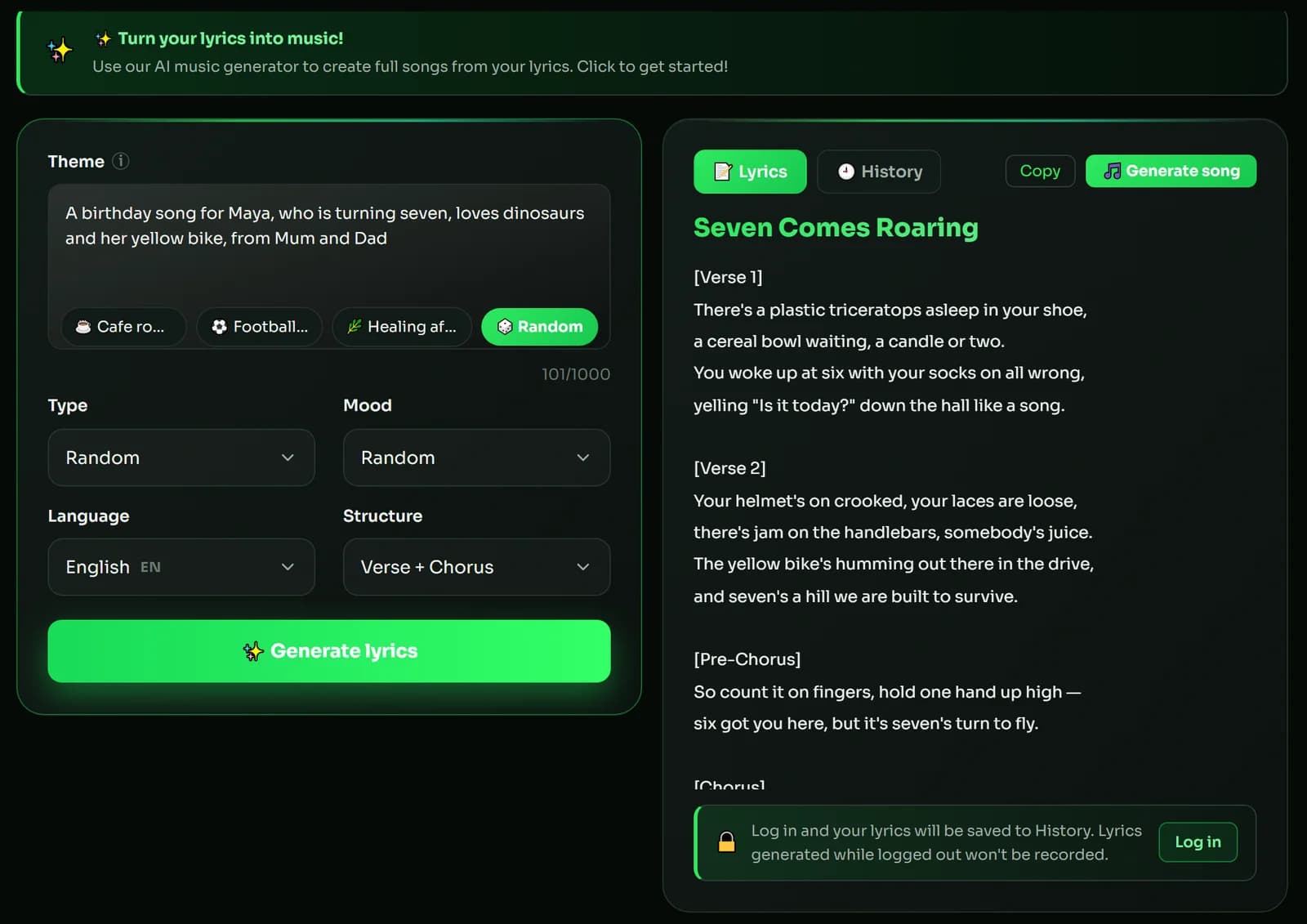
A one-line theme in, a full birthday lyric out. Edit the name’s position before you use it.
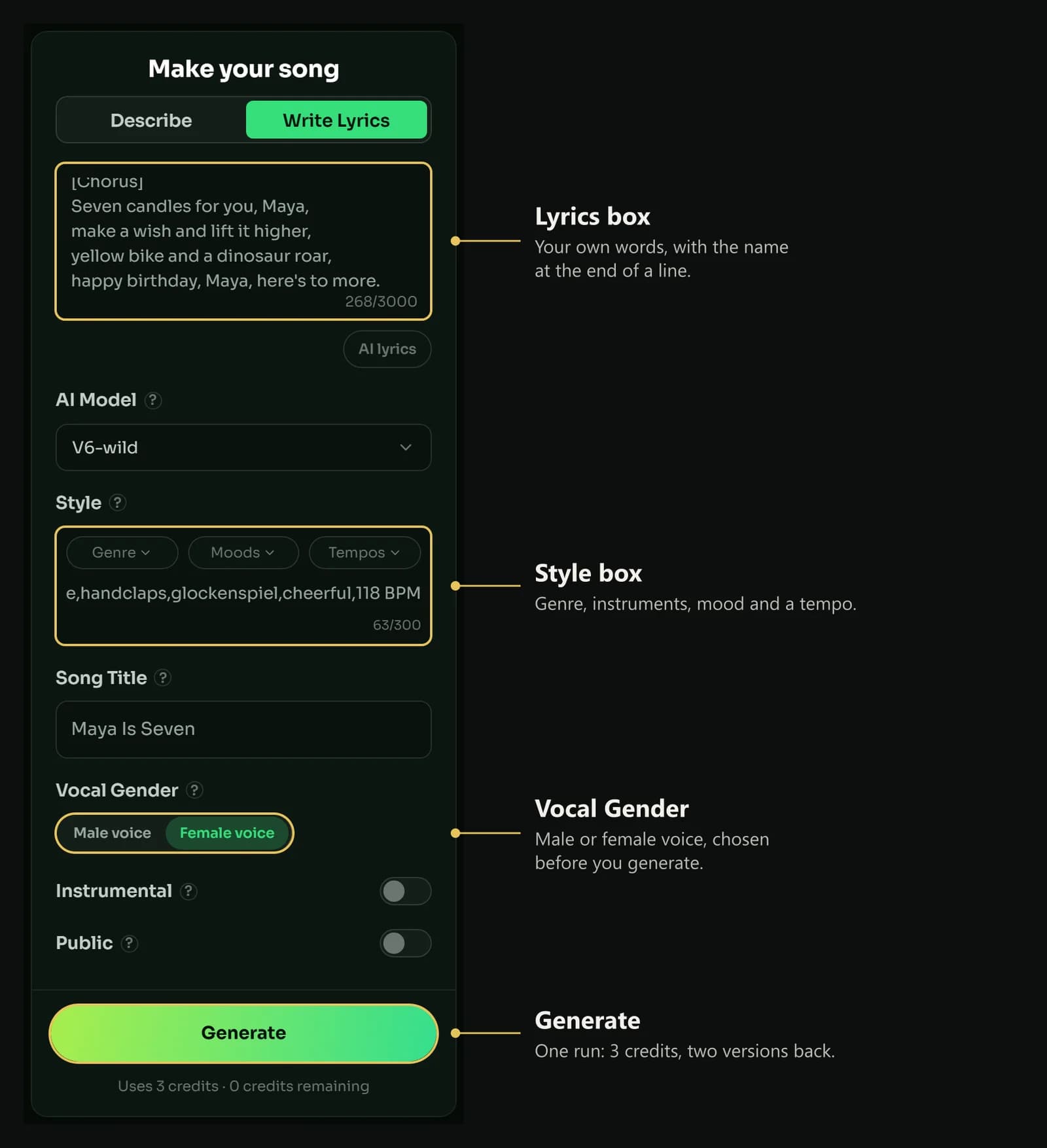
Write Lyrics: the chorus with the name where you put it, a style line, a title and a voice. The gold outlines and labels are ours.
Step 4: Match the style to the person
Next to its Genre, Moods and Tempos menus, the Style box has a free line of 300 characters. The shortcut suggests uplifting pop, which suits most birthdays. These lines suit particular ones:
| If the song is for | Pick this style line |
|---|---|
| A child under eight | upbeat kids pop, ukulele, handclaps, glockenspiel, cheerful, 118 BPM |
| A teenager | bright pop rock, driving drums, electric guitar, shout-along chorus, 150 BPM |
| A partner | soft acoustic ballad, fingerpicked guitar, warm vocal, intimate, 80 BPM |
| A parent or grandparent | swing jazz, walking bass, brushed drums, muted trumpet, playful, 126 BPM |
| A friend who can take a joke | funk pop, slap bass, horn stabs, cheeky, 110 BPM |
| A milestone party | dance pop, four-on-the-floor, bright synths, big chorus, 124 BPM |
| A colleague | feel-good indie pop, clean guitar, claps, light, 112 BPM |
The tempos are first guesses. Our prompt formula guide has a larger word bank if none of these fits, and the eight rules for prompts explain why a short line with a tempo beats a long one without.
Step 5: Generate and check the name
Give the song a title and press Generate. A run uses 3 credits, shown under the button, and returns two versions. Listen to both with one question in mind: can someone who has never seen the lyrics tell what the name is?
- If the name is clear in one version → keep that one, whatever else you think of the other.
- If the name is rushed in both → shorten its line, move it to the end, and run again.
- If the name is mispronounced → respell it by sound and run again.
- If the name is right and one other line is wrong → on a paid plan, Edit song section redoes a stretch of 7 to 60 seconds with new words and gives you two versions of the change.
Step 6: Play it, send it, or make a video
Playing it at the party is personal use. That is what the free plan allows, and on any plan the song you generate belongs to you. You can play the song from your library on the site. When you want a file to send or to keep, a paid plan adds the MP3 and WAV download.
A video makes it a keepsake. MuseGen’s Music Video Maker starts from your finished song. Add one photo on its Image to Video tab and the person in it becomes the star, in 16:9 or in 9:16 for a phone. You see the story and the first frames before any video is made, then a free 15-second preview. MuseGen’s terms require that you have permission for any photo you upload, so ask first, or keep the surprise to the song. Our guide to putting a photo in an AI music video walks through it.
Using it for work is commercial use. A song for a client, a paid greeting service or a monetised channel needs a paid plan or a commercial licence for that one track.
What to put in the song at each age
The details change with the age, and so does who the song is really for. A first-birthday song is sung to the parents as much as to the baby; a hundredth is a whole life in three minutes. These are starting suggestions, not rules.
| Age | What to mention | A style that tends to fit |
|---|---|---|
| 1 | The year of firsts: the first step, the first word, the nights nobody slept | Lullaby, music box, soft strings, around 70 BPM |
| 4 to 10 | The things they talk about all day: an animal, a team, a toy with a name | Kids pop with handclaps and glockenspiel |
| 13 | The first teenage year: a new school, a new phone, a new kind of independence | Bright pop rock, a shout-along chorus |
| 15 or 16 | A big party year: the quinceañera in Latin American cultures, the sweet sixteen in the United States and Canada | Dance pop with a big chorus for the room |
| 18 and 21 | Leaving home, the first car, what comes next | Anthemic indie pop |
| 30, 40, 50 | A gentle joke about the number, then what they have built | Funk pop or swing |
| 60 and over | The long view: family, a place, a saying everyone repeats | Swing, jazz or a warm ballad |
| 100 | A life in a few lines: the decade they were born, the people who came after | Crooner ballad with brushed drums |
On the two coming-of-age parties: quinceañera and sweet sixteen.
Playing it on the day
A song made for one person still has to work in a room full of people. A little planning keeps the moment from going wrong.
- Choose the moment. Play it when everyone is sitting down, before the candles. Once the cake is cut, the room is too busy to listen.
- Test the speaker first. A phone speaker loses the bass and most of the warmth. Play it once on the speaker you will use, at the volume you will use.
- Give the guests the chorus. Put the words on a screen or a card. The chorus comes back two or three times, so by the second one the room can sing along.
- Have it ready without the internet. Playing from your library needs a connection; a downloaded file (a paid-plan feature) plays anywhere.
- Film the reaction, with permission. The face of the person hearing their name in a song is often the best part.
- If they are far away, send it as a file or turn it into a short video, so they can play it at their own party.
Can you use the traditional Happy Birthday song?
Yes. “Happy Birthday to You” is in the public domain in the United States and the European Union. A US federal judge ruled in September 2015 that the long-standing copyright claim on it was invalid, a settlement in 2016 confirmed the song as public domain, and the copyright in the European Union expired on 1 January 2017.
So you may type its words into the Write Lyrics box with a name added. Bear in mind what the song maker does with them: it writes its own music for the words it is given, so you get a new melody, a fresh tune for these words. The familiar tune stays with a room full of people singing it; the new song is the one that is about one person.
On the song’s copyright history: Happy Birthday to You. This is general information, and the position differs in some other countries.
Make one that could only be for them.
Open the song maker, tap Birthday, type the name, and add the two things nobody else would know.
FAQ
Can AI make a happy birthday song with a name in it?
Yes. An AI song maker writes and sings a new birthday song around the name and details you give it. In MuseGen, tap the Birthday shortcut, type the name over the words someone special, and each run returns two versions for 3 credits.
Is there a free birthday song maker with names?
You can start on MuseGen without paying: new accounts receive welcome credits one time, each song run uses 3, and the lyrics generator costs nothing. Free-plan songs are for personal use, which covers playing one at the party; downloading the file takes a paid plan.
How do I get the AI to pronounce a name correctly?
Spell the name the way it sounds and let it close the line. Niamh typed as Neev, or Joaquin as Wah-keen, gives the singer the sound instead of the spelling, and a name that closes a short line is held longer than one in the middle.
Can I use the traditional Happy Birthday song?
Yes. Happy Birthday to You is in the public domain in the United States, confirmed by a 2016 court settlement, and in the European Union, where the copyright expired on 1 January 2017. An AI song maker will set the words to new music, so you get a fresh tune for the words.
What should I include in a personalised birthday song?
The name, the age or milestone, who the song is from, and two or three details only that person would recognise, such as a hobby, a habit or a place. Three specific details do more than a list of compliments.
Where should the name go in the lyrics?
At the end of a line in the chorus, at least twice. The chorus is the part that repeats, so a name used twice there is heard six times in a song with three choruses.
Can I make a funny birthday song?
Yes. MuseGen's song maker has Funny song and Teasing shortcuts beside Birthday, and a description such as late to her own party again, world champion of losing her keys sets the tone. Keep to jokes the person makes about themselves, because the song will be played in front of everyone.
Can I turn the birthday song into a video with their photo?
Yes. MuseGen's Music Video Maker has an Image to Video tab: upload one photo and the person in it leads the video, in 16:9 or 9:16, with a free 15-second preview before the full video. The terms require permission for any photo you upload.
How do I fit a long name into a birthday song?
Give the long name a short line of its own, or use the shorter name the family calls them in the chorus and keep the full name for one moment in a verse. Say the line aloud and clap on the strong words to check the stressed syllable of the name lands on the beat.
When should I play a birthday song at a party?
When everyone is sitting down and before the candles, while the room is still listening. Test the speaker first at the volume you will use, and put the chorus on a screen or a card so guests can join in when it comes round again.
Keep reading
- How to Star in Your Own AI Music Video — add a photo and turn the song into a video.
- The 10 Best AI Lyrics Generators of 2026 — more tools for the words.
- How to Write AI Music Prompts — eight rules for descriptions and style lines.
Sources & notes
- MuseGen — AI Song Maker, AI Lyrics Generator and Music Video Maker, read on 18 November 2026; the lyrics-generator sample was run in November 2026. Source of the Birthday shortcut and its text, the field limits, the cost shown for a run, the lyrics generator’s output and the video options.
- MuseGen — Pricing, Terms of Service and Commercial License Terms. Source of the plan benefits and the ownership, personal-use and input-permission wording.
- Quinceañera and Sweet sixteen — Wikipedia, read 18 November 2026. The two coming-of-age birthday parties.
- Happy Birthday to You — Wikipedia, read 18 November 2026. The 2015 ruling, the 2016 settlement and the expiry in the European Union.
The advice on placing, spelling and rhyming a name, on hard names, on ages and on playing the song is our own, as are the sample descriptions, style lines and lyrics. Results vary from run to run. In the song-maker screenshots, the empty space inside the form is trimmed, and the gold outlines and labels are ours.

 MuseGen
Create original music in any genre using advanced MuseGen technology.