How Does an AI Music Generator Work? From Prompt to Finished Song

MuseGen Team
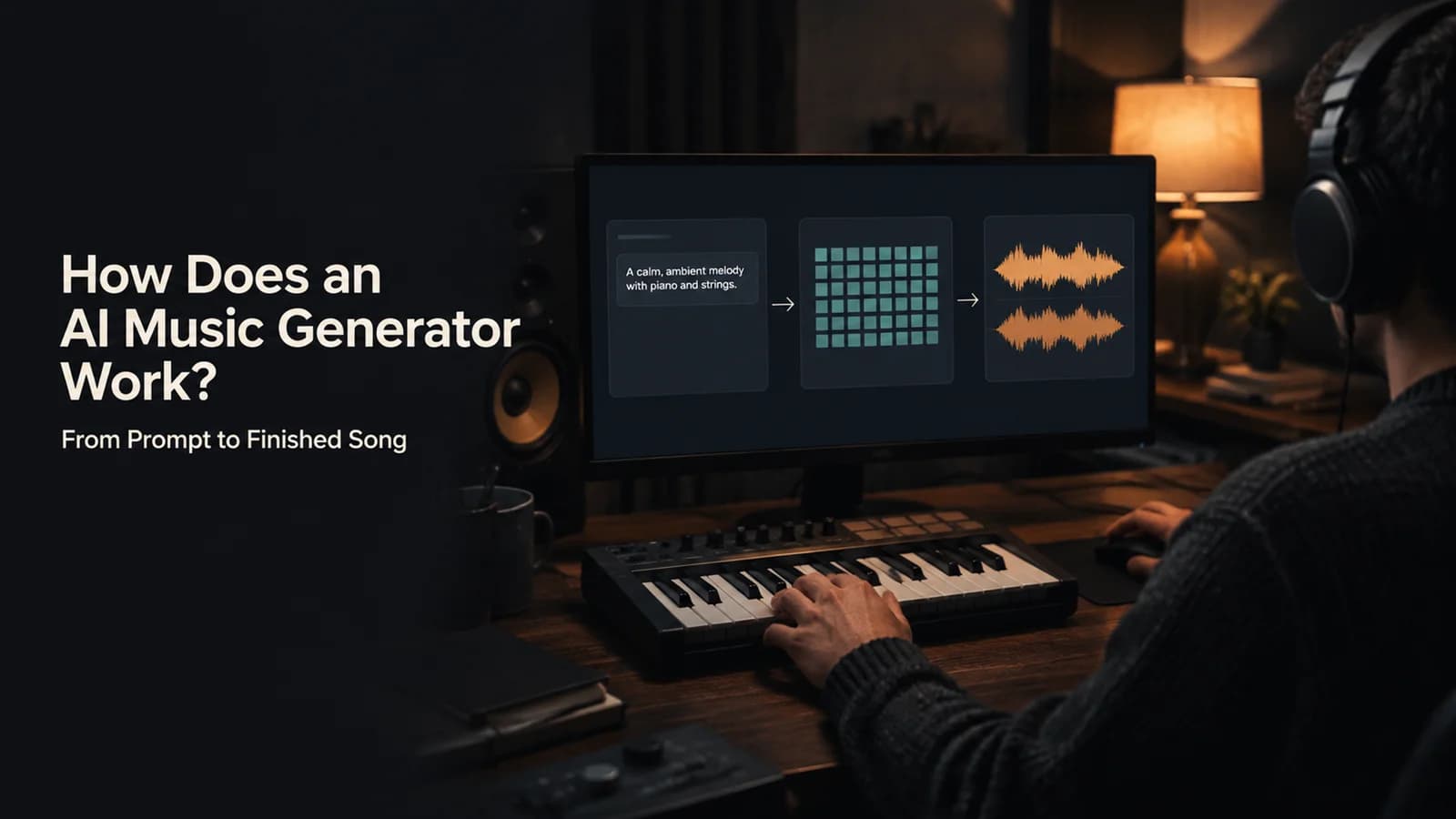
Type “a calming violin melody backed by a distorted guitar riff” and, a minute or so later, a finished track comes back. That is the part you see. This guide explains the part you do not: what an AI music generator does between your prompt and the audio, using the published research behind the field and the tools’ own pages rather than guesswork.
The short answer
An AI music generator compresses sound into a compact code, learns to generate inside that code from a text description, and then decodes the result back into a waveform. The tools differ in how they generate, not in that basic frame.
- Compress. A neural codec such as SoundStream or EnCodec turns audio into tokens, or a variational autoencoder turns it into a latent.
- Connect words to sound. A joint audio-text model such as MuLan lets a description steer the music.
- Generate. A Transformer predicts tokens one at a time (MusicLM, MusicGen, Jukebox), or a diffusion model removes noise from a latent (Stable Audio).
- Decode. The codec’s decoder rebuilds a waveform, at 24 kHz, 32 kHz or 44.1 kHz in the papers below.
- Shape it. Lyrics, structure, and the ability to extend or replace a section sit on top of that core.
One caution before the detail: the research below is public, and most commercial products are not. Treat it as the frame the field shares, not as a description of any single tool.
Quick facts
- Two generation families: Language models over audio tokens, and latent diffusion.
- MusicLM (Jan 2023): Hierarchical sequence-to-sequence model; 24 kHz music that stays consistent over several minutes.
- MusicGen (Jun 2023): Single-stage Transformer over EnCodec tokens; 32 kHz; trained on 20,000 hours of licensed music.
- Stable Audio (Feb 2024): Latent diffusion; 44.1 kHz stereo, up to 95 seconds in 8 seconds on one A100; trained on about 19,500 hours from AudioSparx.
- MuLan (Aug 2022): Joint audio-text embedding trained on 44 million recordings (370,000 hours).
- Checked: 10 November 2026, against the arXiv papers, Google DeepMind’s Lyria page and the vendors’ own pages.
Predict compressed sound, then decode it
Raw audio is a very long sequence: a stereo recording at CD quality is 44,100 numbers per second for each channel, so a three-minute song is millions of values. Early work on generating music directly in that raw form had to cope with the length. OpenAI’s Jukebox, published in 2020, did it by using a multi-scale vector-quantised autoencoder to compress raw audio into discrete codes and then modelling those codes with autoregressive Transformers.
That compress-then-model idea is the frame almost every later system uses. The details differ: what the compressed representation is, how the text enters, and whether the generator predicts codes or removes noise. The figure shows how the pieces fit.
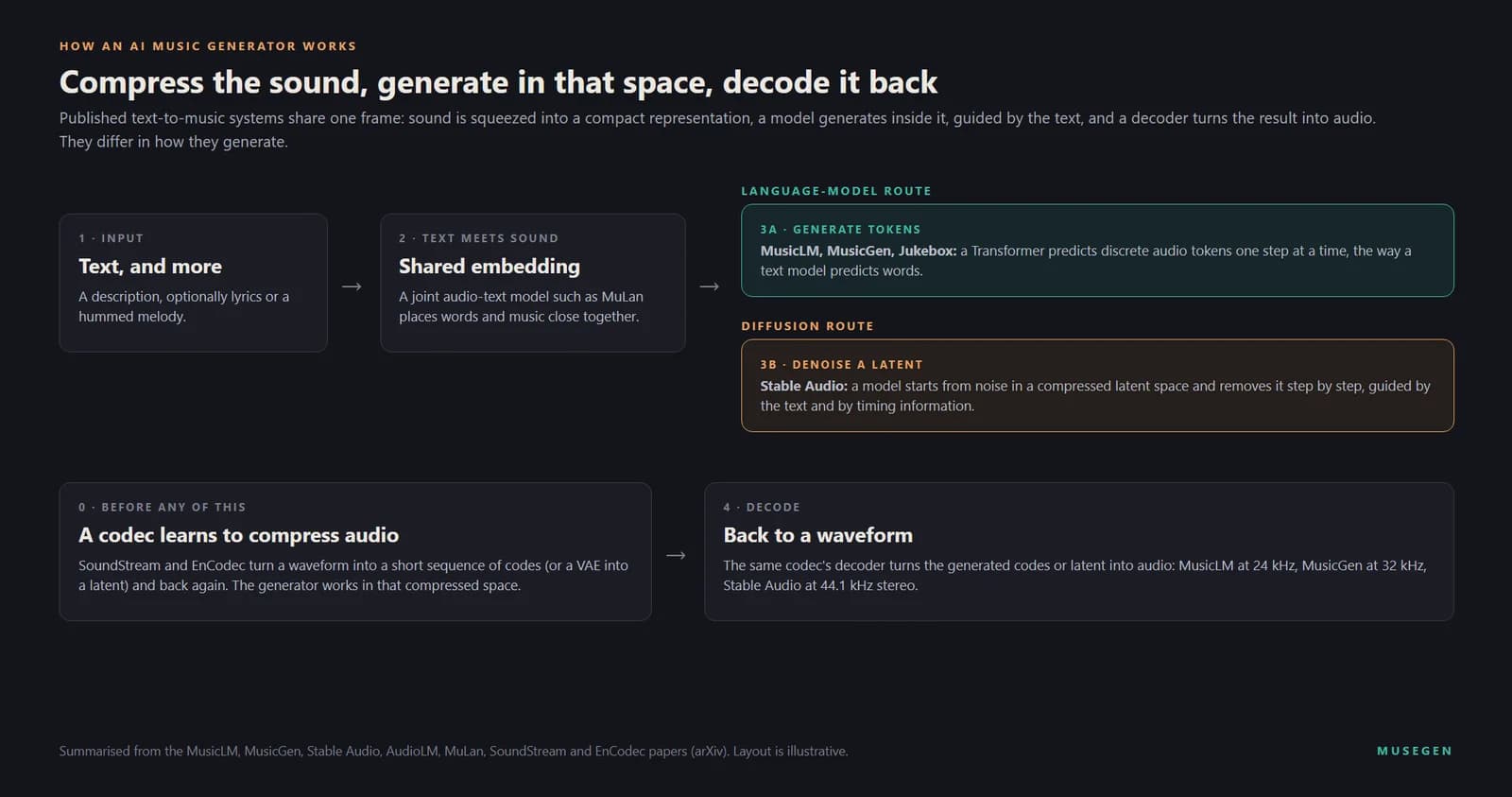
The shared frame of published text-to-music systems, summarised from the papers in the sources.
Step 1: Sound is compressed into tokens or a latent
The compressor is a neural audio codec. SoundStream, from Google in 2021, pairs a convolutional encoder and decoder with a residual vector quantiser and works at 3 to 18 kilobits per second. EnCodec, from Meta in 2022, does the same job for 24 kHz mono and 48 kHz stereo audio. A residual vector quantiser produces several parallel streams of tokens, each from a different learned codebook, so one second of music becomes a short grid of integers instead of tens of thousands of samples.
Systems pick different compressors. MusicLM relies on SoundStream and reconstructs 24 kHz music at 6 kbps. MusicGen uses EnCodec and generates at 32 kHz. Stable Audio does not use tokens at all: its latent comes from a fully convolutional variational autoencoder, and it works at 44.1 kHz in stereo. The choice sets a ceiling, because a generator can never produce more detail than the decoder can rebuild.
Step 2: Words are tied to sound
Text-to-music needs a bridge between a sentence and a sound. MuLan is one: a two-tower model that links music audio to unconstrained natural-language descriptions, trained on 44 million recordings (370,000 hours) and weakly associated free-form text. Words and music that belong together land close to each other in the same embedding space.
MusicLM uses that bridge to solve a data problem. Good paired data, music with an accurate description, is scarce, so it conditions on the MuLan embedding of the audio during training and on the embedding of the text at inference, which removes the need for captions at training time. The same system can be conditioned on text and a melody, transforming a whistled or hummed tune according to a style described in words. The authors released MusicCaps, a set of 5,500 music-text pairs with descriptions written by experts, so that others can evaluate their own models.
Step 3: Two ways to generate
Once sound lives in a compact space and text can steer it, generation is a prediction problem. Published systems fall into two families.
| Approach | Examples | What the papers say | Published detail |
|---|---|---|---|
| Language model over tokens | AudioLM, MusicLM, MusicGen, Jukebox | AudioLM “casts audio generation as a language modeling task” in the space of discrete tokens | MusicGen: one single-stage Transformer with token interleaving, which removes the need to cascade several models; 32 kHz |
| Latent diffusion | Stable Audio | Generates in a compressed latent and is conditioned on text and on timing embeddings | 44.1 kHz stereo, up to 95 seconds in 8 seconds on an A100 GPU |
A language model predicts the next token given everything before it and the text embedding, the way a chatbot predicts the next word. AudioLM showed that this works for sound: by training on large corpora of raw audio it learns to continue a short prompt coherently, and it did so for piano music without any symbolic representation of music. MusicGen simplified the recipe to a single model that handles several token streams at once.
A diffusion model starts from noise and removes it in many small steps, steered by the text. Stable Audio does this in a latent space, which is what makes it fast, and adds timing embeddings so that the requested length is part of the conditioning; the authors say it can generate music with structure and stereo sounds.
Step 4: Decoding, and why the codec sets the ceiling
The last step reverses the first. The codec’s decoder turns the generated tokens or latent back into a waveform. Sample rates in the papers climb from 24 kHz (MusicLM) to 32 kHz (MusicGen) to 44.1 kHz stereo (Stable Audio), and each increase is a decoder and a training-data decision as much as a generator one. This is also why two tools built on similar generators can sound different: the compressor and decoder shape the texture of everything they produce.
Lyrics and vocals: the hardest part
Music with a singer adds a second language to the signal. Jukebox was among the first models to generate music with singing in the raw audio domain, and it could be conditioned on artist, genre and on unaligned lyrics, meaning the words come without timestamps and the model has to work out when each one is sung. That alignment problem is why vocals remain the weak point of many generators: they have to get words, pitch and timing right at once.
Commercial tools mostly say little about how they handle lyrics. What they publish is often the result. Mureka’s V9.5 release notes, for example, say that 61.0 percent of vocals passed its checks and that 28.0 percent of songs were usable overall, in a 100-song test the company ran itself; no outside lab has verified the results. Google lists improved vocals as a headline change for Lyria 3.5. Both are reminders that vocal quality is still being worked on, and that it varies from one generation to the next.
Why a song has a verse and a chorus
A model that only predicts the next moment tends to wander. Two answers appear in the literature. MusicLM models generation hierarchically, with coarse tokens that carry long-range structure and finer tokens that carry detail, and reports music that stays consistent over several minutes. Stable Audio conditions on timing, so that it can fit music to a requested length. A third answer comes from a vendor rather than a paper: Mureka describes its MusiCoT framework as having the model form an explicit plan of a song’s structure and expressive direction before it generates, and then builds the track one section at a time from that plan. That is Mureka’s own description of its own system, and our Mureka review covers what the company publishes and what it does not.
Extending and replacing a section
Because the model continues a sequence, extending a track is a natural extension of what it does: AudioLM’s own result is that it generates coherent continuations from a short prompt. Replacing a section is a regeneration of a masked stretch with the surrounding music as context, and several products offer it under different names. Udio and ElevenLabs call it inpainting, Suno has Replace Section, and MuseGen has Edit song section; our reviews of Suno, Udio and ElevenLabs Music describe each in practice.
What the models learned from
Training data is where research and products diverge most. The papers are specific about it:
- MusicGen trained on 20,000 hours of licensed music: an internal set of 10,000 high-quality tracks plus the Shutterstock and Pond5 collections. The authors state that all the data was covered by legal agreements with the rights holders, and note that it contains a larger proportion of Western-style music.
- Stable Audio trained on 806,284 audio files, about 19,500 hours, with text metadata from the stock-music provider AudioSparx: 66 percent of files are music, 25 percent sound effects and 9 percent instrument stems.
- MuLan trained on 44 million recordings, about 370,000 hours, paired with weakly associated text.
Commercial vendors rarely publish a comparable account, and their positions differ: Soundraw says it trains only on music written and recorded in-house, ElevenLabs has announced licensing deals, Udio settled with Universal Music Group, and Suno, Mureka and Google each face litigation over training. We keep those facts current in the individual reviews, because they change; the point here is that the training data behind a tool is part of what you are choosing when you choose it.
Why the same prompt gives different songs
Generation is sampled, not looked up, so two runs from one prompt differ. There is also a dial between following the text closely and varying freely. MusicGen’s paper describes the technique: during training it drops the text condition with a probability of 0.2, and at inference it applies a guidance scale of 3.0 to push the output toward the description. Products usually hide that dial and offer something simpler: several versions of the same request. That is why generating twice and choosing is normal practice rather than a sign that something went wrong.
What they still get wrong
- Length and coherence. Stable Audio renders up to 95 seconds in one pass, and longer music relies on techniques such as hierarchical modelling or extending.
- Vocals. Alignment of words, pitch and timing is still the weakest part, as the vendor-reported figures above show.
- Diversity of style. MusicGen’s authors note a larger proportion of Western-style music in their data, and the same skew is likely wherever the training data is similar.
- Naming artists. Some tools forbid it outright, as ElevenLabs does in its Music Terms, so describing the sound is the safer habit everywhere.
- Provenance. Google says Lyria tracks carry an imperceptible SynthID watermark; other tools differ, and a track’s origin is not always detectable.
What you control in MuseGen at each step
Every step above has a control you can see and change on MuseGen’s song maker page, so you decide what goes into each stage instead of leaving it to a single prompt box. This section maps those controls onto the steps; it describes the page, not MuseGen’s model internals.
- Your words (step 2). The Describe tab takes a free description of up to 3,000 characters, with scene shortcuts such as Birthday, Love confession and Kids’ song, and an AI Polish button. The Write Lyrics tab takes your own lyrics instead.
- The sound you ask for (step 2 and 3). The Style box has Genre, Moods and Tempos menus plus a free line of up to 300 characters, and an Instrumental switch for a track with no vocals.
- Versions (variation). Each generation returns two versions to choose from; the page shows a cost of 3 credits per run.
- Editing (extend and replace). Edit song section lets you drag across the waveform to choose 7 to 60 seconds and write new lyrics for that part, and one submission returns two complete songs to choose from. Extend song length and AI song covers are listed as membership benefits.
- Beyond the song. The Music Video Maker reads the finished song, including its structure and beat, before it plans the shots; our AI music video guide walks through that step.
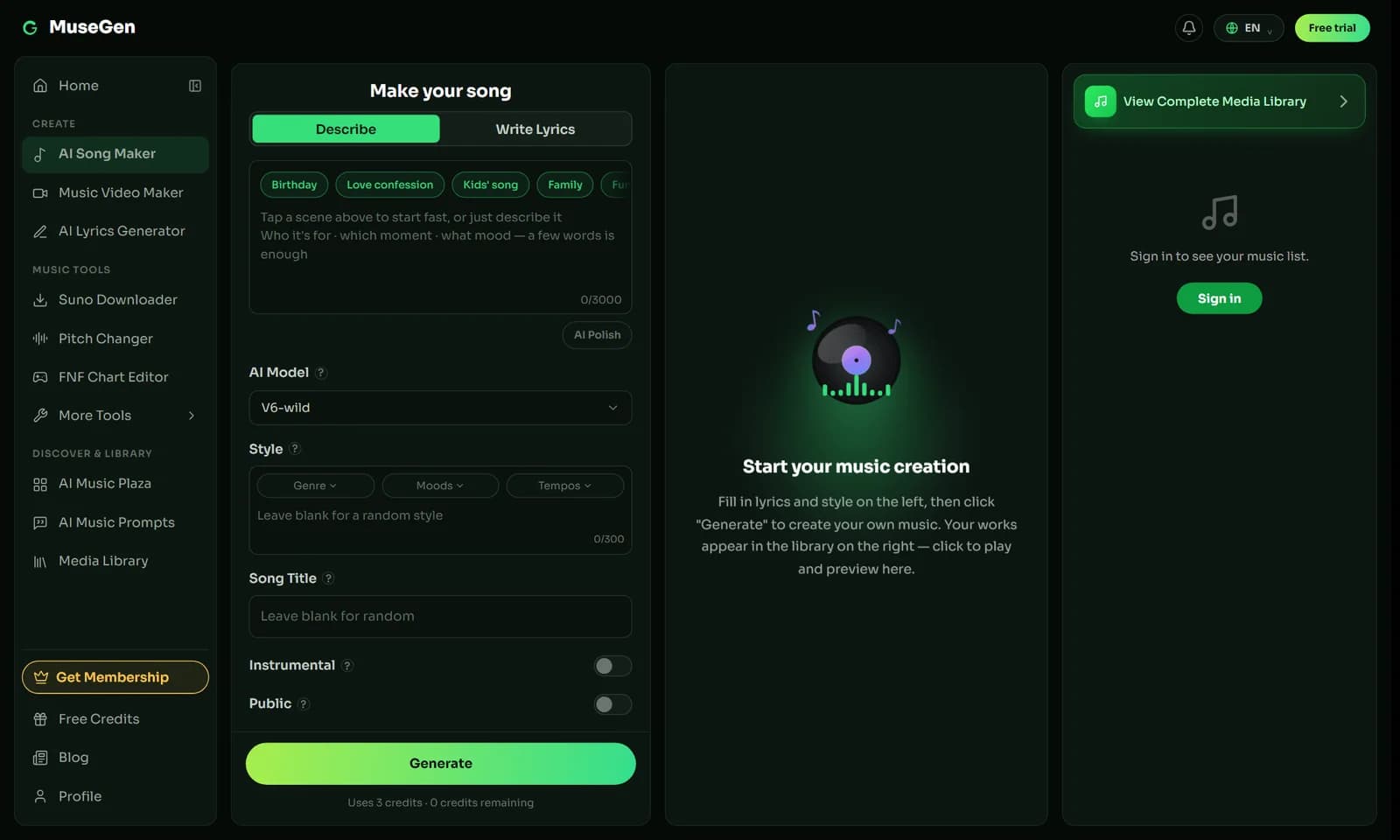
The song maker’s Describe tab: description, style and the Generate button.
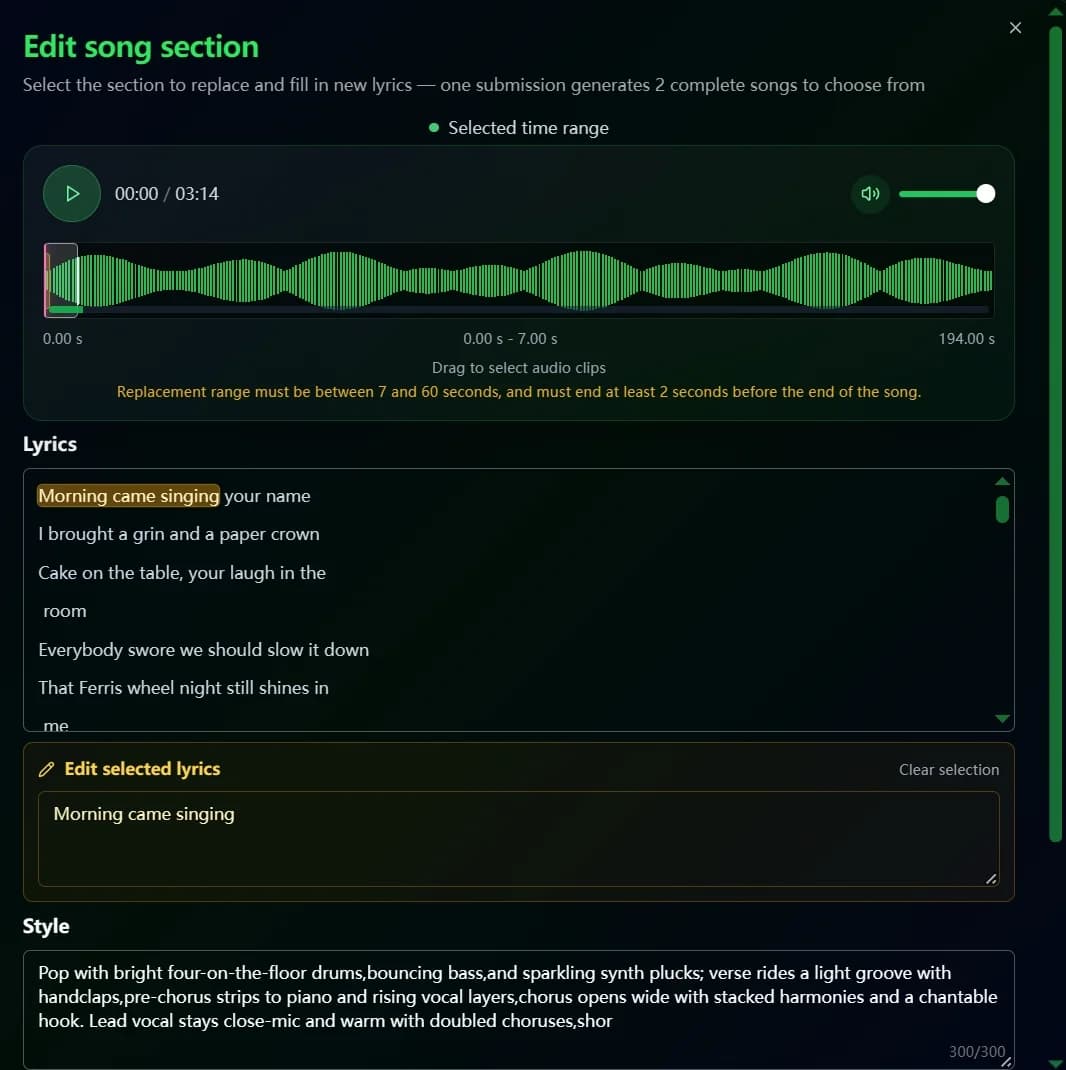
Edit song section: choose a time range, write new lyrics, and pick from two complete songs.
What to look for in a tool
Once you know the pipeline, the questions to ask of any tool follow from it:
- If you need to fix a song rather than redo it → look for extend and replace-section controls, not just a prompt box.
- If you plan to release the track → read the training-data and commercial-use terms before the sound quality; our benchmark puts the export and licensing limits side by side.
- If you need a long track → check the per-generation length and whether the tool extends cleanly.
- If you are choosing between tools → see our ranked guide to the best AI music generators.
Hear the pipeline for yourself.
Describe a song in the song maker, generate two versions, and compare them.
FAQ
What is an AI music generator?
An AI music generator is software that turns a text description, and sometimes lyrics or a melody, into a finished audio track by generating a compressed representation of sound and decoding it into a waveform. Some tools return one version, others return two or more to choose from.
How does AI turn text into music?
It links words to sound through a shared audio-text representation, then a generative model produces compressed audio guided by that representation. Google's MuLan paper, for example, trained a joint audio-text model on 44 million recordings (370,000 hours) with free-form text descriptions, and MusicLM uses that representation to steer generation.
Do AI music generators use language models or diffusion?
Both approaches exist in published research. MusicLM, MusicGen and Jukebox predict discrete audio tokens with Transformers, while Stable Audio uses latent diffusion. Most commercial tools do not say which approach they use, so treat the two families as a frame for understanding rather than a description of any one product.
Do AI music generators copy existing songs?
Research suggests generated music is not a lookup of training tracks: the MusicLM paper reports that its generated token sequences differ significantly from the corresponding sequences in the training set. That is one model's research finding, not a guarantee for any product, and each vendor's training data and licensing differs, which is why the licence terms of the tool you use matter.
Why do AI-generated vocals sometimes sound wrong?
Singing combines words, pitch and timing in one signal, and the model has to align the lyrics to the audio by itself. Jukebox, an early model that generated singing in raw audio, was conditioned on unaligned lyrics for exactly that reason. Vendors still treat vocal quality as work in progress: Mureka's own V9.5 release notes report a 61.0 percent vocal pass rate on its 100-song evaluation.
How long can an AI-generated song be?
It depends on the model and the product. Stable Audio can render up to 95 seconds in one pass, and the MusicLM paper reports music that stays consistent over several minutes. Commercial tools set their own per-generation limits and offer extend features to go longer, so check the limit of the tool you plan to use.
Is AI-generated music watermarked?
Some of it is. Google says every track made with its Lyria models carries an imperceptible SynthID watermark, so that music created or edited with AI can be detected. Other tools handle watermarks and labelling differently, so read each vendor's terms before you release a track.
How do I get better results from an AI music generator?
Describe the music instead of naming an artist: genre, tempo, instruments, mood and vocal character. Then generate more than one version and extend or replace the parts you like less. Our guides to writing AI music prompts go through the method step by step.
Keep reading
- How to Write AI Music Prompts — turning what you now know about the model into better descriptions.
- The AI Music Prompt Formula — a repeatable structure for the description box.
- The 10 Best AI Music Generators of 2026 — ranked tools, scored on the same criteria.
- What Are Stems? — what separating a finished song into parts gives you.
Sources
- Agostinelli et al., MusicLM: Generating Music From Text (arXiv, 26 January 2023).
- Copet et al., Simple and Controllable Music Generation (MusicGen) (arXiv, 8 June 2023).
- Evans et al., Fast Timing-Conditioned Latent Audio Diffusion (Stable Audio) (arXiv, 7 February 2024).
- Borsos et al., AudioLM: a Language Modeling Approach to Audio Generation (arXiv, 7 September 2022).
- Huang et al., MuLan: A Joint Embedding of Music Audio and Natural Language (arXiv, 26 August 2022).
- Zeghidour et al., SoundStream: An End-to-End Neural Audio Codec (arXiv, 7 July 2021) and Défossez et al., High Fidelity Neural Audio Compression (EnCodec) (arXiv, 24 October 2022).
- Dhariwal et al., Jukebox: A Generative Model for Music (arXiv, 30 April 2020).
- Google DeepMind — Lyria, source of the SynthID statement and the Lyria 3.5 description.
- Mureka — What is Mureka? and What Changed in the Mureka V9.5 Model?, source of the MusiCoT description and the self-reported figures.
- MuseGen — song maker page, read on 10 November 2026.
This guide is published by MuseGen, which makes an AI music generator. The research summarised here is public and independent of any product, and we have tried to say which statements come from papers and which come from vendors. Sizes, limits and interfaces change often; check the current pages before you rely on a figure.